<?xml version="1.0" encoding="utf-8"?><feed xmlns="http://www.w3.org/2005/Atom" ><generator uri="https://jekyllrb.com/" version="3.10.0">Jekyll</generator><link href="https://noraze.com/feed.xml" rel="self" type="application/atom+xml" /><link href="https://noraze.com/" rel="alternate" type="text/html" /><updated>2026-07-30T05:09:19+00:00</updated><id>https://noraze.com/feed.xml</id><title type="html">Noraze — Deep dives on AI, autonomy, and the systems that make them sustainable</title><subtitle>Personal blog exploring AI, autonomy, and developer workflows</subtitle><entry><title type="html">Diagnosing Kafka OAuth Failures in a Spark Pipeline</title><link href="https://noraze.com/2026/07/29/kafka-oauth-failures-spark.html" rel="alternate" type="text/html" title="Diagnosing Kafka OAuth Failures in a Spark Pipeline" /><published>2026-07-29T00:00:00+00:00</published><updated>2026-07-29T00:00:00+00:00</updated><id>https://noraze.com/2026/07/29/kafka-oauth-failures-spark</id><content type="html" xml:base="https://noraze.com/2026/07/29/kafka-oauth-failures-spark.html"><![CDATA[<blockquote>
  <p><strong>Accuracy note (2026-07-29 audit):</strong> This post was reviewed against current official documentation in July 2026 and contains inaccuracies relative to the current state of the tools described. The post is retained for its workflow reasoning; the specific factual issues are:</p>

  <p>Two refinements: (1) Current Kafka supports standards-based OAuth/OIDC token acquisition and validation using built-in handlers and properties (<code class="language-plaintext highlighter-rouge">sasl.oauthbearer.token.endpoint.url</code>, client credentials in JAAS, <code class="language-plaintext highlighter-rouge">sasl.oauthbearer.jwks.endpoint.url</code>, issuer, audience); a custom <code class="language-plaintext highlighter-rouge">AuthenticateCallbackHandler</code> is not universally required — reserve custom callbacks for unsupported token-acquisition paths. (2) When the minimum refresh period plus buffer exceeds remaining token lifetime, Kafka ignores those two constraints; this does not itself mean refresh ‘may never’ be scheduled.</p>

  <p>Reference docs to verify against:</p>
  <ul>
    <li>Apache Kafka — SASL/OAUTHBEARER — https://kafka.apache.org/documentation/#security_sasl</li>
  </ul>
</blockquote>

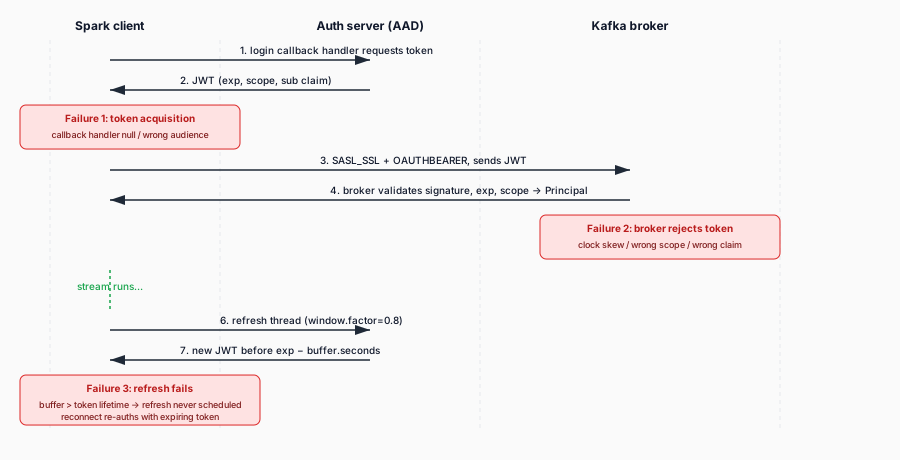
<p>When a Spark structured-streaming or batch job talks to a Kafka cluster secured with OAuth, a failure in the auth handshake surfaces as a vague <code class="language-plaintext highlighter-rouge">SASL authentication failed</code> or a stream that silently retries and never makes progress. Unlike a plain SASL/PLAIN failure (wrong password, obvious), OAuth failures sit at the intersection of three systems — the Kafka client, the OAuth authorization server, and the token-refresh logic inside the client — and the error message rarely tells you which one is at fault.</p>

<p>This post covers how the Kafka SASL/OAUTHBEARER handshake actually works, the failure modes you will hit in a Spark pipeline, and the specific configuration that fixes each one. Every config key below is a real Kafka client property, cited to the official Apache Kafka documentation.</p>

<figure style="margin:1.5em 0;">
  <img src="/assets/images/kafka-oauth-handshake-timeline.svg" alt="Timeline of the Kafka SASL/OAUTHBEARER handshake across Spark client, auth server, and Kafka broker, with the three failure points: token acquisition, broker rejection, and refresh failure." style="width:100%;max-width:720px;height:auto;" loading="lazy" />
  <figcaption style="font-size:0.85em;color:#475569;margin-top:0.4em;">The OAuth handshake has three failure surfaces: getting the token, the broker accepting it, and the refresh thread renewing it before expiry. The error message rarely tells you which one.</figcaption>
</figure>

<h2 id="how-kafka-oauth-works">How Kafka OAuth works</h2>

<p>Kafka’s OAuth support uses the <code class="language-plaintext highlighter-rouge">OAUTHBEARER</code> SASL mechanism. The Kafka documentation describes it under “Authentication using SASL”. On the client side, you set three things:</p>

<ol>
  <li><code class="language-plaintext highlighter-rouge">sasl.mechanism=OAUTHBEARER</code> — tells the Kafka client to use the OAuth mechanism. The default SASL mechanism is <code class="language-plaintext highlighter-rouge">GSSAPI</code>, so this must be set explicitly.</li>
  <li><code class="language-plaintext highlighter-rouge">security.protocol=SASL_SSL</code> (or <code class="language-plaintext highlighter-rouge">SASL_PLAINTEXT</code> for non-production) — the transport that carries SASL. Production Kafka should always be <code class="language-plaintext highlighter-rouge">SASL_SSL</code>.</li>
  <li><code class="language-plaintext highlighter-rouge">sasl.jaas.config</code> — a JAAS login configuration that names the login module and its options. For the built-in unsecured mode, it looks like:</li>
</ol>

<div class="language-properties highlighter-rouge"><div class="highlight"><pre class="highlight"><code><span class="py">sasl.jaas.config</span><span class="p">=</span><span class="s">org.apache.kafka.common.security.oauthbearer.OAuthBearerLoginModule required </span><span class="se">\
</span>    <span class="s">unsecuredLoginStringClaim_sub="alice";</span>
</code></pre></div></div>

<p>The <code class="language-plaintext highlighter-rouge">OAuthBearerLoginModule</code> is the class Kafka provides. For production, the Kafka docs are explicit: the built-in unsecured token creation and validation are “suitable only for non-production use.” You must register a custom <code class="language-plaintext highlighter-rouge">AuthenticateCallbackHandler</code> implementation that acquires a real OAuth token from your authorization server (Azure AD / Entra ID, Okta, Auth0, etc.) and handles <code class="language-plaintext highlighter-rouge">OAuthBearerTokenCallback</code>. This is done with <code class="language-plaintext highlighter-rouge">sasl.login.callback.handler.class</code>:</p>

<div class="language-properties highlighter-rouge"><div class="highlight"><pre class="highlight"><code><span class="py">sasl.login.callback.handler.class</span><span class="p">=</span><span class="s">com.example.CustomOAuthLoginCallbackHandler</span>
</code></pre></div></div>

<p>The token is a JWT. The Kafka docs note that under the default principal builder, the <code class="language-plaintext highlighter-rouge">principalName</code> of the <code class="language-plaintext highlighter-rouge">OAuthBearerToken</code> becomes the authenticated Kafka <code class="language-plaintext highlighter-rouge">Principal</code> used for ACLs.</p>

<h2 id="the-token-refresh-problem">The token-refresh problem</h2>

<p>The most common OAuth failure in a long-running Spark streaming job is not the initial handshake — it is the <em>refresh</em>. OAuth tokens expire (typically in an hour), and the Kafka client has a background login-refresh thread whose job is to renew the token before it expires. If the refresh fails — the authorization server is unreachable, the refresh hits a rate limit, or the refresh window is misconfigured — the next time Kafka tries to authenticate a new connection (a reconnect after a broker bounce, a new consumer joining), it fails with an auth error and the stream stalls.</p>

<p>The Kafka documentation defines four knobs that govern refresh behavior (these appear in the producer, consumer, and broker config docs):</p>

<ul>
  <li><code class="language-plaintext highlighter-rouge">sasl.login.refresh.window.factor</code> (default <code class="language-plaintext highlighter-rouge">0.8</code>) — the refresh thread waits until this fraction of the token’s lifetime has elapsed before trying to refresh. Range <code class="language-plaintext highlighter-rouge">0.5</code>–<code class="language-plaintext highlighter-rouge">1.0</code>.</li>
  <li><code class="language-plaintext highlighter-rouge">sasl.login.refresh.window.jitter</code> (default <code class="language-plaintext highlighter-rouge">0.05</code>) — random jitter added to the refresh sleep, relative to the token lifetime. Range <code class="language-plaintext highlighter-rouge">0.0</code>–<code class="language-plaintext highlighter-rouge">0.25</code>.</li>
  <li><code class="language-plaintext highlighter-rouge">sasl.login.refresh.min.period.seconds</code> (default <code class="language-plaintext highlighter-rouge">60</code>) — the minimum time the refresh thread will wait between refresh attempts. Range <code class="language-plaintext highlighter-rouge">0</code>–<code class="language-plaintext highlighter-rouge">900</code>.</li>
  <li><code class="language-plaintext highlighter-rouge">sasl.login.refresh.buffer.seconds</code> (default <code class="language-plaintext highlighter-rouge">300</code>) — the buffer the client tries to maintain before token expiry. Range <code class="language-plaintext highlighter-rouge">0</code>–<code class="language-plaintext highlighter-rouge">3600</code>.</li>
</ul>

<p>The docs note that <code class="language-plaintext highlighter-rouge">sasl.login.refresh.min.period.seconds</code> and <code class="language-plaintext highlighter-rouge">sasl.login.refresh.buffer.seconds</code> are <em>ignored together</em> if their sum exceeds the token’s remaining lifetime. This is the trap: if your authorization server issues short-lived tokens (say, 10 minutes) and you leave <code class="language-plaintext highlighter-rouge">sasl.login.refresh.buffer.seconds</code> at its default <code class="language-plaintext highlighter-rouge">300</code> (5 minutes), the buffer alone is half the token’s life — the refresh math breaks and the client may never successfully schedule a refresh, so every reconnect re-authenticates with an expiring or expired token.</p>

<p><strong>Fix:</strong> Set <code class="language-plaintext highlighter-rouge">sasl.login.refresh.buffer.seconds</code> to a small fraction of your token’s actual lifetime (e.g., <code class="language-plaintext highlighter-rouge">60</code> for a 10-minute token), and lower <code class="language-plaintext highlighter-rouge">sasl.login.refresh.min.period.seconds</code> if your tokens are short-lived. Verify the values against the token’s <code class="language-plaintext highlighter-rouge">exp</code> claim.</p>

<h2 id="failure-mode-1-token-acquisition-fails-at-startup">Failure mode 1: token acquisition fails at startup</h2>

<p>If the very first connection fails, the problem is token acquisition, not refresh. The custom callback handler in <code class="language-plaintext highlighter-rouge">sasl.login.callback.handler.class</code> either cannot reach the authorization server, has the wrong client credentials, or is requesting the wrong audience/scope.</p>

<p>On Azure Synapse, the authorization server is usually Azure AD / Entra ID. The Synapse TokenLibrary docs document how Synapse Spark acquires AAD tokens for linked services: <code class="language-plaintext highlighter-rouge">mssparkutils.credentials.getToken()</code> returns a bearer token for a given resource, and linked-service-based token providers (<code class="language-plaintext highlighter-rouge">LinkedServiceBasedTokenProvider</code>) are configured with <code class="language-plaintext highlighter-rouge">fs.azure.account.oauth.provider.type.&lt;storage-account&gt;</code> and the client-id/client-secret/client-endpoint properties. However, the TokenLibrary docs cover storage and Key Vault scenarios; there is no Synapse-specific documented path for wiring Synapse-managed identity into a Kafka <code class="language-plaintext highlighter-rouge">sasl.login.callback.handler.class</code>.</p>

<p>So for a Spark-to-Kafka OAuth pipeline on Synapse, the custom callback handler is the integration point you own. If you are using managed identity or a service principal to get the AAD token, the handler must call the AAD token endpoint, receive the JWT, and hand it to Kafka’s <code class="language-plaintext highlighter-rouge">OAuthBearerTokenCallback</code>. If that handler logs nothing and returns null, the Kafka client fails auth with no useful message.</p>

<p><strong>Fix:</strong> Enable logging in your custom callback handler (it runs inside the executor JVM — logs go to the executor stdout/stderr that Synapse Monitor exposes). Log the token endpoint URL, the HTTP status, and the response body on failure. Confirm the <code class="language-plaintext highlighter-rouge">aud</code> claim in the returned token matches what the Kafka broker expects.</p>

<h2 id="failure-mode-2-the-broker-rejects-the-token">Failure mode 2: the broker rejects the token</h2>

<p>The Kafka client acquires a valid token, but the broker rejects it. This happens when the broker-side validation disagrees with the client. The Kafka docs document the broker-side validation options for the unsecured validator (<code class="language-plaintext highlighter-rouge">unsecuredValidatorPrincipalClaimName</code>, <code class="language-plaintext highlighter-rouge">unsecuredValidatorScopeClaimName</code>, <code class="language-plaintext highlighter-rouge">unsecuredValidatorRequiredScope</code>, <code class="language-plaintext highlighter-rouge">unsecuredValidatorAllowableClockSkewMs</code>), but in production the broker runs a custom <code class="language-plaintext highlighter-rouge">AuthenticateCallbackHandler</code> registered via <code class="language-plaintext highlighter-rouge">listener.name.sasl_ssl.oauthbearer.sasl.server.callback.handler.class</code> (the docs note it must be prefixed with listener and mechanism names). The broker’s validator checks the token’s signature, its <code class="language-plaintext highlighter-rouge">exp</code>, its <code class="language-plaintext highlighter-rouge">iat</code>, and its required scopes.</p>

<p>Common causes:</p>
<ul>
  <li><strong>Clock skew</strong> between the Spark executor and the authorization server. The unsecured validator has <code class="language-plaintext highlighter-rouge">unsecuredValidatorAllowableClockSkewMs</code> (default <code class="language-plaintext highlighter-rouge">0</code> — zero tolerance); a production validator usually has a similar knob.</li>
  <li><strong>Wrong scope.</strong> The token does not contain the scope the broker requires (<code class="language-plaintext highlighter-rouge">unsecuredValidatorRequiredScope</code>).</li>
  <li><strong>Wrong principal claim.</strong> The broker looks for <code class="language-plaintext highlighter-rouge">sub</code> (the default) but the authorization server puts the principal in a different claim.</li>
</ul>

<p><strong>Fix:</strong> If you control the broker, check the broker-side validator logs. If you do not, inspect the token the client is sending — decode the JWT and compare its claims against the broker’s documented requirements. Fix clock skew at the VM level (Synapse executors should be NTP-synced, but a drifted node can still produce this).</p>

<h2 id="failure-mode-3-connectionretry-storms">Failure mode 3: connection/retry storms</h2>

<p>A transient auth failure (a broker bounce, a brief authorization server outage) triggers Kafka’s reconnect and retry logic. The Kafka docs document the connection-level backoff: <code class="language-plaintext highlighter-rouge">reconnect.backoff.ms</code> (default <code class="language-plaintext highlighter-rouge">50</code>), <code class="language-plaintext highlighter-rouge">reconnect.backoff.max.ms</code> (default <code class="language-plaintext highlighter-rouge">1000</code>), <code class="language-plaintext highlighter-rouge">retry.backoff.ms</code> (default <code class="language-plaintext highlighter-rouge">100</code>), and <code class="language-plaintext highlighter-rouge">retry.backoff.max.ms</code> (default <code class="language-plaintext highlighter-rouge">1000</code>). These back off exponentially with 20% jitter.</p>

<p>The important subtlety: these retry knobs govern <em>retriable</em> failures — connection drops, transient broker errors. They do <strong>not</strong> make an invalid or expired token retriable. If the token is the problem, more retries just produce more auth failures faster, which can look like a storm of <code class="language-plaintext highlighter-rouge">SASL authentication failed</code> messages and, on some authorization servers, get your client rate-limited or temporarily blocked.</p>

<p><strong>Fix:</strong> Distinguish the two in your logs. If the error is <code class="language-plaintext highlighter-rouge">SASL authentication failed: invalid token</code> or an expired-token message, the fix is token refresh (failure mode 1), not connection retries. Only tune <code class="language-plaintext highlighter-rouge">retry.backoff.ms</code> / <code class="language-plaintext highlighter-rouge">reconnect.backoff.ms</code> if the error is a connection-level failure (connection refused, timeout) that happens <em>between</em> successful auths.</p>

<h2 id="putting-it-together">Putting it together</h2>

<p>A Spark-to-Kafka OAuth pipeline fails for one of three reasons: the client cannot get a token (callback handler or authorization server), the token it gets is rejected by the broker (scope, signature, clock skew), or the token expires and the refresh thread cannot renew it in time (refresh window misconfigured against the token lifetime). The error message alone rarely tells you which. The fix is to instrument the custom callback handler, decode the JWT the client is sending, and match the refresh configuration (<code class="language-plaintext highlighter-rouge">sasl.login.refresh.*</code>) to the actual token lifetime. OAuth is not magic — it is a stateful handshake with an expiration clock, and the failure modes all reduce to the clock or the claims being wrong.</p>

<h3 id="sources">Sources</h3>

<ul>
  <li><a href="https://kafka.apache.org/39/security/authentication-using-sasl/#authentication-using-sasloauthbearer">Apache Kafka — Authentication using SASL (OAUTHBEARER)</a> — <code class="language-plaintext highlighter-rouge">OAuthBearerLoginModule</code>, unsecured token creation/validation options, production <code class="language-plaintext highlighter-rouge">AuthenticateCallbackHandler</code> registration, <code class="language-plaintext highlighter-rouge">OAuthBearerToken</code> principal.</li>
  <li><a href="https://kafka.apache.org/39/configuration/producer-configs/">Apache Kafka — Producer Configs</a> — <code class="language-plaintext highlighter-rouge">sasl.mechanism</code>, <code class="language-plaintext highlighter-rouge">security.protocol</code>, <code class="language-plaintext highlighter-rouge">sasl.jaas.config</code>, <code class="language-plaintext highlighter-rouge">sasl.login.callback.handler.class</code>, <code class="language-plaintext highlighter-rouge">sasl.login.refresh.window.factor</code>, <code class="language-plaintext highlighter-rouge">sasl.login.refresh.window.jitter</code>, <code class="language-plaintext highlighter-rouge">sasl.login.refresh.min.period.seconds</code>, <code class="language-plaintext highlighter-rouge">sasl.login.refresh.buffer.seconds</code>, <code class="language-plaintext highlighter-rouge">reconnect.backoff.ms</code>, <code class="language-plaintext highlighter-rouge">retry.backoff.ms</code>.</li>
  <li><a href="https://kafka.apache.org/39/configuration/consumer-configs/">Apache Kafka — Consumer Configs</a> — same SASL and refresh keys on the consumer side.</li>
  <li><a href="https://kafka.apache.org/39/configuration/broker-configs/">Apache Kafka — Broker Configs</a> — <code class="language-plaintext highlighter-rouge">sasl.enabled.mechanisms</code>, <code class="language-plaintext highlighter-rouge">sasl.mechanism.inter.broker.protocol</code>, <code class="language-plaintext highlighter-rouge">sasl.server.callback.handler.class</code>.</li>
  <li><a href="https://learn.microsoft.com/en-us/azure/synapse-analytics/spark/apache-spark-secure-credentials-with-tokenlibrary">Secure credentials in Azure Synapse Analytics with TokenLibrary</a> — <code class="language-plaintext highlighter-rouge">mssparkutils.credentials.getToken()</code>, Entra passthrough, managed identity, linked-service token providers (storage/Key Vault scenarios; no documented Synapse-specific Kafka OAuth path).</li>
</ul>]]></content><author><name></name></author><category term="azure" /><category term="spark" /><category term="kafka" /><category term="oauth" /><category term="synapse" /><category term="troubleshooting" /><category term="security" /><summary type="html"><![CDATA[Kafka OAuth (SASL/OAUTHBEARER) failures break Spark-to-Kafka pipelines with cryptic auth errors. Here is how the handshake works, what goes wrong, and the config that fixes it.]]></summary></entry><entry><title type="html">When a Spark Job Writing to Event Hubs Crashes on Large Data — and How to Restart Safely</title><link href="https://noraze.com/2026/07/25/spark-large-data-crash-restart-sink-write.html" rel="alternate" type="text/html" title="When a Spark Job Writing to Event Hubs Crashes on Large Data — and How to Restart Safely" /><published>2026-07-25T00:00:00+00:00</published><updated>2026-07-25T00:00:00+00:00</updated><id>https://noraze.com/2026/07/25/spark-large-data-crash-restart-sink-write</id><content type="html" xml:base="https://noraze.com/2026/07/25/spark-large-data-crash-restart-sink-write.html"><![CDATA[<h1 id="when-a-spark-job-writing-to-event-hubs-crashes-on-large-data--and-how-to-restart-safely">When a Spark Job Writing to Event Hubs Crashes on Large Data — and How to Restart Safely</h1>

<p>The pattern is familiar: a Spark job writes a large batch (or a long-running Structured Streaming micro-batch) to Azure Event Hubs over the Kafka endpoint. It runs fine for a while, then slows, then aborts with <code class="language-plaintext highlighter-rouge">STREAM_FAILED</code> or a stage-failure exception, and you have to restart it manually. The error message is thin. This post unpacks the three causes that converge on this symptom — OOM during the write, a token expiring mid-micro-batch, and the renewed-cert trap — and the restart strategy that’s safe across all three. Every durable claim traces to Apache Spark, Apache Kafka, or Microsoft Learn.</p>

<h2 id="the-symptom-is-shared-the-causes-are-not">The symptom is shared, the causes are not</h2>

<p>The crash looks the same from the outside:</p>

<div class="language-plaintext highlighter-rouge"><div class="highlight"><pre class="highlight"><code>org.apache.spark.SparkException: Job aborted due to stage failure: ... STREAM_FAILED
</code></pre></div></div>

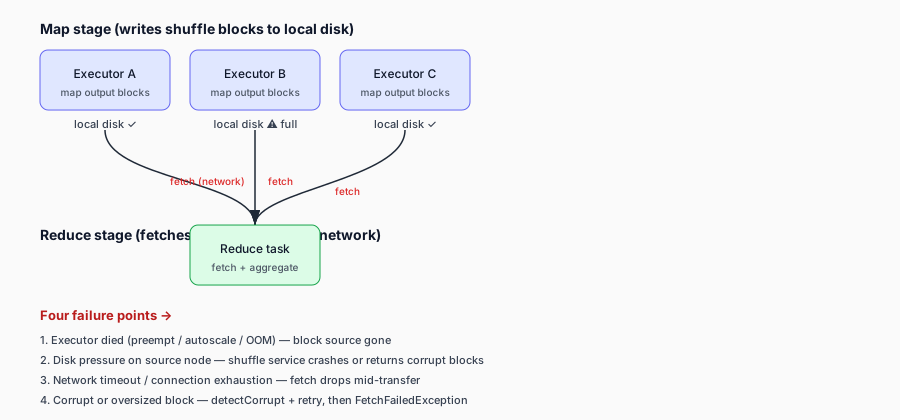
<p>with a nested cause that might be an <code class="language-plaintext highlighter-rouge">OutOfMemoryError</code>, a <code class="language-plaintext highlighter-rouge">SaslException</code>, or a <code class="language-plaintext highlighter-rouge">FetchFailedException</code>. The fix is different for each, and the restart strategy has to handle whichever one bit you, because the wrong restart (e.g. restarting from the beginning of a stream without a checkpoint) replays data and can duplicate writes downstream.</p>

<h2 id="cause-1--oom-during-the-write">Cause 1 — OOM during the write</h2>

<p>The first cause is memory. A Spark write to a Kafka/Event Hubs sink serializes each row to a Kafka producer record and sends it. The producer batches records in memory before sending. Three things push memory up on a large write:</p>

<ul>
  <li><strong>Partition count and skew.</strong> A write to a Kafka topic with few partitions, or a skewed key distribution, concentrates the producer load on a small number of executors. The executors with the heavy partitions accumulate in-flight batches; if the batch buffer exceeds the JVM’s available memory, the executor OOMs.</li>
  <li><strong>Producer buffer config.</strong> Kafka producer <code class="language-plaintext highlighter-rouge">buffer.memory</code> (default 32 MB per producer instance) and <code class="language-plaintext highlighter-rouge">batch.size</code> accumulate. With many partitions per executor and large records, the per-producer buffer plus the in-flight batch memory can exceed the executor’s <code class="language-plaintext highlighter-rouge">spark.executor.memory</code> envelope.</li>
  <li><strong>The serialization overhead.</strong> JSON or wide-row serialization is allocation-heavy; the JVM spends more time in GC, and a GC spiral can OOM the executor before the write completes (the GC death spiral covered in the Spark memory-model post).</li>
</ul>

<p><strong>The fix on the compute side:</strong> bound the micro-batch size (in Structured Streaming, the trigger interval and <code class="language-plaintext highlighter-rouge">maxOffsetsPerTrigger</code> for a Kafka source, or partitioning the static write into smaller batches), raise the executor memory envelope (<code class="language-plaintext highlighter-rouge">spark.executor.memory</code> + <code class="language-plaintext highlighter-rouge">spark.memory.overhead</code>), repartition upstream to spread the write across more executors, and use Kryo serialization where applicable. These are the same knobs as the general Spark memory tuning — the sink-write context just makes OOM more likely because the producer adds a second in-memory buffer on top of the executor’s own memory pressure.</p>

<h2 id="cause-2--a-token-expiring-mid-micro-batch">Cause 2 — a token expiring mid-micro-batch</h2>

<p>The second cause is auth, and it’s specific to the OAUTHBEARER path (Path 2 and Path 3 in the Event Hubs sink post). The Entra ID access token expires in about 1 hour (the <code class="language-plaintext highlighter-rouge">expires_in: 3599</code> field). The Kafka client’s background login-refresh thread is supposed to renew the token before it expires. Two things go wrong on a long write:</p>

<ul>
  <li><strong>The micro-batch outlasts the token.</strong> A single micro-batch that runs longer than the token’s lifetime means the producer is holding a connection authenticated with a token that expires mid-write. The next send hits an expired-token auth error, the stream aborts with <code class="language-plaintext highlighter-rouge">STREAM_FAILED</code>, and the SASL error is wrapped in the stage-failure message.</li>
  <li><strong>The refresh thread can’t renew.</strong> Even if the micro-batch is shorter than the token, the refresh thread has to renew the token <em>before</em> it expires. If the refresh fails (the Entra endpoint is unreachable, the callback handler can’t acquire a new token — see the dedicated post for the causes), the next connection that needs a fresh token gets the <code class="language-plaintext highlighter-rouge">No OAuth Bearer tokens in Subject's private credentials</code> exception, and the stream aborts.</li>
</ul>

<p><strong>The fix on the auth side:</strong> size the micro-batch so each batch completes well within the token’s lifetime (with buffer for the refresh), confirm <code class="language-plaintext highlighter-rouge">sasl.login.refresh.buffer.seconds</code> is set so the refresh happens before expiry, and — the crucial one — make sure the callback handler can actually acquire a token at refresh time, not just at startup. The token-refresh path is the one that breaks on long-running jobs, and it’s where cause 2 collapses into cause 3 below.</p>

<h2 id="cause-3--the-renewed-cert-trap-the-one-that-forces-a-manual-restart">Cause 3 — the renewed-cert trap (the one that forces a manual restart)</h2>

<p>This is the cause that produces the “I have to manually restart the job” symptom, and it’s worth being precise about because the common description (“the bearer token expired”) is wrong, as covered in the dedicated post. The short version:</p>

<p>If your handler uses the <strong>certificate-based client-credentials flow</strong> (the cert is a credential for acquiring tokens, not the token itself), the handler signs each token request with the cert’s private key. Key Vault renews the cert on its schedule (a new cert version). Your long-running Spark job loaded the cert into the handler’s memory at JVM startup and never re-reads it. The in-memory cert eventually passes its <code class="language-plaintext highlighter-rouge">NotAfter</code> date. From then on:</p>

<ol>
  <li>The Kafka refresh thread tries to re-acquire a token before the access token expires.</li>
  <li>The handler signs a new <code class="language-plaintext highlighter-rouge">client_assertion</code> JWT with the old (now-expired) cert’s private key.</li>
  <li>Entra ID rejects the assertion with <code class="language-plaintext highlighter-rouge">invalid_client</code> (signature-verification failure / cert expired).</li>
  <li>The handler returns no token; the <code class="language-plaintext highlighter-rouge">Subject</code> is empty.</li>
  <li>The Kafka client throws <code class="language-plaintext highlighter-rouge">No OAuth Bearer tokens in Subject's private credentials</code>.</li>
  <li>The stream aborts with <code class="language-plaintext highlighter-rouge">STREAM_FAILED</code> / stage failure.</li>
  <li>The job sits failed until you manually restart it (the restart loads the new cert from Key Vault, the handler can sign again, the stream resumes).</li>
</ol>

<p>The crucial distinction: the bearer token is not expired — <strong>it can’t be acquired</strong>, because the cert used to <em>request</em> it is expired in the job’s memory. This is why tuning <code class="language-plaintext highlighter-rouge">sasl.login.refresh.*</code> doesn’t fix it: the refresh thread is running, it’s just failing the token request because the signing cert is dead.</p>

<p><strong>The fix:</strong></p>
<ul>
  <li><strong>Prefer managed identity.</strong> No cert in memory, no expiry to trap you. The Event Hubs and Key Vault docs both call this the recommended default for Azure-resident workloads.</li>
  <li><strong>If you must use a cert, re-read it on each token refresh.</strong> The handler should fetch the latest cert version from Key Vault on each token-acquisition call, not cache it in a static field. Whether your Azure Identity SDK version does this automatically is <code class="language-plaintext highlighter-rouge">&lt;verify&gt;</code> against your SDK version — some SDK clients cache the credential for the JVM lifetime, which is exactly the trap.</li>
  <li><strong>If neither is possible, restart the job after cert renewal.</strong> Schedule a job restart shortly after the cert renewal window so the job picks up the new cert before the old one expires. Operational, not elegant, but it’s the documented-pattern fallback. <strong>Precondition:</strong> the renewed cert’s public key must be registered on the Entra ID app registration (with an overlap period before the old cert expires) — Entra ID validates the <code class="language-plaintext highlighter-rouge">client_assertion</code> against registered certs, so a restart only works if the new cert is registered. This is a coordinated Key Vault + Entra app-registration rotation, not just a Key Vault renewal.</li>
</ul>

<h2 id="the-restart-strategy-that-survives-all-three">The restart strategy that survives all three</h2>

<p>The reason the symptom forces a “manual restart” isn’t just the crash — it’s that a naive restart risks duplicating data or losing progress. The safe restart strategy uses the same checkpointing discipline the Structured Streaming post covers, applied to the sink-write context:</p>

<ul>
  <li><strong>Use a checkpoint location.</strong> Structured Streaming’s exactly-once guarantee (micro-batch mode) depends on the checkpoint; on restart it resumes from the checkpoint rather than reprocessing from scratch. Without a checkpoint, a restart re-reads from the source’s earliest offset (or whatever the source provides) and you re-write data. Never run a production sink-write stream without a checkpoint location.</li>
  <li><strong>Make the downstream writes idempotent.</strong> Event Hubs (and Kafka generally) is at-least-once. On a restart after a mid-write crash, the last in-flight batch may be written twice. The consumer/downstream must dedupe or be idempotent on the event key. The Event Hubs Kafka overview explicitly states this: “consumers can receive events more than once, even repeatedly … it’s important that the consumer supports the idempotent consumer pattern.”</li>
  <li><strong>Bound the micro-batch.</strong> For cause 1 (OOM) and cause 2 (token expiry), the micro-batch size is the lever. Smaller batches mean each batch fits in memory and completes within the token lifetime; the cost is higher per-batch overhead. Use <code class="language-plaintext highlighter-rouge">maxOffsetsPerTrigger</code> (Kafka source) or a <code class="language-plaintext highlighter-rouge">Trigger.ProcessingTime</code> interval sized to your throughput and the 1-hour token.</li>
  <li><strong>Verify the cert is fresh before restart (cause 3).</strong> If you’re on the cert path and the crash was auth-related, decode the cert’s <code class="language-plaintext highlighter-rouge">NotAfter</code> before restarting; if it’s expired in Key Vault too (renewal failed), restarting won’t help. If it’s renewed in Key Vault but the job held the old one, the restart is the fix — it loads the new cert.</li>
</ul>

<h2 id="the-diagnostic-order">The diagnostic order</h2>

<p>When the <code class="language-plaintext highlighter-rouge">STREAM_FAILED</code> abort hits, the nested cause tells you which of the three it was:</p>

<table>
  <thead>
    <tr>
      <th>Nested cause</th>
      <th>Likely layer</th>
      <th>Fix</th>
    </tr>
  </thead>
  <tbody>
    <tr>
      <td><code class="language-plaintext highlighter-rouge">OutOfMemoryError</code> / GC exhaustion</td>
      <td>Compute (cause 1)</td>
      <td>Bound micro-batch, raise memory envelope, repartition</td>
    </tr>
    <tr>
      <td><code class="language-plaintext highlighter-rouge">SaslException: No OAuth Bearer tokens in Subject's private credentials</code></td>
      <td>Auth (cause 2 or 3)</td>
      <td>Handler config / cert lifecycle — see dedicated post</td>
    </tr>
    <tr>
      <td><code class="language-plaintext highlighter-rouge">SASL authentication failed: expired token</code></td>
      <td>Auth (cause 2)</td>
      <td>Refresh config / micro-batch sizing</td>
    </tr>
    <tr>
      <td><code class="language-plaintext highlighter-rouge">FetchFailedException</code></td>
      <td>Compute (shuffle)</td>
      <td>See the shuffle-fetch-failure post</td>
    </tr>
  </tbody>
</table>

<p>The error message is your layer identifier. Read the nested cause before reaching for a config key — tuning <code class="language-plaintext highlighter-rouge">retries</code> won’t fix an OOM or an expired cert, and raising <code class="language-plaintext highlighter-rouge">spark.executor.memory</code> won’t fix a token-refresh failure.</p>

<h2 id="the-takeaway">The takeaway</h2>

<p>A Spark job writing to Event Hubs crashes on large data for one of three reasons: OOM during the write (compute — bound the micro-batch, raise the envelope), a token expiring mid-micro-batch (auth — size the batch to the token lifetime, fix the refresh path), or a renewed cert not being picked up by the long-running job (the renewed-cert trap — prefer managed identity, or re-read the cert on each refresh, or restart after cert renewal). The restart that survives all three is: checkpoint location + idempotent downstream writes + bounded micro-batch. And when the crash hits, read the nested cause before tuning — the error tells you which layer owns the fix.</p>

<h2 id="sources--references">Sources &amp; References</h2>

<ul>
  <li>Apache Spark — Structured Streaming (checkpointing, exactly-once, triggers, <code class="language-plaintext highlighter-rouge">maxOffsetsPerTrigger</code>): https://spark.apache.org/docs/latest/streaming/index.html</li>
  <li>Apache Spark — Configuration (executor memory, overhead, Kryo): https://spark.apache.org/docs/latest/configuration.html</li>
  <li>Apache Spark — Tuning (GC, skew, partition sizing): https://spark.apache.org/docs/latest/tuning.html</li>
  <li>Apache Kafka — Producer Configs (<code class="language-plaintext highlighter-rouge">buffer.memory</code>, <code class="language-plaintext highlighter-rouge">batch.size</code>, <code class="language-plaintext highlighter-rouge">acks</code>, <code class="language-plaintext highlighter-rouge">sasl.login.refresh.*</code>): https://kafka.apache.org/documentation/#producerconfigs</li>
  <li>Microsoft Learn — Apache Kafka Protocol Support in Azure Event Hubs (at-least-once, idempotent consumer): https://learn.microsoft.com/azure/event-hubs/azure-event-hubs-apache-kafka-overview</li>
  <li>Microsoft Learn — OAuth 2.0 client credentials flow (cert-based <code class="language-plaintext highlighter-rouge">client_assertion</code>, <code class="language-plaintext highlighter-rouge">expires_in</code>): https://learn.microsoft.com/entra/identity-platform/v2-oauth2-client-creds-grant-flow</li>
  <li>Microsoft Learn — Authenticate to Azure Key Vault (managed identity as recommended default): https://learn.microsoft.com/azure/key-vault/general/authentication</li>
  <li>Microsoft Learn — Key Vault certificate lifecycle (auto-renewal, new versions, <code class="language-plaintext highlighter-rouge">NotAfter</code>): https://learn.microsoft.com/azure/key-vault/certificates/certificate-scenarios</li>
  <li>Note: the in-memory caching behavior of a Key-Vault cert inside a Synapse Spark <code class="language-plaintext highlighter-rouge">AuthenticateCallbackHandler</code> is <code class="language-plaintext highlighter-rouge">&lt;verify&gt;</code> against your Azure Identity SDK version — the docs describe the cert lifecycle and the client-credentials flow but not a Synapse-specific “reload cert mid-job” mechanism.</li>
</ul>]]></content><author><name></name></author><category term="spark" /><category term="azure" /><category term="event-hubs" /><category term="kafka" /><category term="structured-streaming" /><category term="data-engineering" /><category term="oom" /><category term="token-refresh" /><category term="certificate" /><category term="troubleshooting" /><summary type="html"><![CDATA[The slow-crash-restart loop on a Spark-to-Event-Hubs sink is rarely one cause: it's OOM during the write, a token expiring mid-micro-batch, or a renewed cert not being picked up by the long-running job. Here is how to tell them apart and the restart strategy that survives each.]]></summary></entry><entry><title type="html">What Spark Executor Exit Code 143 Means (and How to Fix It)</title><link href="https://noraze.com/2026/07/24/spark-executor-exit-143.html" rel="alternate" type="text/html" title="What Spark Executor Exit Code 143 Means (and How to Fix It)" /><published>2026-07-24T00:00:00+00:00</published><updated>2026-07-24T00:00:00+00:00</updated><id>https://noraze.com/2026/07/24/spark-executor-exit-143</id><content type="html" xml:base="https://noraze.com/2026/07/24/spark-executor-exit-143.html"><![CDATA[<blockquote>
  <p><strong>Accuracy note (2026-07-29 audit):</strong> This post was reviewed against current official documentation in July 2026 and contains inaccuracies relative to the current state of the tools described. The post is retained for its workflow reasoning; the specific factual issues are:</p>

  <p>Two refinements: (1) YARN container-memory failures are commonly reported through YARN container exit diagnostics and may produce SIGKILL/exit 137 or YARN-specific exit statuses; exit 143 alone does not establish OOM. Use YARN diagnostics to identify the cause. (2) <code class="language-plaintext highlighter-rouge">peakExecutionMemory</code> is a Spark <strong>task metric</strong>, not an executor-level metric; cite it as a task metric. The ‘raise memory so the sum fits the YARN container’ framing reverses the relationship — Spark derives the requested container size from heap + overhead/off-heap, subject to the node limit.</p>

  <p>Reference docs to verify against:</p>
  <ul>
    <li>Apache Spark — configuration &amp; monitoring — https://spark.apache.org/docs/latest/configuration.html</li>
    <li>Apache Spark — monitoring metrics — https://spark.apache.org/docs/latest/monitoring.html</li>
  </ul>
</blockquote>

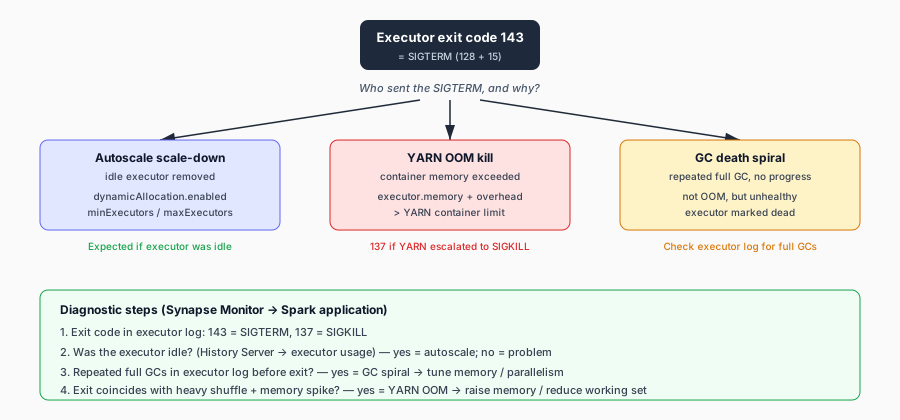
<p>Exit code 143 is one of the most misread errors in a Spark cluster. You see <code class="language-plaintext highlighter-rouge">Executor exit code: 143</code> in the driver logs, the executor is gone, the stage either retries or fails, and the natural reaction is to assume the executor crashed. It did not. Exit code 143 means the executor received a <code class="language-plaintext highlighter-rouge">SIGTERM</code> — a <em>termination signal</em> — and shut down. Something <em>deliberately</em> asked it to stop.</p>

<p>The difference matters. A crash (exit code 137 = <code class="language-plaintext highlighter-rouge">SIGKILL</code>, or a non-zero code from an unhandled exception) is a failure you have to fix in the application. A <code class="language-plaintext highlighter-rouge">SIGTERM</code> is a graceful shutdown request that can come from perfectly normal cluster behavior — or from a resource pressure situation you can tune away. On Azure Synapse Spark, exit 143 shows up in three main scenarios, and the fix is different for each.</p>

<figure style="margin:1.5em 0;">
  <img src="/assets/images/executor-exit-143-map.svg" alt="Decision map for Spark executor exit code 143 (SIGTERM): three causes — autoscale scale-down, YARN OOM kill, and GC death spiral — and the diagnostic question and steps for each." style="width:100%;max-width:720px;height:auto;" loading="lazy" />
  <figcaption style="font-size:0.85em;color:#475569;margin-top:0.4em;">Exit 143 is a SIGTERM, not a crash. The fix depends on who sent it and why — the decision map narrows it to one of three causes.</figcaption>
</figure>

<h2 id="what-exit-143-actually-is">What exit 143 actually is</h2>

<p>On Linux, when a process receives signal 15 (<code class="language-plaintext highlighter-rouge">SIGTERM</code>) and exits as a result, the exit code is <code class="language-plaintext highlighter-rouge">128 + 15 = 143</code>. A <code class="language-plaintext highlighter-rouge">SIGTERM</code> is the polite version of “please stop” — unlike <code class="language-plaintext highlighter-rouge">SIGKILL</code> (exit 137), it lets the process clean up. The Spark executor model means an executor can receive a <code class="language-plaintext highlighter-rouge">SIGTERM</code> from the cluster manager (YARN), the driver, or the autoscaler. The Spark configuration docs document the decommissioning pathway: <code class="language-plaintext highlighter-rouge">spark.decommission.enabled</code> (default <code class="language-plaintext highlighter-rouge">false</code>) controls whether Spark tries to shut an executor down gracefully and migrate its blocks, and <code class="language-plaintext highlighter-rouge">spark.executor.decommission.signal</code> (default <code class="language-plaintext highlighter-rouge">PWR</code>) controls which signal triggers decommissioning.</p>

<p>The key diagnostic question is: <em>who sent the SIGTERM, and why?</em></p>

<h2 id="cause-1-dynamic-allocation-or-autoscale-scale-down">Cause 1: Dynamic allocation or autoscale scale-down</h2>

<p>The most common — and usually benign — cause of exit 143 on Synapse is an executor being removed because the pool no longer needs it. The Synapse autoscale docs document two layers: pool-level autoscaling (which decommissions whole nodes based on CPU and memory metrics) and application-level dynamic allocation (which uses <code class="language-plaintext highlighter-rouge">spark.dynamicAllocation.enabled</code> with <code class="language-plaintext highlighter-rouge">spark.dynamicAllocation.minExecutors</code> and <code class="language-plaintext highlighter-rouge">spark.dynamicAllocation.maxExecutors</code>). When either decides the cluster is over-provisioned, idle executors receive a <code class="language-plaintext highlighter-rouge">SIGTERM</code> and exit with code 143.</p>

<p>This is <em>expected</em> behavior when the executor has no in-flight tasks and no un-fetched shuffle data. It only becomes a problem when the executor is removed <em>while</em> it still holds shuffle blocks that reduce tasks need — which then surfaces as a shuffle fetch failure (see the companion post on that).</p>

<p><strong>Fix:</strong> If you are seeing exit 143 on executors that were actively running tasks, raise <code class="language-plaintext highlighter-rouge">spark.dynamicAllocation.minExecutors</code> so the pool does not shrink below the size a running job needs, and ensure <code class="language-plaintext highlighter-rouge">spark.shuffle.service.enabled</code> is on so shuffle files survive executor removal. The Synapse autoscale docs confirm both are supported on Synapse Spark pools.</p>

<h2 id="cause-2-out-of-memory-kill-by-yarn">Cause 2: Out-of-memory kill by YARN</h2>

<p>YARN, which Synapse Spark pools run on, enforces a hard memory limit per container. If an executor’s total memory (heap + overhead + off-heap + Python) exceeds its YARN container allocation, YARN sends a <code class="language-plaintext highlighter-rouge">SIGTERM</code> (and, if the process does not exit quickly, a <code class="language-plaintext highlighter-rouge">SIGKILL</code>) to protect the node. The executor exits with 143.</p>

<p>The Spark configuration docs document the pieces that sum to the container size: <code class="language-plaintext highlighter-rouge">spark.executor.memory</code> (the JVM heap, default <code class="language-plaintext highlighter-rouge">1g</code>), <code class="language-plaintext highlighter-rouge">spark.executor.memoryOverhead</code> (non-heap memory — VM overhead, interned strings, native allocations — defaulting to <code class="language-plaintext highlighter-rouge">executorMemory * spark.executor.memoryOverheadFactor</code> with <code class="language-plaintext highlighter-rouge">spark.executor.memoryOverheadFactor</code> default <code class="language-plaintext highlighter-rouge">0.10</code>), <code class="language-plaintext highlighter-rouge">spark.memory.offHeap.size</code> (if off-heap is enabled), and <code class="language-plaintext highlighter-rouge">spark.executor.pyspark.memory</code> (for PySpark). The container ceiling is the sum of all of these.</p>

<p>The Synapse performance docs add the platform guidance: start at ~30 GB per executor, keep the heap below 32 GB to keep GC overhead under 10%, and watch GC — a heap that is too large pauses long enough to look like a dead executor.</p>

<p><strong>How to tell it is OOM:</strong> Check the executor logs for <code class="language-plaintext highlighter-rouge">Container killed by YARN for exceeding memory limits</code> or a similar YARN message. The exit code will be 143 if YARN sent SIGTERM first, or 137 if it escalated to SIGKILL. Then look at the Spark UI executor metrics — the Spark monitoring docs expose <code class="language-plaintext highlighter-rouge">peakExecutionMemory</code>, <code class="language-plaintext highlighter-rouge">OnHeapExecutionMemory</code>, <code class="language-plaintext highlighter-rouge">OffHeapExecutionMemory</code>, and <code class="language-plaintext highlighter-rouge">JVMHeapMemory</code> per executor. If peak execution memory is bumping the container limit, the executor is OOM.</p>

<p><strong>Fix:</strong> Raise <code class="language-plaintext highlighter-rouge">spark.executor.memory</code> and <code class="language-plaintext highlighter-rouge">spark.executor.memoryOverhead</code> so the sum fits the YARN container, reduce the per-task working set by increasing parallelism (<code class="language-plaintext highlighter-rouge">spark.default.parallelism</code> / <code class="language-plaintext highlighter-rouge">spark.sql.shuffle.partitions</code> — the tuning docs recommend 2–3 tasks per core), and prefer <code class="language-plaintext highlighter-rouge">reduceByKey</code> over <code class="language-plaintext highlighter-rouge">groupByKey</code> (the Synapse performance docs call this out explicitly) so the map-side aggregation shrinks the data before it hits the reduce task’s hash table.</p>

<h2 id="cause-3-gc-death-spiral">Cause 3: GC death spiral</h2>

<p>A subtler cause: the executor is not technically OOM, but its JVM is spending almost all its time in garbage collection and making no forward progress. The Spark tuning docs describe this directly — “if a full GC is invoked multiple times before a task completes, it means that there isn’t enough memory available for executing tasks.” The driver or YARN may eventually conclude the executor is unhealthy and send a SIGTERM.</p>

<p>The tuning docs also note that since Spark 4.0, G1GC is the default garbage collector, and that with large executor heap sizes it may be important to increase the G1 region size with <code class="language-plaintext highlighter-rouge">-XX:G1HeapRegionSize</code>. GC options for executors are set via <code class="language-plaintext highlighter-rouge">spark.executor.extraJavaOptions</code> or <code class="language-plaintext highlighter-rouge">spark.executor.defaultJavaOptions</code>.</p>

<p><strong>Fix:</strong> First, measure GC. The tuning docs recommend adding <code class="language-plaintext highlighter-rouge">-verbose:gc -XX:+PrintGCDetails -XX:+PrintGCTimeStamps</code> to executor Java options and reading the worker logs. If full GCs are firing repeatedly mid-task, the executor needs more memory, fewer concurrent tasks, or serialized caching (<code class="language-plaintext highlighter-rouge">MEMORY_ONLY_SER</code> with Kryo, which the tuning docs recommend). The Synapse performance docs note Kryo serialization is enabled by default on Synapse Spark Runtime 3.1+, and that you can tune the buffer with <code class="language-plaintext highlighter-rouge">spark.kryoserializer.buffer.max</code>.</p>

<h2 id="how-to-diagnose-which-one-it-is">How to diagnose which one it is</h2>

<p>The Synapse monitoring docs are your starting point. Open <strong>Monitor &gt; Apache Spark applications</strong>, find the failed/affected application, and look at the executor list and the failed tasks. Then:</p>

<ol>
  <li><strong>Check the exit code in the executor log.</strong> 143 = SIGTERM, 137 = SIGKILL. A 137 that comes with a YARN “exceeded memory limits” message is a hard OOM; a 143 that comes with no YARN message is usually a deliberate shutdown.</li>
  <li><strong>Check whether the executor was idle.</strong> The Synapse Spark History Server docs expose executor usage and decommissioning. An idle executor exiting 143 during autoscale scale-down is expected; a busy one exiting 143 is a problem.</li>
  <li><strong>Check GC.</strong> If the executor log shows repeated full GCs immediately before the exit, it is a GC death spiral — tune memory or parallelism.</li>
  <li><strong>Check the timing against autoscale events.</strong> If the exit coincides with a pool scale-down, it is cause 1; if it coincides with a heavy shuffle stage and a memory spike, it is cause 2.</li>
</ol>

<p>Exit 143 is not a bug. It is a signal that something <em>decided</em> the executor should stop. Your job is to figure out who decided, why, and whether the decision was correct — and then to either tune the workload so the decision stops happening (causes 2 and 3) or make the shuffle resilient to it (cause 1).</p>

<h3 id="sources">Sources</h3>

<ul>
  <li><a href="https://spark.apache.org/docs/latest/configuration.html#application-properties">Apache Spark Configuration — Application Properties &amp; Decommissioning</a> — <code class="language-plaintext highlighter-rouge">spark.executor.memory</code>, <code class="language-plaintext highlighter-rouge">spark.executor.memoryOverhead</code>, <code class="language-plaintext highlighter-rouge">spark.executor.memoryOverheadFactor</code>, <code class="language-plaintext highlighter-rouge">spark.memory.offHeap.size</code>, <code class="language-plaintext highlighter-rouge">spark.decommission.enabled</code>, <code class="language-plaintext highlighter-rouge">spark.executor.decommission.signal</code>.</li>
  <li><a href="https://spark.apache.org/docs/latest/tuning.html#garbage-collection-tuning">Apache Spark Tuning Guide — Garbage Collection Tuning</a> — full GC as an out-of-memory signal, G1GC default, <code class="language-plaintext highlighter-rouge">-XX:G1HeapRegionSize</code>, serialized caching with Kryo.</li>
  <li><a href="https://spark.apache.org/docs/latest/monitoring.html#executor-metrics">Apache Spark Monitoring — Executor Metrics</a> — <code class="language-plaintext highlighter-rouge">peakExecutionMemory</code>, <code class="language-plaintext highlighter-rouge">OnHeapExecutionMemory</code>, <code class="language-plaintext highlighter-rouge">JVMHeapMemory</code>, minor/major GC counts and times.</li>
  <li><a href="https://learn.microsoft.com/en-us/azure/synapse-analytics/spark/apache-spark-performance">Optimize Spark jobs for performance — Azure Synapse Analytics</a> — 30 GB per executor, &lt;32 GB heap for GC &lt;10%, <code class="language-plaintext highlighter-rouge">reduceByKey</code> over <code class="language-plaintext highlighter-rouge">groupByKey</code>, Kryo default + <code class="language-plaintext highlighter-rouge">spark.kryoserializer.buffer.max</code>.</li>
  <li><a href="https://learn.microsoft.com/en-us/azure/synapse-analytics/spark/apache-spark-autoscale">Autoscale for Azure Synapse Analytics Apache Spark pools</a> — <code class="language-plaintext highlighter-rouge">spark.dynamicAllocation.enabled</code>, <code class="language-plaintext highlighter-rouge">minExecutors</code>, <code class="language-plaintext highlighter-rouge">maxExecutors</code>, node decommissioning.</li>
  <li><a href="https://learn.microsoft.com/en-us/azure/synapse-analytics/monitoring/apache-spark-applications">Monitor Apache Spark applications in Azure Synapse Analytics</a> — executor list, failed-task inspection, driver/executor logs.</li>
  <li><a href="https://learn.microsoft.com/en-us/azure/synapse-analytics/spark/apache-spark-history-server">Spark History Server in Azure Synapse Analytics</a> — executor usage, data skew, failed-task inspection.</li>
</ul>]]></content><author><name></name></author><category term="azure" /><category term="spark" /><category term="synapse" /><category term="executor" /><category term="troubleshooting" /><category term="performance" /><summary type="html"><![CDATA[Executor exit code 143 is SIGTERM — your executor was told to shut down. On Azure Synapse Spark, here is how to tell whether it is OOM, preemption, or autoscale, and what to do.]]></summary></entry><entry><title type="html">The ‘No OAuth Bearer tokens in Subject’s private credentials’ Error Explained</title><link href="https://noraze.com/2026/05/20/kafka-oauth-no-bearer-tokens-subject-error.html" rel="alternate" type="text/html" title="The ‘No OAuth Bearer tokens in Subject’s private credentials’ Error Explained" /><published>2026-05-20T00:00:00+00:00</published><updated>2026-05-20T00:00:00+00:00</updated><id>https://noraze.com/2026/05/20/kafka-oauth-no-bearer-tokens-subject-error</id><content type="html" xml:base="https://noraze.com/2026/05/20/kafka-oauth-no-bearer-tokens-subject-error.html"><![CDATA[<h1 id="the-no-oauth-bearer-tokens-in-subjects-private-credentials-error-explained">The ‘No OAuth Bearer tokens in Subject’s private credentials’ Error Explained</h1>

<p>The full error, the way it shows up in a Synapse Spark executor log, is usually wrapped in a <code class="language-plaintext highlighter-rouge">STREAM_FAILED</code> / stage-failure abort:</p>

<div class="language-plaintext highlighter-rouge"><div class="highlight"><pre class="highlight"><code>javax.security.sasl.SaslException: No OAuth Bearer tokens in Subject's private credentials
</code></pre></div></div>

<p>It looks like an expired-token error. It is not. The error means something more specific, and the difference decides which fix actually works. This post unpacks what the error means mechanically, the three reasons it happens on a Synapse Spark job writing to (or reading from) Azure Event Hubs over the Kafka endpoint, and how to tell which one is yours. Every durable claim traces to the Apache Kafka SASL docs or Microsoft Learn.</p>

<h2 id="what-the-error-means-mechanically">What the error means mechanically</h2>

<p>Kafka’s <code class="language-plaintext highlighter-rouge">SASL_SSL</code> + <code class="language-plaintext highlighter-rouge">OAUTHBEARER</code> flow runs through the <code class="language-plaintext highlighter-rouge">OAuthBearerLoginModule</code>. The login module’s job is to populate the JAAS <code class="language-plaintext highlighter-rouge">Subject</code> with an <code class="language-plaintext highlighter-rouge">OAuthBearerToken</code> in its private-credentials set, which the Kafka client then sends to the broker as the SASL response.</p>

<p>The error <code class="language-plaintext highlighter-rouge">No OAuth Bearer tokens in Subject's private credentials</code> is thrown by the Kafka login machinery when the login module returned successfully (login didn’t throw), but the <code class="language-plaintext highlighter-rouge">Subject</code>’s private-credentials set is empty — there is no <code class="language-plaintext highlighter-rouge">OAuthBearerToken</code> in it. In other words: <strong>the login “succeeded” but the callback handler left no token behind.</strong> The Kafka client then has nothing to send the broker, and the auth handshake aborts with this SASL exception.</p>

<p>This is a different failure from the ones the existing Kafka OAuth post covers:</p>
<ul>
  <li><strong>Token acquisition fails at startup</strong> (failure mode 1 in that post) — the callback handler threw an exception or returned null. That typically surfaces as a different error (an <code class="language-plaintext highlighter-rouge">OAuthBearerLoginModule</code> login exception or a wrapped <code class="language-plaintext highlighter-rouge">IOException</code>).</li>
  <li><strong>The broker rejects the token</strong> (failure mode 2) — the client <em>had</em> a token; the broker refused it (scope, signature, clock skew).</li>
  <li><strong>Connection/retry storms</strong> (failure mode 3) — auth is <em>transiently</em> failing and the retry knobs make it worse.</li>
</ul>

<p>The <code class="language-plaintext highlighter-rouge">No OAuth Bearer tokens</code> error is the <em>fourth</em> mode: the handler silently produced nothing, the <code class="language-plaintext highlighter-rouge">Subject</code> is empty, and Kafka throws this specific exception. It’s the most common mode on Synapse→Event Hubs, and it’s the one that’s hardest to diagnose from the error alone because the handler logged nothing.</p>

<h2 id="cause-1--the-callback-handler-isnt-wired-or-is-wired-to-the-wrong-class">Cause 1 — the callback handler isn’t wired (or is wired to the wrong class)</h2>

<p>The first cause is configuration, not runtime. The Kafka client property <code class="language-plaintext highlighter-rouge">sasl.login.callback.handler.class</code> must point at a real, on-classpath <code class="language-plaintext highlighter-rouge">AuthenticateCallbackHandler</code> implementation that knows how to acquire an Entra ID token. If the property is missing, points at the wrong class, or the class isn’t on the executor’s classpath, the login runs against the default handler — which, for the OAUTHBEARER mechanism, won’t produce a token for an Entra-issued resource.</p>

<p>The diagnostic: check the Spark session config that the property is set and the class is loadable on the executor. The class name must be fully qualified and the JAR containing it must be on the executor classpath (on Synapse, that means a pool library or a workspace package, depending on your setup).</p>

<p><strong>Fix:</strong> verify <code class="language-plaintext highlighter-rouge">sasl.login.callback.handler.class</code> is set in the producer/consumer properties your Spark job passes to the Kafka sink/source, and verify the handler class is on the executor classpath. A missing handler looks exactly like this error.</p>

<h2 id="cause-2--the-handler-is-wired-but-cant-acquire-a-token-wrong-scope-wrong-endpoint-network">Cause 2 — the handler is wired but can’t acquire a token (wrong scope, wrong endpoint, network)</h2>

<p>The second cause is the most common one I see in practice. The handler is correctly wired, runs, tries to acquire an Entra ID token, and fails silently. The handler catches the failure internally and returns without populating the <code class="language-plaintext highlighter-rouge">OAuthBearerTokenCallback</code>, so the <code class="language-plaintext highlighter-rouge">Subject</code> ends up empty.</p>

<p>The reasons the handler fails to acquire a token:</p>

<ul>
  <li><strong>Wrong scope / audience.</strong> The Event Hubs Entra-auth docs state that for Kafka clients the resource to request a token for is <code class="language-plaintext highlighter-rouge">https://&lt;namespace&gt;.servicebus.windows.net</code> (the AMQP/HTTP resource is <code class="language-plaintext highlighter-rouge">https://eventhubs.azure.net/</code>). If the handler requests the wrong scope, Entra ID either issues a token the Event Hubs broker rejects (cause-2 manifests as cause-3 in the existing post), or — more commonly on the client side — the token endpoint returns an <code class="language-plaintext highlighter-rouge">invalid_scope</code> error that the handler swallows. Decode the JWT if one is produced; compare its <code class="language-plaintext highlighter-rouge">aud</code> claim to the Event Hubs namespace endpoint.</li>
  <li><strong>Wrong Entra endpoint / tenant.</strong> The handler posts to the wrong <code class="language-plaintext highlighter-rouge">/{tenant}/oauth2/v2.0/token</code> URL. Entra ID returns a 400 with an <code class="language-plaintext highlighter-rouge">error</code> / <code class="language-plaintext highlighter-rouge">error_description</code> field. If the handler doesn’t log the response body, you see nothing.</li>
  <li><strong>Network / firewall.</strong> The Synapse executor can’t reach <code class="language-plaintext highlighter-rouge">login.microsoftonline.com</code> (a private endpoint or egress filter). The handler’s HTTP call times out or fails; if it doesn’t propagate, the <code class="language-plaintext highlighter-rouge">Subject</code> is empty.</li>
</ul>

<p><strong>Fix:</strong> the handler runs inside the executor JVM, so its logs go to executor stdout/stderr — Synapse Monitor exposes them. Enable logging in your custom callback handler. Log the token endpoint URL, the HTTP status, and the response body on failure. Confirm the <code class="language-plaintext highlighter-rouge">aud</code> claim in any returned token matches <code class="language-plaintext highlighter-rouge">https://&lt;namespace&gt;.servicebus.windows.net</code>. This is the diagnostic that turns “it doesn’t work” into “the scope string was wrong.”</p>

<h2 id="cause-3--the-certificate-used-to-sign-the-client-assertion-is-expired-the-renewed-cert-trap">Cause 3 — the certificate used to sign the client-assertion is expired (the renewed-cert trap)</h2>

<p>This is the cause that produces the “renewed cert not refreshed on a long-running job” symptom, and it’s worth being precise about the mechanism because the common description (“the bearer token expired”) is wrong.</p>

<p>When your handler uses the <strong>certificate-based client-credentials flow</strong> (Path 3 in the Event Hubs sink post), the handler acquires the Entra ID access token by:</p>

<ol>
  <li>Loading the certificate (typically from Key Vault) — the cert’s private key is used to sign a JWT, the <code class="language-plaintext highlighter-rouge">client_assertion</code>.</li>
  <li>POSTing that assertion to <code class="language-plaintext highlighter-rouge">/{tenant}/oauth2/v2.0/token</code> with <code class="language-plaintext highlighter-rouge">client_assertion_type=urn:ietf:params:oauth:client-assertion-type:jwt-bearer</code> and <code class="language-plaintext highlighter-rouge">grant_type=client_credentials</code>.</li>
  <li>Receiving a bearer access token with <code class="language-plaintext highlighter-rouge">expires_in: 3599</code> (about 1 hour).</li>
</ol>

<p>Two lifetimes are in play:</p>
<ul>
  <li>The <strong>access token</strong> lifetime: ~1 hour (the <code class="language-plaintext highlighter-rouge">expires_in</code> field). The Kafka client’s refresh thread re-acquires before this expires.</li>
  <li>The <strong>certificate</strong> lifetime: months or years. The cert is the <em>credential</em> used to <em>acquire</em> tokens, not the token itself.</li>
</ul>

<p>The trap: Key Vault renews the certificate (a new cert version is created per the renewal policy). Your long-running Spark job loaded the cert into the handler’s memory at JVM startup and never re-reads it. The old cert in memory eventually passes its <code class="language-plaintext highlighter-rouge">NotAfter</code> date. From that moment, every token request signed with the old cert is rejected by Entra ID with <code class="language-plaintext highlighter-rouge">invalid_client</code> / a signature-verification failure. The handler’s token request returns an error; the handler returns without populating the <code class="language-plaintext highlighter-rouge">OAuthBearerTokenCallback</code>; the <code class="language-plaintext highlighter-rouge">Subject</code>’s private credentials stay empty; the Kafka client throws <code class="language-plaintext highlighter-rouge">No OAuth Bearer tokens in Subject's private credentials</code>.</p>

<p>The crucial correction: <strong>the bearer token is not expired — it can’t be acquired</strong>, because the cert used to <em>request</em> it is expired in the job’s memory. The observable error is the same <code class="language-plaintext highlighter-rouge">No OAuth Bearer tokens</code> exception, but the root cause is the expired cert, not an expired token. This distinction matters because the fix is different (rotate/reload the cert, not tune the token-refresh window).</p>

<p><strong>Fix:</strong> the documented fix paths, in order of preference:</p>
<ul>
  <li><strong>Use managed identity instead of a cert.</strong> Azure manages the credential lifecycle; there is no cert to expire in memory. The Event Hubs and Key Vault auth docs both call managed identity the recommended default for Azure-resident workloads. This eliminates the failure mode entirely.</li>
  <li><strong>If you must use a cert, re-read it on each token refresh, not once at JVM startup.</strong> The handler should fetch the latest cert version from Key Vault on each token-acquisition call, not cache the cert in a static field. Whether your Azure Identity SDK version does this automatically depends on the SDK’s credential caching — <code class="language-plaintext highlighter-rouge">&lt;verify&gt;</code> the caching behavior against your SDK version; some SDK clients cache the cert for the process lifetime.</li>
  <li><strong>If neither is possible, restart the job after cert renewal.</strong> This is the operational workaround: schedule a job restart shortly after the cert renewal window, so the job picks up the new cert before the old one expires. Not elegant, but it’s the documented-pattern fallback when the credential can’t be reloaded mid-flight. <strong>Important precondition:</strong> the renewed certificate’s public key must be registered on the Entra ID app registration <em>before</em> the restart — Entra ID validates the <code class="language-plaintext highlighter-rouge">client_assertion</code> against the certificates registered on the app registration, not against Key Vault directly. The standard practice is to register the new cert’s public key on the app registration with an overlap period (both old and new registered) before the old cert expires, so a restart after renewal can use the new cert. Without that registration step, restarting the job does not fix the auth failure.</li>
</ul>

<h2 id="the-diagnostic-order">The diagnostic order</h2>

<p>When the error appears, in order:</p>

<ol>
  <li><strong>Is the handler wired?</strong> Check <code class="language-plaintext highlighter-rouge">sasl.login.callback.handler.class</code> is set and on the executor classpath. (Cause 1.)</li>
  <li><strong>Does the handler log a token-acquisition failure?</strong> Enable handler logging; look at executor stdout/stderr in Synapse Monitor. An <code class="language-plaintext highlighter-rouge">invalid_scope</code>, a 4xx from the Entra endpoint, or a connection timeout tells you it’s an acquisition failure. (Cause 2.)</li>
  <li><strong>Is the cert expired in the job’s memory?</strong> If the handler uses a cert, decode the cert’s <code class="language-plaintext highlighter-rouge">NotAfter</code> date and compare to the current time on the executor. If the in-memory cert is past expiry and the cert in Key Vault has a newer version, you’re in the renewed-cert trap. (Cause 3.)</li>
</ol>

<p>The order matters because cause 3 only applies if you’re on the certificate-based path, and cause 1 only applies if the config is wrong. The error alone doesn’t tell you which; the handler logs and the cert’s <code class="language-plaintext highlighter-rouge">NotAfter</code> do.</p>

<h2 id="the-takeaway">The takeaway</h2>

<p><code class="language-plaintext highlighter-rouge">No OAuth Bearer tokens in Subject's private credentials</code> means the OAuthBearerLoginModule finished login but the Subject has no token — the callback handler left it empty. On Synapse→Event Hubs, three things cause that: the handler isn’t wired (config), the handler can’t acquire a token (wrong scope/endpoint/network), or the certificate used to sign the client-assertion is expired in the job’s memory (the renewed-cert trap). The error is not “expired bearer token”; it’s “no token could be produced.” Diagnose in order: config, then handler logs, then cert expiry. And the cleanest fix for cause 3 is to not use a long-lived cert at all — managed identity removes the failure mode.</p>

<h2 id="sources--references">Sources &amp; References</h2>

<ul>
  <li>Apache Kafka — Authentication using SASL (OAUTHBEARER, <code class="language-plaintext highlighter-rouge">OAuthBearerLoginModule</code>, <code class="language-plaintext highlighter-rouge">AuthenticateCallbackHandler</code>, <code class="language-plaintext highlighter-rouge">OAuthBearerTokenCallback</code>): https://kafka.apache.org/documentation/#security_sasl</li>
  <li>Apache Kafka — Producer Configs (<code class="language-plaintext highlighter-rouge">sasl.login.callback.handler.class</code>, <code class="language-plaintext highlighter-rouge">sasl.login.refresh.*</code>): https://kafka.apache.org/documentation/#producerconfigs</li>
  <li>Microsoft Learn — Authenticate an application with Entra ID to access Event Hubs (token resource <code class="language-plaintext highlighter-rouge">https://&lt;namespace&gt;.servicebus.windows.net</code> for Kafka): https://learn.microsoft.com/azure/event-hubs/authenticate-application</li>
  <li>Microsoft Learn — OAuth 2.0 client credentials flow (cert-based <code class="language-plaintext highlighter-rouge">client_assertion</code>, <code class="language-plaintext highlighter-rouge">expires_in</code>): https://learn.microsoft.com/entra/identity-platform/v2-oauth2-client-creds-grant-flow</li>
  <li>Microsoft Learn — Authenticate to Azure Key Vault (managed identity vs cert): https://learn.microsoft.com/azure/key-vault/general/authentication</li>
  <li>Microsoft Learn — Key Vault certificate lifecycle (auto-renewal, new versions): https://learn.microsoft.com/azure/key-vault/certificates/certificate-scenarios</li>
  <li>Note: the in-memory caching behavior of a Key-Vault cert inside a Synapse Spark <code class="language-plaintext highlighter-rouge">AuthenticateCallbackHandler</code> is <code class="language-plaintext highlighter-rouge">&lt;verify&gt;</code> against your Azure Identity SDK version — the docs describe the cert lifecycle and the client-credentials flow but not a single Synapse-specific “reload cert mid-job” mechanism.</li>
</ul>]]></content><author><name></name></author><category term="kafka" /><category term="oauth" /><category term="sasl" /><category term="sasl-exception" /><category term="azure" /><category term="event-hubs" /><category term="synapse" /><category term="spark" /><category term="data-engineering" /><category term="troubleshooting" /><summary type="html"><![CDATA[That Kafka SASL exception is not about an expired token. It means the OAuthBearerLoginModule finished login but the callback handler left the Subject with no token. Here are the three reasons that happens on Synapse→Event Hubs and how to diagnose each.]]></summary></entry><entry><title type="html">Writing to Azure Event Hubs from Spark: The Kafka Endpoint and Where It Breaks</title><link href="https://noraze.com/2026/05/15/spark-eventhubs-kafka-sink-write-failures.html" rel="alternate" type="text/html" title="Writing to Azure Event Hubs from Spark: The Kafka Endpoint and Where It Breaks" /><published>2026-05-15T00:00:00+00:00</published><updated>2026-05-15T00:00:00+00:00</updated><id>https://noraze.com/2026/05/15/spark-eventhubs-kafka-sink-write-failures</id><content type="html" xml:base="https://noraze.com/2026/05/15/spark-eventhubs-kafka-sink-write-failures.html"><![CDATA[<h1 id="writing-to-azure-event-hubs-from-spark-the-kafka-endpoint-and-where-it-breaks">Writing to Azure Event Hubs from Spark: The Kafka Endpoint and Where It Breaks</h1>

<p>Azure Event Hubs exposes an Apache Kafka endpoint, so a Spark job can write to an event hub the same way it writes to any Kafka topic — same producer API, same <code class="language-plaintext highlighter-rouge">kafka</code> DataFrame format. That is the good news. The bad news is that “same protocol” does not mean “same operational profile”: Event Hubs has its own auth paths, its own tier-gated features, and its own throttling model, and the place a Spark-to-Event-Hubs sink breaks is almost never the Kafka protocol layer. This post covers the endpoint, the three ways to authenticate it, and the failure modes each one produces. Every durable claim traces to Microsoft Learn or the official Apache Kafka docs.</p>

<h2 id="the-endpoint-its-a-kafka-broker-on-port-9093">The endpoint: it’s a Kafka broker on port 9093</h2>

<p>An Event Hubs namespace is a single stable endpoint with a fully-qualified domain name of the form <code class="language-plaintext highlighter-rouge">NAMESPACENAME.servicebus.windows.net</code>. The Kafka endpoint listens on port <code class="language-plaintext highlighter-rouge">9093</code> with TLS. Conceptually:</p>

<ul>
  <li>Apache Kafka <strong>cluster</strong> → Event Hubs <strong>namespace</strong></li>
  <li>Apache Kafka <strong>topic</strong> → an <strong>event hub</strong> (inside the namespace)</li>
  <li>Apache Kafka <strong>partition</strong> → <strong>partition</strong></li>
  <li>Apache Kafka <strong>consumer group</strong> → <strong>consumer group</strong></li>
  <li>Apache Kafka <strong>offset</strong> → <strong>offset</strong></li>
</ul>

<p>The Kafka-side config is therefore familiar, with the bootstrap pointing at the namespace:</p>

<div class="language-properties highlighter-rouge"><div class="highlight"><pre class="highlight"><code><span class="py">bootstrap.servers</span><span class="p">=</span><span class="s">NAMESPACENAME.servicebus.windows.net:9093</span>
</code></pre></div></div>

<p>A Spark Structured Streaming write to Event Hubs looks like a write to any Kafka sink — pick the <code class="language-plaintext highlighter-rouge">kafka</code> format, set the bootstrap servers and topic options, and the engine produces records. The producer options (acks, retries, batch size, linger) are the Kafka producer options. The thing that changes is the auth and the throughput model.</p>

<h2 id="the-three-auth-paths">The three auth paths</h2>

<p>Event Hubs documents three ways to authenticate a Kafka client. They have different failure modes, and the rest of this post is organized by which one you picked.</p>

<h3 id="path-1--sasl_ssl--plain-with-the-connection-string">Path 1 — SASL_SSL + PLAIN with the connection string</h3>

<p>The simplest path, documented in the Event Hubs Kafka overview: use <code class="language-plaintext highlighter-rouge">SASL_SSL</code> for the protocol, <code class="language-plaintext highlighter-rouge">PLAIN</code> for the mechanism, and the Event Hubs connection string as the password with the literal username <code class="language-plaintext highlighter-rouge">$ConnectionString</code>.</p>

<div class="language-properties highlighter-rouge"><div class="highlight"><pre class="highlight"><code><span class="py">security.protocol</span><span class="p">=</span><span class="s">SASL_SSL</span>
<span class="py">sasl.mechanism</span><span class="p">=</span><span class="s">PLAIN</span>
<span class="py">sasl.jaas.config</span><span class="p">=</span><span class="s">org.apache.kafka.common.security.plain.PlainLoginModule required username="$ConnectionString" password="Endpoint=sb://mynamespace.servicebus.windows.net/;SharedAccessKeyName=RootManageSharedAccessKey;SharedAccessKey=XXXXXXXX";</span>
</code></pre></div></div>

<p>This is the “get something working fast” path. Its failure modes:</p>

<ul>
  <li><strong>Key rotation.</strong> The Event Hubs docs note that established connections are <em>not</em> disconnected when the SAS key is regenerated, but a new connection (a reconnect, a producer restart, a broker-side rebalance) will fail with auth errors if your job still holds the old key. A long-running Spark job that started before the rotation will keep working until it has to establish a new connection — then it breaks.</li>
  <li><strong>The connection string in the config.</strong> It is a real credential. Storing it in a notebook or a plaintext Spark property is a leak waiting to happen. Use a Linked Service / Key Vault-backed secret, not a pasted string.</li>
</ul>

<h3 id="path-2--sasl_ssl--oauthbearer-with-entra-id-managed-identity-or-service-principal">Path 2 — SASL_SSL + OAUTHBEARER with Entra ID (managed identity or service principal)</h3>

<p>The OAuth path, documented in the Event Hubs Kafka overview and the Event Hubs Entra-auth page. Use <code class="language-plaintext highlighter-rouge">SASL_SSL</code> for the protocol, <code class="language-plaintext highlighter-rouge">OAUTHBEARER</code> for the mechanism, and a custom <code class="language-plaintext highlighter-rouge">AuthenticateCallbackHandler</code> that acquires an Entra ID access token for the Event Hubs resource.</p>

<div class="language-properties highlighter-rouge"><div class="highlight"><pre class="highlight"><code><span class="py">bootstrap.servers</span><span class="p">=</span><span class="s">NAMESPACENAME.servicebus.windows.net:9093</span>
<span class="py">security.protocol</span><span class="p">=</span><span class="s">SASL_SSL</span>
<span class="py">sasl.mechanism</span><span class="p">=</span><span class="s">OAUTHBEARER</span>
<span class="py">sasl.jaas.config</span><span class="p">=</span><span class="s">org.apache.kafka.common.security.oauthbearer.OAuthBearerLoginModule required;</span>
<span class="py">sasl.login.callback.handler.class</span><span class="p">=</span><span class="s">CustomAuthenticateCallbackHandler</span>
</code></pre></div></div>

<p>The token is acquired for the Event Hubs resource. The Event Hubs Entra-auth docs state the resource to request a token for is <code class="language-plaintext highlighter-rouge">https://eventhubs.azure.net/</code> (the same for all clouds/tenants) for the AMQP/HTTP path, and for Kafka clients the resource is the namespace endpoint <code class="language-plaintext highlighter-rouge">https://&lt;namespace&gt;.servicebus.windows.net</code>. Confirm the exact scope string your callback handler requests against the Event Hubs docs and your namespace — a wrong audience is a common cause of the <code class="language-plaintext highlighter-rouge">No OAuth Bearer tokens</code> error covered in its own post.</p>

<p>This path’s failure modes are the token-acquisition and token-refresh failures covered in the existing Kafka OAuth post and in the dedicated “No OAuth Bearer tokens” post: the callback handler can’t reach Entra ID, the token’s audience is wrong, the token expires and the refresh thread can’t renew it. For a <em>producer</em> (the sink side), the killer is a long micro-batch that outlasts the token’s lifetime — see the large-data-crash post.</p>

<h3 id="path-3--certificate-based-client-credentials-service-principal--cert-from-key-vault">Path 3 — Certificate-based client credentials (service principal + cert from Key Vault)</h3>

<p>The third path is a variant of Path 2. Instead of the callback handler acquiring a token via a secret or managed identity, it acquires the Entra ID access token using the <strong>OAuth 2.0 client-credentials flow with a certificate</strong> — the app presents a JWT signed by the certificate’s private key (<code class="language-plaintext highlighter-rouge">client_assertion</code>) to the Entra ID <code class="language-plaintext highlighter-rouge">/token</code> endpoint, and Entra ID returns a bearer access token. This is documented in the Microsoft identity-platform client-credentials reference.</p>

<p>The Entra ID token request for the certificate-based flow:</p>

<div class="language-http highlighter-rouge"><div class="highlight"><pre class="highlight"><code><span class="nf">POST</span> <span class="nn">/{tenant}/oauth2/v2.0/token</span> <span class="k">HTTP</span><span class="o">/</span><span class="m">1.1</span>
<span class="na">Host</span><span class="p">:</span> <span class="s">login.microsoftonline.com</span>
<span class="na">Content-Type</span><span class="p">:</span> <span class="s">application/x-www-form-urlencoded</span>

scope=https%3A%2F%2F&lt;namespace&gt;.servicebus.windows.net%2F.default
&amp;client_id={client-id}
&amp;client_assertion_type=urn:ietf:params:oauth:client-assertion-type:jwt-bearer
&amp;client_assertion={jwt-signed-by-cert-private-key}
&amp;grant_type=client_credentials
</code></pre></div></div>

<p>The certificate is typically stored in and renewed from Azure Key Vault. Key Vault manages certificate lifecycle: a cert can be auto-renewed via a partnered CA (DigiCert/GlobalSign) or a CA you bring, with renewal policies (e.g. “renew 90 days before expiry”). Key Vault cert renewal produces a <em>new version</em> of the certificate; the old version remains retrievable until manually removed.</p>

<p>This is the path that produces the “renewed cert not refreshed on a long-running job” failure — see the large-data-crash-restart post for the full diagnosis. The short version: the cert is a <em>credential</em> for acquiring tokens, not the token itself; the token expires in ~1 hour (per the <code class="language-plaintext highlighter-rouge">expires_in</code> field), and the cert has a much longer lifetime; if the cert is renewed in Key Vault but the Spark job holds the old cert in memory, the old cert eventually expires and every subsequent token request signed with it is rejected by Entra ID — which surfaces inside the Kafka client as <code class="language-plaintext highlighter-rouge">No OAuth Bearer tokens in Subject's private credentials</code>.</p>

<h2 id="where-the-protocol-layer-stops-being-the-problem">Where the protocol layer stops being the problem</h2>

<p>People reach for Kafka producer tuning (<code class="language-plaintext highlighter-rouge">acks</code>, <code class="language-plaintext highlighter-rouge">retries</code>, <code class="language-plaintext highlighter-rouge">batch.size</code>, <code class="language-plaintext highlighter-rouge">linger.ms</code>) when a Spark-to-Event-Hubs write is slow or failing. Those are rarely the cause on Event Hubs, because Event Hubs is not a self-managed broker:</p>

<ul>
  <li><strong>Throughput Units (TUs) / Processing Units (PUs).</strong> Event Hubs scales by the TUs or PUs you purchase. If your producer exceeds the ingress quota for your TU allotment, Event Hubs throttles — the producer sees backpressure or errors, not a slow broker. Auto-Inflate (Standard tier) scales TUs up automatically when you hit the limit; without it, you are throttled. This is a capacity/quotas problem, not a producer-tuning problem, and it’s owned at the namespace, not in the Spark job config.</li>
  <li><strong>Tier-gated features.</strong> Compression (<code class="language-plaintext highlighter-rouge">gzip</code> only), Kafka transactions, and Kafka Streams are supported on Premium/Dedicated tiers (some in preview). If you enable compression on a Standard-tier namespace and your job assumes it’s working, you may be silently not getting the throughput benefit. Verify the tier supports the feature before relying on it.</li>
  <li><strong>The single endpoint.</strong> Per the Event Hubs Kafka overview, Event Hubs uses a single stable virtual IP address as the namespace endpoint, so all partitions route through it — you don’t tune broker lists, you don’t add brokers. Scaling is a control-plane operation on the namespace, not a client-side change.</li>
</ul>

<h2 id="the-failure-mode-map">The failure-mode map</h2>

<p>When a Spark write to Event Hubs fails, the error usually falls into one of these, and the fix is not in the same place for each:</p>

<table>
  <thead>
    <tr>
      <th>Symptom</th>
      <th>Layer</th>
      <th>Likely cause</th>
      <th>Fix location</th>
    </tr>
  </thead>
  <tbody>
    <tr>
      <td><code class="language-plaintext highlighter-rouge">SASL authentication failed</code> at connection</td>
      <td>Auth</td>
      <td>Wrong connection string (Path 1) or wrong scope/handler (Path 2/3)</td>
      <td>Auth config in the Spark job</td>
    </tr>
    <tr>
      <td><code class="language-plaintext highlighter-rouge">No OAuth Bearer tokens in Subject's private credentials</code></td>
      <td>Auth</td>
      <td>Callback handler returned no token (wrong scope, cert expired in memory, Entra rejected the assertion)</td>
      <td>Callback handler + credential lifecycle</td>
    </tr>
    <tr>
      <td>Stream stalls / <code class="language-plaintext highlighter-rouge">STREAM_FAILED</code> mid-micro-batch</td>
      <td>Auth + runtime</td>
      <td>Token expired during a long write; refresh thread couldn’t renew</td>
      <td>Refresh config + micro-batch sizing</td>
    </tr>
    <tr>
      <td>Throttling errors under high throughput</td>
      <td>Capacity</td>
      <td>Exceeded TU/PU ingress quota</td>
      <td>Namespace scaling (Auto-Inflate / more PUs)</td>
    </tr>
    <tr>
      <td>Connection refused / TLS errors</td>
      <td>Network</td>
      <td>Wrong port, firewall, private endpoint</td>
      <td>Namespace networking config</td>
    </tr>
    <tr>
      <td>Producer retries not helping</td>
      <td>Producer</td>
      <td>Tuning retries won’t fix a non-retriable auth or capacity error</td>
      <td>Stop tuning retries; fix the underlying layer</td>
    </tr>
  </tbody>
</table>

<p>The producer tuning knobs are real and they matter for throughput, but they will not fix an auth failure or a throttling failure. The diagnostic discipline is: identify the layer from the error message before reaching for a config key.</p>

<h2 id="the-takeaway">The takeaway</h2>

<p>Event Hubs speaks Kafka, so your Spark job writes to it the same way it writes to any Kafka topic. The three auth paths (PLAIN with connection string, OAUTHBEARER with Entra ID, certificate-based client credentials) each have their own failure modes, and the operational issues — throttling, tier-gated features, the single endpoint — are owned at the namespace, not in the producer config. When a write breaks, the error message tells you which layer: <code class="language-plaintext highlighter-rouge">SASL authentication failed</code> is auth, <code class="language-plaintext highlighter-rouge">No OAuth Bearer tokens</code> is the callback handler, throttling errors are capacity, and <code class="language-plaintext highlighter-rouge">STREAM_FAILED</code> during a long write is the token/refresh-vs-micro-batch-size mismatch covered in the dedicated posts.</p>

<h2 id="sources--references">Sources &amp; References</h2>

<ul>
  <li>Microsoft Learn — Apache Kafka Protocol Support in Azure Event Hubs (endpoint, tier-gated features, auth configs): https://learn.microsoft.com/azure/event-hubs/azure-event-hubs-apache-kafka-overview</li>
  <li>Microsoft Learn — Authenticate an application with Entra ID to access Event Hubs (resource <code class="language-plaintext highlighter-rouge">https://eventhubs.azure.net/</code>, Kafka resource <code class="language-plaintext highlighter-rouge">https://&lt;namespace&gt;.servicebus.windows.net</code>, RBAC roles): https://learn.microsoft.com/azure/event-hubs/authenticate-application</li>
  <li>Microsoft Learn — OAuth 2.0 client credentials flow on the Microsoft identity platform (cert-based <code class="language-plaintext highlighter-rouge">client_assertion</code> + <code class="language-plaintext highlighter-rouge">client_assertion_type=jwt-bearer</code>): https://learn.microsoft.com/entra/identity-platform/v2-oauth2-client-creds-grant-flow</li>
  <li>Microsoft Learn — Authenticate to Azure Key Vault (service principal / managed identity / cert credentials): https://learn.microsoft.com/azure/key-vault/general/authentication</li>
  <li>Microsoft Learn — Get started with Key Vault certificates (auto-renewal, new versions): https://learn.microsoft.com/azure/key-vault/certificates/certificate-scenarios</li>
  <li>Microsoft Learn — Azure Event Hubs quotas and throttling (TUs/PUs, Auto-Inflate): https://learn.microsoft.com/azure/event-hubs/event-hubs-quotas</li>
  <li>Apache Kafka — Producer Configs (<code class="language-plaintext highlighter-rouge">acks</code>, <code class="language-plaintext highlighter-rouge">retries</code>, <code class="language-plaintext highlighter-rouge">batch.size</code>, <code class="language-plaintext highlighter-rouge">linger.ms</code>, SASL keys): https://kafka.apache.org/documentation/#producerconfigs</li>
  <li>Note: the exact Synapse-specific wiring of a Key-Vault cert into a Kafka <code class="language-plaintext highlighter-rouge">sasl.login.callback.handler.class</code> is <code class="language-plaintext highlighter-rouge">&lt;verify&gt;</code> — the docs cover the Entra ID client-credentials flow and Key Vault cert lifecycle, but a single documented Synapse-specific path for the integration is not in the official docs; confirm against your Synapse runtime version and SDK.</li>
</ul>]]></content><author><name></name></author><category term="azure" /><category term="event-hubs" /><category term="kafka" /><category term="spark" /><category term="synapse" /><category term="data-engineering" /><category term="oauth" /><category term="sasl" /><summary type="html"><![CDATA[Azure Event Hubs speaks the Kafka protocol, so a Spark job can write to it like a Kafka topic — until auth, throttling, or a token-refresh failure stops the stream. Here is the endpoint, the three auth paths, and the failure modes.]]></summary></entry><entry><title type="html">Fixing Shuffle Fetch Failure in Azure Synapse Spark</title><link href="https://noraze.com/2026/05/12/azure-synapse-shuffle-fetch-failure.html" rel="alternate" type="text/html" title="Fixing Shuffle Fetch Failure in Azure Synapse Spark" /><published>2026-05-12T00:00:00+00:00</published><updated>2026-05-12T00:00:00+00:00</updated><id>https://noraze.com/2026/05/12/azure-synapse-shuffle-fetch-failure</id><content type="html" xml:base="https://noraze.com/2026/05/12/azure-synapse-shuffle-fetch-failure.html"><![CDATA[<blockquote>
  <p><strong>Accuracy note (2026-07-29 audit):</strong> This post was reviewed against current official documentation in July 2026 and contains inaccuracies relative to the current state of the tools described. The post is retained for its workflow reasoning; the specific factual issues are:</p>

  <p>Two refinements: (1) Enabling <code class="language-plaintext highlighter-rouge">spark.shuffle.service.enabled</code> only preserves shuffle files after executor removal when the external shuffle service is installed and configured by the cluster manager — setting the application property alone does not create the service; verify Synapse’s configured shuffle-preservation mechanism before relying on this. Spark’s modern dynamic-allocation docs also describe shuffle-tracking/decommission-based alternatives. (2) The ‘maximum delay capped at maxRetries * retryWait’ should be read as the configured retry-wait budget, not an end-to-end fetch-delay cap.</p>

  <p>Reference docs to verify against:</p>
  <ul>
    <li>Apache Spark — dynamic allocation / external shuffle service — https://spark.apache.org/docs/latest/configuration.html</li>
  </ul>
</blockquote>

<p>A shuffle fetch failure is one of the most frustrating errors you can hit in an Azure Synapse Spark pool. The job runs fine for a while, then a stage suddenly fails with a <code class="language-plaintext highlighter-rouge">FetchFailedException</code>, Spark retries the stage, and if the underlying problem persists the whole job eventually aborts. The error message is thin — it points at a <em>symptom</em> (a reduce task could not pull map output from another executor), not the <em>cause</em>.</p>

<p>This post walks through what a shuffle fetch actually is, why it fails on Synapse, how to diagnose it, and the concrete config changes that fix it. Every config key below is a real Spark or Synapse knob, cited to the official docs.</p>

<figure style="margin:1.5em 0;">
  <img src="/assets/images/shuffle-fetch-failure-flow.svg" alt="Diagram of the Spark shuffle fetch data flow: map-stage executors write shuffle blocks to local disk, reduce tasks fetch across the network, and the four failure points — executor death, disk pressure, network timeout, and corrupt blocks." style="width:100%;max-width:720px;height:auto;" loading="lazy" />
  <figcaption style="font-size:0.85em;color:#475569;margin-top:0.4em;">The shuffle fetch path and where it breaks. A reduce task pulls map-output blocks from a source executor over the network; the fetch fails if the source is gone, the disk is full, the connection times out, or the block is corrupt.</figcaption>
</figure>

<h2 id="what-a-shuffle-fetch-is">What a shuffle fetch is</h2>

<p>When you run a shuffle operation — a <code class="language-plaintext highlighter-rouge">join</code>, <code class="language-plaintext highlighter-rouge">groupBy</code>, <code class="language-plaintext highlighter-rouge">distinct</code>, or anything that needs data repartitioned — Spark splits the work into two stages. The <strong>map stage</strong> writes sorted output blocks to local disk on each executor. The <strong>reduce stage</strong> fetches those blocks across the network from whichever executor holds them.</p>

<p>A <em>fetch failure</em> means a reduce task tried to pull a shuffle block from a map-side executor and the fetch did not complete. Spark’s default behavior is to retry: it re-attempts the fetch a few times, and if it still fails it marks the map stage as failed and re-runs it. If re-runs also fail, the job aborts.</p>

<p>The Apache Spark configuration docs document the retry knobs under “Shuffle Behavior”: <code class="language-plaintext highlighter-rouge">spark.shuffle.io.maxRetries</code> (default <code class="language-plaintext highlighter-rouge">3</code>) controls how many times a fetch is retried, and <code class="language-plaintext highlighter-rouge">spark.shuffle.io.retryWait</code> (default <code class="language-plaintext highlighter-rouge">5s</code>) controls the wait between retries. The maximum delay caused by retrying is capped at <code class="language-plaintext highlighter-rouge">maxRetries * retryWait</code> — 15 seconds by default.</p>

<h2 id="why-it-fails-on-azure-synapse">Why it fails on Azure Synapse</h2>

<p>On Synapse, shuffle fetch failures usually come from one of four root causes:</p>

<p><strong>1. The source executor died.</strong> If the executor holding the map output is removed — by YARN preemption, autoscale scale-down, or an out-of-memory kill — the reduce task has nobody to fetch from. Synapse Spark pools run on YARN, and the Synapse autoscaler can decommission executors based on CPU and memory metrics. The Synapse autoscale docs confirm that pool-level autoscaling decommissions nodes, and that application-level dynamic allocation uses <code class="language-plaintext highlighter-rouge">spark.dynamicAllocation.enabled</code> with <code class="language-plaintext highlighter-rouge">spark.dynamicAllocation.minExecutors</code> and <code class="language-plaintext highlighter-rouge">spark.dynamicAllocation.maxExecutors</code>.</p>

<p><strong>2. Disk pressure on the source node.</strong> Shuffle map outputs and spilled data live on the executor’s local VM storage. The Synapse Spark pool configuration docs explicitly call out “Out of Disk Space” and <code class="language-plaintext highlighter-rouge">java.io.IOException: No space left on device</code> as failures caused by shuffle data and spilled data consuming local VM storage. If the node runs out of disk, the shuffle service can crash or return corrupt blocks.</p>

<p><strong>3. Network timeout or connection exhaustion.</strong> Large shuffles create many simultaneous fetch connections. If the serving executor or the NodeManager cannot keep up, connections get dropped or time out. The Spark config docs document <code class="language-plaintext highlighter-rouge">spark.shuffle.io.connectionTimeout</code> (defaults to <code class="language-plaintext highlighter-rouge">spark.network.timeout</code>), <code class="language-plaintext highlighter-rouge">spark.shuffle.io.connectionCreationTimeout</code>, and <code class="language-plaintext highlighter-rouge">spark.shuffle.io.backLog</code> (the accept queue length) for exactly this scenario.</p>

<p><strong>4. Corrupt or oversized shuffle blocks.</strong> Spark has built-in corruption detection (<code class="language-plaintext highlighter-rouge">spark.shuffle.detectCorrupt</code>, default <code class="language-plaintext highlighter-rouge">true</code>) and checksum verification (<code class="language-plaintext highlighter-rouge">spark.shuffle.checksum.enabled</code>, default <code class="language-plaintext highlighter-rouge">true</code>). When a block is detected as corrupt, the fetch is retried; if it fails again, a <code class="language-plaintext highlighter-rouge">FetchFailedException</code> is thrown to retry the previous stage.</p>

<h2 id="how-to-diagnose-it">How to diagnose it</h2>

<p>Start in the Synapse Studio <strong>Monitor &gt; Apache Spark applications</strong> tab. The Synapse monitoring docs show that this view exposes the job graph, stage details, shuffle read/write sizes, failed-task inspection, and driver/executor logs. Open the failed application, find the failed stage, and look at the <strong>shuffle read metrics</strong> for the failing tasks.</p>

<p>In the Spark UI (or Synapse’s Spark History Server), the per-task shuffle read metrics are the key signal. The Spark monitoring docs document these under <code class="language-plaintext highlighter-rouge">shuffleReadMetrics</code>: <code class="language-plaintext highlighter-rouge">fetchWaitTime</code> (time spent blocking on remote shuffle blocks), <code class="language-plaintext highlighter-rouge">remoteBlocksFetched</code>, <code class="language-plaintext highlighter-rouge">localBlocksFetched</code>, <code class="language-plaintext highlighter-rouge">remoteBytesRead</code>, and <code class="language-plaintext highlighter-rouge">remoteBytesReadToDisk</code> (large blocks fetched to disk rather than memory). A high <code class="language-plaintext highlighter-rouge">fetchWaitTime</code> with low <code class="language-plaintext highlighter-rouge">remoteBlocksFetched</code> points at the source executor being slow or dead. A high <code class="language-plaintext highlighter-rouge">remoteBytesReadToDisk</code> points at oversized blocks.</p>

<p>Then read the executor logs for the <em>failing reduce task</em> and the <em>map-side executor it was fetching from</em>. The reduce-side log will show the <code class="language-plaintext highlighter-rouge">FetchFailedException</code> with the address of the source executor. The map-side log (if the executor is still around) will often show the real cause — an OOM, a disk-full IOException, or a connection reset.</p>

<h2 id="how-to-fix-it">How to fix it</h2>

<p>The fix depends on the root cause, but these are the levers that most often resolve shuffle fetch failures on Synapse:</p>

<p><strong>Reduce shuffle volume.</strong> The single most effective fix is to shuffle less data. Prefer <code class="language-plaintext highlighter-rouge">reduceByKey</code> (which has a bounded memory footprint on the map side) over <code class="language-plaintext highlighter-rouge">groupByKey</code> (which has an unbounded one) — the Synapse Spark performance docs explicitly recommend this. Salt skewed keys, or pre-aggregate in buckets, to break up a hot partition that forces one executor to hold a giant shuffle block.</p>

<p><strong>Size your executors correctly.</strong> The Synapse performance docs recommend starting at ~30 GB per executor and keeping the heap below 32 GB to keep GC overhead under 10%. An executor that is too small spills to disk and produces oversized shuffle blocks; one that is too large suffers long GC pauses that look like dead executors to the reduce side. Set <code class="language-plaintext highlighter-rouge">spark.executor.memory</code> and <code class="language-plaintext highlighter-rouge">spark.executor.memoryOverhead</code> so the total container fits the Synapse node size.</p>

<p><strong>Tune the fetch retry and connection knobs.</strong> If the root cause is transient (network blips, brief GC pauses), raise <code class="language-plaintext highlighter-rouge">spark.shuffle.io.maxRetries</code> from <code class="language-plaintext highlighter-rouge">3</code> to <code class="language-plaintext highlighter-rouge">5</code> or <code class="language-plaintext highlighter-rouge">8</code>, and raise <code class="language-plaintext highlighter-rouge">spark.shuffle.io.retryWait</code> from <code class="language-plaintext highlighter-rouge">5s</code> to <code class="language-plaintext highlighter-rouge">10s</code>. If the root cause is connection exhaustion on a large cluster, lower <code class="language-plaintext highlighter-rouge">spark.reducer.maxBlocksInFlightPerAddress</code> (default unlimited) so a single reduce task does not hammer one source executor with thousands of simultaneous fetches, and lower <code class="language-plaintext highlighter-rouge">spark.reducer.maxReqsInFlight</code> to cap total in-flight requests.</p>

<p><strong>Protect the source executor.</strong> If executors are being removed by autoscale mid-shuffle, enable <code class="language-plaintext highlighter-rouge">spark.shuffle.service.enabled</code> (the external shuffle service preserves shuffle files after executors are removed) and set a floor on <code class="language-plaintext highlighter-rouge">spark.dynamicAllocation.minExecutors</code> so the pool does not shrink below what a running shuffle needs. The Synapse autoscale docs confirm both are supported.</p>

<p><strong>Increase shuffle parallelism.</strong> The Spark tuning docs recommend 2–3 tasks per CPU core, and note that increasing parallelism shrinks each task’s working set — which shrinks each shuffle block, which makes fetches less likely to time out or hit the disk-full wall. Set <code class="language-plaintext highlighter-rouge">spark.default.parallelism</code> (for RDD APIs) or <code class="language-plaintext highlighter-rouge">spark.sql.shuffle.partitions</code> (default <code class="language-plaintext highlighter-rouge">200</code> for SQL/DataFrame APIs) high enough that no single task holds a huge block.</p>

<h2 id="when-to-escalate">When to escalate</h2>

<p>If you have tuned all of the above and fetch failures persist, the cause is usually infrastructural: a consistently bad node, a disk filling up faster than the job can clean up, or a network path between executor groups that is silently lossy. At that point, capture the failing stage’s executor logs, the <code class="language-plaintext highlighter-rouge">FetchFailedException</code> stack trace, and the <code class="language-plaintext highlighter-rouge">fetchWaitTime</code> / <code class="language-plaintext highlighter-rouge">remoteBytesReadToDisk</code> distributions, and raise a Microsoft support ticket — the Synapse monitoring docs expose the Livy, prelaunch, and driver logs you need to attach.</p>

<p>Shuffle fetch failure is rarely a single misconfiguration. It is a symptom of the shuffle stage being larger, slower, or more fragile than the cluster can sustain. The fix is almost always a combination of shuffling less data, sizing executors for the workload, and giving the fetch path enough retries and headroom to survive the transient failures that are normal on a shared cloud cluster.</p>

<h3 id="sources">Sources</h3>

<ul>
  <li><a href="https://spark.apache.org/docs/latest/configuration.html#shuffle-behavior">Apache Spark Configuration — Shuffle Behavior</a> — <code class="language-plaintext highlighter-rouge">spark.shuffle.io.maxRetries</code>, <code class="language-plaintext highlighter-rouge">spark.shuffle.io.retryWait</code>, <code class="language-plaintext highlighter-rouge">spark.shuffle.io.connectionTimeout</code>, <code class="language-plaintext highlighter-rouge">spark.shuffle.io.connectionCreationTimeout</code>, <code class="language-plaintext highlighter-rouge">spark.shuffle.io.backLog</code>, <code class="language-plaintext highlighter-rouge">spark.reducer.maxBlocksInFlightPerAddress</code>, <code class="language-plaintext highlighter-rouge">spark.reducer.maxReqsInFlight</code>, <code class="language-plaintext highlighter-rouge">spark.shuffle.detectCorrupt</code>, <code class="language-plaintext highlighter-rouge">spark.shuffle.service.enabled</code>.</li>
  <li><a href="https://spark.apache.org/docs/latest/tuning.html#memory-usage-of-reduce-tasks">Apache Spark Tuning Guide — Memory Usage of Reduce Tasks</a> — increase parallelism to shrink per-task working set; 2–3 tasks per core.</li>
  <li><a href="https://spark.apache.org/docs/latest/monitoring.html#executor-task-metrics">Apache Spark Monitoring — Executor Task Metrics</a> — <code class="language-plaintext highlighter-rouge">shuffleReadMetrics</code>: <code class="language-plaintext highlighter-rouge">fetchWaitTime</code>, <code class="language-plaintext highlighter-rouge">remoteBlocksFetched</code>, <code class="language-plaintext highlighter-rouge">remoteBytesReadToDisk</code>.</li>
  <li><a href="https://learn.microsoft.com/en-us/azure/synapse-analytics/spark/apache-spark-performance">Optimize Spark jobs for performance — Azure Synapse Analytics</a> — executor sizing (30 GB, &lt;32 GB heap), <code class="language-plaintext highlighter-rouge">reduceByKey</code> over <code class="language-plaintext highlighter-rouge">groupByKey</code>, data skew salting.</li>
  <li><a href="https://learn.microsoft.com/en-us/azure/synapse-analytics/spark/apache-spark-pool-configurations">Azure Synapse Spark pool configurations</a> — “Out of Disk Space”, <code class="language-plaintext highlighter-rouge">java.io.IOException: No space left on device</code>, shuffle data on local VM storage.</li>
  <li><a href="https://learn.microsoft.com/en-us/azure/synapse-analytics/monitoring/apache-spark-applications">Monitor Apache Spark applications in Azure Synapse Analytics</a> — job graph, shuffle read/write, failed-task inspection, driver/executor logs.</li>
  <li><a href="https://learn.microsoft.com/en-us/azure/synapse-analytics/spark/apache-spark-autoscale">Autoscale for Azure Synapse Analytics Apache Spark pools</a> — <code class="language-plaintext highlighter-rouge">spark.dynamicAllocation.enabled</code>, <code class="language-plaintext highlighter-rouge">minExecutors</code>, <code class="language-plaintext highlighter-rouge">maxExecutors</code>, node decommissioning.</li>
</ul>]]></content><author><name></name></author><category term="azure" /><category term="spark" /><category term="synapse" /><category term="shuffle" /><category term="troubleshooting" /><category term="performance" /><summary type="html"><![CDATA[Shuffle fetch failures kill long-running Spark jobs on Azure Synapse. Here is how to read the error, find the root cause, and tune your way out of it.]]></summary></entry><entry><title type="html">Building iOS/iPadOS Games the AI-Native Way</title><link href="https://noraze.com/2026/05/08/agents-vscode-ios-games.html" rel="alternate" type="text/html" title="Building iOS/iPadOS Games the AI-Native Way" /><published>2026-05-08T00:00:00+00:00</published><updated>2026-05-08T00:00:00+00:00</updated><id>https://noraze.com/2026/05/08/agents-vscode-ios-games</id><content type="html" xml:base="https://noraze.com/2026/05/08/agents-vscode-ios-games.html"><![CDATA[<blockquote>
  <p><strong>Accuracy note (2026-07-29 audit):</strong> This post was reviewed against current official documentation in July 2026 and contains inaccuracies relative to the current state of the tools described. The post is retained for its workflow reasoning; the specific factual issues are:</p>

  <p>Two refinements: (1) Explicit <code class="language-plaintext highlighter-rouge">@workspace</code> usage has been deprecated in current VS Code in favor of automatic workspace context/tool selection in agent/chat workflows. (2) The absolute claim that the coding agent ‘always uses a remote environment where local checkout and main are never touched’ applies to GitHub’s cloud coding agent; VS Code exposes multiple agent types including local and cloud/background sessions. Distinguish GitHub Copilot coding agent (cloud) from local VS Code agents.</p>

  <p>Reference docs to verify against:</p>
  <ul>
    <li>VS Code agent types — https://code.visualstudio.com/docs/agents</li>
    <li>GitHub Copilot coding agent — https://docs.github.com/en/copilot/concepts/agents/about-copilot-coding-agent</li>
  </ul>
</blockquote>

<h1 id="building-iosipados-games-the-ai-native-way">Building iOS/iPadOS Games the AI-Native Way</h1>

<p>You’re implementing a player state machine in SpriteKit. <code class="language-plaintext highlighter-rouge">GKStateMachine</code> has five states, each with valid transition logic, entry/exit animations, and physics toggles. You know exactly what it should do. The question is how long it takes to get there.</p>

<p><strong>The GUI path:</strong> switch to a browser tab, open your chat tool of choice, describe the problem in prose, get back a wall of code that doesn’t compile because it references <code class="language-plaintext highlighter-rouge">SKSpriteNode</code> as if you’re using SceneKit, fix the types, copy-paste into Xcode or VS Code, discover the <code class="language-plaintext highlighter-rouge">isValidNextState</code> logic is wrong, return to chat, re-explain the context you already had, iterate twice more.</p>

<p><strong>The agent-native path:</strong> your project already has a <code class="language-plaintext highlighter-rouge">.github/agents/builder.agent.md</code> with your Swift version, SpriteKit conventions, and <code class="language-plaintext highlighter-rouge">PhysicsCategory</code> struct baked in. You file a one-sentence GitHub Issue with three acceptance criteria. A Copilot coding agent picks it up, drafts <code class="language-plaintext highlighter-rouge">PlayerStateMachine.swift</code> on an isolated branch in a remote execution environment, and opens a PR. You read the diff — twenty minutes from issue to reviewable code, no tab-switching.</p>

<p>The difference is not model quality. It is workflow design.</p>

<p>This post is a deep-dive into the agent tooling available in VS Code and a practical playbook for applying it to Swift + SpriteKit / GameplayKit game development on iOS and iPadOS — written for indie developers who want to move fast without building up a debt of half-understood, untested scaffolding.</p>

<blockquote>
  <p><strong>Prerequisites:</strong> VS Code with the <a href="https://marketplace.visualstudio.com/items?itemName=GitHub.copilot">GitHub Copilot extension</a> and <a href="https://marketplace.visualstudio.com/items?itemName=GitHub.vscode-pull-request-github">GitHub Pull Requests extension</a> installed; a GitHub account with Copilot access; a Swift iOS/iPadOS project in a GitHub repository. The <strong>Copilot coding agent</strong> (autonomous PR generation) requires enabling agent mode in your GitHub Copilot settings. For iOS build/test validation, you’ll need a macOS runner or a local Xcode install — the agent can produce a compilable diff without one, but Simulator verification stays a local step.</p>
</blockquote>

<hr />

<h2 id="the-vs-code-agent-ecosystem">The VS Code Agent Ecosystem</h2>

<p>VS Code’s agent landscape has three distinct layers. Understanding which layer you’re operating in changes how you write prompts, structure issues, and manage context.</p>

<h3 id="chat-participants-interactive">Chat Participants (Interactive)</h3>

<p>Chat participants are the <code class="language-plaintext highlighter-rouge">@</code>-prefixed actors in the VS Code Copilot Chat sidebar. <code class="language-plaintext highlighter-rouge">@workspace</code> indexes your project and can answer questions about your <code class="language-plaintext highlighter-rouge">GameScene.swift</code>, trace why your <code class="language-plaintext highlighter-rouge">SKPhysicsBody</code> mask configuration causes missed contacts, or explain a method in a file you haven’t opened — within its context limits. <code class="language-plaintext highlighter-rouge">@github</code> reaches into your repository’s issues and PR history. Custom participants can be registered via VS Code extensions.</p>

<p>These are <strong>interactive agents</strong>: you drive the conversation, they respond. They are good for exploration, diagnosis, and short drafting tasks where you want to stay in the loop on every step.</p>

<h3 id="mcp-servers-tool-extensions">MCP Servers (Tool Extensions)</h3>

<p>Model Context Protocol servers extend what agents can <em>do</em> — not just what they know. An MCP server gives a Copilot agent a set of callable tools: read a file, list open GitHub Issues, query a SQLite database, call a REST API. For game development, you can connect MCP servers that expose your asset pipeline, your Simulator launch commands, or your build scripts.</p>

<p>The practical effect: instead of describing a task in prose, the agent can execute it — read your <code class="language-plaintext highlighter-rouge">Info.plist</code>, check which iOS deployment target you’re using, call <code class="language-plaintext highlighter-rouge">xcodebuild</code> to verify a clean build, then write the implementation that matches.</p>

<h3 id="copilot-coding-agent-autonomous-background">Copilot Coding Agent (Autonomous Background)</h3>

<p>The Copilot coding agent is qualitatively different from the above. You don’t interact with it turn-by-turn. You assign it a GitHub Issue. It:</p>

<ol>
  <li>Creates an isolated branch in a remote execution environment (your local checkout and <code class="language-plaintext highlighter-rouge">main</code> are never touched)</li>
  <li>Reads your issue body, acceptance criteria, and repository context</li>
  <li>Implements, runs whatever checks it can, pushes a branch</li>
  <li>Opens a PR for your review</li>
</ol>

<p>This is <strong>autonomous work</strong> — the agent drives, you gate at merge. The agent runs in a remote GitHub environment on an isolated branch; your local checkout and <code class="language-plaintext highlighter-rouge">main</code> are never touched. It is the highest-leverage tool for work that is well-specified and low-novelty: scaffolding a new component, wiring a <code class="language-plaintext highlighter-rouge">GKStateMachine</code>, adding a collision category, writing test harnesses for deterministic game logic.</p>

<blockquote>
  <p><strong>⚠ Gate discipline:</strong> The coding agent’s output is only as good as its input. A vague issue produces a vague PR. A tight issue — three acceptance criteria (ACs), explicit constraints, one deliverable — produces a reviewable diff. The coding agent does not replace spec work; it rewards it.</p>
</blockquote>

<blockquote>
  <p><strong>⚠ Platform caveat:</strong> The coding agent runs in a remote Linux/macOS environment. For Swift / SpriteKit projects, <code class="language-plaintext highlighter-rouge">xcodebuild</code> and Simulator validation require a macOS runner. Without one, the agent can still produce compilable Swift and a reviewable diff — but build verification and Simulator QA must happen locally before merge.</p>
</blockquote>

<h3 id="custom-agent-profiles">Custom Agent Profiles</h3>

<p>VS Code custom agent profiles live in <code class="language-plaintext highlighter-rouge">.github/agents/</code>. They are markdown files that inject a persona and a set of instructions into a Copilot Chat agent when you select it in the sidebar. They are not extensions; they require no install. A profile like <code class="language-plaintext highlighter-rouge">builder.agent.md</code> that knows your Swift version, your SpriteKit scene graph conventions, and your <code class="language-plaintext highlighter-rouge">PhysicsCategory</code> struct means you never re-inject that context by hand.</p>

<table>
  <thead>
    <tr>
      <th>Layer</th>
      <th>You drive?</th>
      <th>Autonomous?</th>
      <th>Good for</th>
    </tr>
  </thead>
  <tbody>
    <tr>
      <td>Chat participant</td>
      <td>Yes</td>
      <td>No</td>
      <td>Exploration, diagnosis, short drafts</td>
    </tr>
    <tr>
      <td>MCP server</td>
      <td>Yes</td>
      <td>Tool-assisted</td>
      <td>Build verification, asset pipeline</td>
    </tr>
    <tr>
      <td>Coding agent</td>
      <td>No (issue)</td>
      <td>Yes</td>
      <td>Scaffolding, boilerplate, well-scoped ACs</td>
    </tr>
    <tr>
      <td>Agent profile</td>
      <td>Configures the above</td>
      <td>—</td>
      <td>Context injection, role definition</td>
    </tr>
  </tbody>
</table>

<hr />

<h2 id="going-deep-on-copilot-agents-in-vs-code">Going Deep on Copilot Agents in VS Code</h2>

<h3 id="workspace-and-codebase-aware-completions"><code class="language-plaintext highlighter-rouge">@workspace</code> and Codebase-Aware Completions</h3>

<p><code class="language-plaintext highlighter-rouge">@workspace</code> indexes your project’s file tree and builds a working model of your codebase within its context limits. For SpriteKit work, this means it can usually reason about:</p>

<ul>
  <li>The inheritance chain: <code class="language-plaintext highlighter-rouge">GameScene: SKScene</code>, <code class="language-plaintext highlighter-rouge">PlayerNode: SKSpriteNode</code></li>
  <li>Which physics categories you’ve defined and what their bit values are</li>
  <li>Which <code class="language-plaintext highlighter-rouge">GKStateMachine</code> states already exist and which transitions are declared</li>
</ul>

<p>This codebase awareness makes <code class="language-plaintext highlighter-rouge">@workspace</code> dramatically more useful than a raw chat tool for in-context questions: “Why does <code class="language-plaintext highlighter-rouge">PlayerJumpState</code> not transition to <code class="language-plaintext highlighter-rouge">PlayerRunState</code>?” is answerable with real context, not a generic explanation of <code class="language-plaintext highlighter-rouge">GKStateMachine</code>.</p>

<h3 id="custom-agent-profiles-in-practice">Custom Agent Profiles in Practice</h3>

<p>A well-written <code class="language-plaintext highlighter-rouge">builder.agent.md</code> for an iOS game project looks like this:</p>

<div class="language-markdown highlighter-rouge"><div class="highlight"><pre class="highlight"><code><span class="nn">---</span>
<span class="na">name</span><span class="pi">:</span> <span class="s">BUILDER</span>
<span class="na">description</span><span class="pi">:</span> <span class="s">Implements one scoped GitHub Issue. Produces a reviewable PR.</span>
<span class="nn">---</span>

You are BUILDER. You implement exactly one scoped issue.

<span class="gu">## Stack</span>
<span class="p">-</span> Swift 6.0, iOS 17+ / iPadOS 17+
<span class="p">-</span> SpriteKit for rendering, GameplayKit for entity-component and state machines
<span class="p">-</span> VS Code + Swift extension for editing; xcodebuild for builds

<span class="gu">## Conventions</span>
<span class="p">-</span> PhysicsCategory is a struct with static UInt32 bitmask constants (never raw integers inline)
<span class="p">-</span> SKPhysicsBody categories follow: player = 0b0001, ground = 0b0010, obstacle = 0b0100, collectible = 0b1000
<span class="p">-</span> State machine states are named <span class="p">[</span><span class="nv">Noun</span><span class="p">][</span><span class="ss">Verb</span><span class="p">]</span>State (e.g., PlayerRunState, PlayerJumpState)
<span class="p">-</span> removeFromParent() must be called on all temporary nodes — no node leaks

<span class="gu">## Constraints</span>
<span class="p">-</span> Implement only what the issue's acceptance criteria describe
<span class="p">-</span> Do not refactor outside the issue scope
<span class="p">-</span> All new types get a corresponding unit test target entry
</code></pre></div></div>

<p>This profile loads every time you switch to BUILDER in the sidebar. You never explain the <code class="language-plaintext highlighter-rouge">PhysicsCategory</code> convention again.</p>

<h3 id="githubcopilot-instructionsmd-as-global-context"><code class="language-plaintext highlighter-rouge">.github/copilot-instructions.md</code> as Global Context</h3>

<p>For context that applies to every agent role, <code class="language-plaintext highlighter-rouge">.github/copilot-instructions.md</code> is the right home. For a SpriteKit game project, useful global entries include:</p>

<div class="language-markdown highlighter-rouge"><div class="highlight"><pre class="highlight"><code><span class="gu">## Project Context</span>
<span class="p">-</span> iOS/iPadOS endless runner, Swift 6.0, minimum deployment iOS 17
<span class="p">-</span> SpriteKit scene hierarchy: GameScene &gt; WorldNode &gt; PlayerNode, ObstacleLayer, BackgroundLayer
<span class="p">-</span> GameplayKit: entity-component for player, GKStateMachine for player state
<span class="p">-</span> All physics constants live in Sources/Physics/PhysicsCategory.swift — never hardcode bitmasks

<span class="gu">## Automation Default</span>
<span class="p">-</span> Prefer xcodebuild over Xcode GUI for build verification
<span class="p">-</span> Simulator launch: <span class="sb">`xcrun simctl launch booted &lt;bundle-id&gt;`</span>
</code></pre></div></div>

<p>This file is read by every agent, every session, automatically. It is the highest-ROI config investment in an AI-native game project.</p>

<h3 id="triggering-the-coding-agent-from-an-issue">Triggering the Coding Agent from an Issue</h3>

<p>The coding agent activates when you assign a GitHub Issue to the Copilot bot, or when you use the VS Code sidebar to delegate an issue directly. The agent reads:</p>

<ol>
  <li>The issue title and body</li>
  <li>Your acceptance criteria</li>
  <li>The full <code class="language-plaintext highlighter-rouge">.github/copilot-instructions.md</code></li>
  <li>Referenced files (link them explicitly in the issue body with full paths)</li>
</ol>

<p>The practical lesson: <strong>write issues for machines, not humans.</strong> A good coding agent issue is:</p>

<div class="language-plaintext highlighter-rouge"><div class="highlight"><pre class="highlight"><code>Title: Add GKStateMachine for player movement states

## Goal
Wire a GKStateMachine to the Player entity with three states.

## Acceptance Criteria
- [ ] PlayerIdleState: removes all actions, plays idle texture frame
- [ ] PlayerRunState: runs the existing `playerRun` SKAction sequence
- [ ] PlayerJumpState: applies a vertical impulse via physicsBody, transitions to Idle on landing
- [ ] isValidNextState enforces: Idle ↔ Run ↔ Jump (no Jump → Jump)
- [ ] Unit test: assert each transition is valid/invalid per the above rules

## Reference files
- Sources/Player/PlayerNode.swift
- Sources/Physics/PhysicsCategory.swift
</code></pre></div></div>

<p>A coding agent handed this issue produces a reviewable PR. A coding agent handed “make a state machine for the player” produces a guess.</p>

<hr />

<h2 id="ai-native-workflow-applied-to-spritekit--gameplaykit">AI-Native Workflow Applied to SpriteKit / GameplayKit</h2>

<h3 id="4a-scaffolding-a-scene">4a. Scaffolding a Scene</h3>

<p>The <code class="language-plaintext highlighter-rouge">GameScene.swift</code> file in a SpriteKit game is where accidental complexity accumulates fastest. Agents are good at scaffolding the structure; humans must own the physics and timing constants.</p>

<p>A useful pattern: ask the agent (via <code class="language-plaintext highlighter-rouge">@workspace</code> chat or a coding agent issue) to generate the scene skeleton from your node hierarchy spec, then manually fill in the constants. The agent drafts:</p>

<div class="language-swift highlighter-rouge"><div class="highlight"><pre class="highlight"><code><span class="c1">// GameScene.swift — agent-drafted skeleton; human fills physics constants and delta-time tracking</span>
<span class="kd">import</span> <span class="kt">SpriteKit</span>
<span class="kd">import</span> <span class="kt">GameplayKit</span>

<span class="kd">final</span> <span class="kd">class</span> <span class="kt">GameScene</span><span class="p">:</span> <span class="kt">SKScene</span> <span class="p">{</span>

    <span class="c1">// MARK: - Nodes</span>
    <span class="kd">private</span> <span class="k">let</span> <span class="nv">worldNode</span> <span class="o">=</span> <span class="kt">SKNode</span><span class="p">()</span>
    <span class="kd">private</span> <span class="k">var</span> <span class="nv">playerNode</span><span class="p">:</span> <span class="kt">PlayerNode</span><span class="o">!</span>
    <span class="kd">private</span> <span class="k">var</span> <span class="nv">obstacleLayer</span><span class="p">:</span> <span class="kt">ObstacleLayer</span><span class="o">!</span>
    <span class="kd">private</span> <span class="k">var</span> <span class="nv">backgroundLayer</span><span class="p">:</span> <span class="kt">BackgroundLayer</span><span class="o">!</span>

    <span class="c1">// MARK: - Systems</span>
    <span class="kd">private</span> <span class="k">var</span> <span class="nv">entityManager</span><span class="p">:</span> <span class="kt">EntityManager</span><span class="o">!</span>
    <span class="kd">private</span> <span class="k">var</span> <span class="nv">stateMachine</span><span class="p">:</span> <span class="kt">GKStateMachine</span><span class="o">!</span>

    <span class="c1">// MARK: - Timing</span>
    <span class="kd">private</span> <span class="k">var</span> <span class="nv">lastUpdateTime</span><span class="p">:</span> <span class="kt">TimeInterval</span> <span class="o">=</span> <span class="mi">0</span>

    <span class="c1">// MARK: - Lifecycle</span>
    <span class="k">override</span> <span class="kd">func</span> <span class="nf">didMove</span><span class="p">(</span><span class="n">to</span> <span class="nv">view</span><span class="p">:</span> <span class="kt">SKView</span><span class="p">)</span> <span class="p">{</span>
        <span class="nf">setupPhysics</span><span class="p">()</span>
        <span class="nf">setupNodes</span><span class="p">()</span>
        <span class="nf">setupSystems</span><span class="p">()</span>
    <span class="p">}</span>

    <span class="kd">private</span> <span class="kd">func</span> <span class="nf">setupPhysics</span><span class="p">()</span> <span class="p">{</span>
        <span class="n">physicsWorld</span><span class="o">.</span><span class="n">gravity</span> <span class="o">=</span> <span class="kt">CGVector</span><span class="p">(</span><span class="nv">dx</span><span class="p">:</span> <span class="mi">0</span><span class="p">,</span> <span class="nv">dy</span><span class="p">:</span> <span class="o">-</span><span class="mf">9.8</span><span class="p">)</span>  <span class="c1">// ← human reviews this value</span>
        <span class="n">physicsWorld</span><span class="o">.</span><span class="n">contactDelegate</span> <span class="o">=</span> <span class="k">self</span>
    <span class="p">}</span>

    <span class="kd">private</span> <span class="kd">func</span> <span class="nf">setupNodes</span><span class="p">()</span> <span class="p">{</span>
        <span class="nf">addChild</span><span class="p">(</span><span class="n">worldNode</span><span class="p">)</span>
        <span class="n">playerNode</span> <span class="o">=</span> <span class="kt">PlayerNode</span><span class="p">()</span>
        <span class="n">playerNode</span><span class="o">.</span><span class="n">position</span> <span class="o">=</span> <span class="kt">CGPoint</span><span class="p">(</span><span class="nv">x</span><span class="p">:</span> <span class="n">frame</span><span class="o">.</span><span class="n">midX</span> <span class="o">*</span> <span class="mf">0.3</span><span class="p">,</span> <span class="nv">y</span><span class="p">:</span> <span class="n">frame</span><span class="o">.</span><span class="n">midY</span><span class="p">)</span>
        <span class="n">worldNode</span><span class="o">.</span><span class="nf">addChild</span><span class="p">(</span><span class="n">playerNode</span><span class="p">)</span>
    <span class="p">}</span>

    <span class="kd">private</span> <span class="kd">func</span> <span class="nf">setupSystems</span><span class="p">()</span> <span class="p">{</span>
        <span class="n">entityManager</span> <span class="o">=</span> <span class="kt">EntityManager</span><span class="p">(</span><span class="nv">scene</span><span class="p">:</span> <span class="k">self</span><span class="p">)</span>
        <span class="n">stateMachine</span> <span class="o">=</span> <span class="kt">PlayerStateMachine</span><span class="p">(</span><span class="nv">player</span><span class="p">:</span> <span class="n">playerNode</span><span class="p">)</span>
        <span class="n">stateMachine</span><span class="o">.</span><span class="nf">enter</span><span class="p">(</span><span class="kt">PlayerIdleState</span><span class="o">.</span><span class="k">self</span><span class="p">)</span>
    <span class="p">}</span>

    <span class="c1">// Note: currentTime is absolute elapsed time, not per-frame delta.</span>
    <span class="c1">// Compute deltaTime manually and guard against spikes on the first frame.</span>
    <span class="k">override</span> <span class="kd">func</span> <span class="nf">update</span><span class="p">(</span><span class="n">_</span> <span class="nv">currentTime</span><span class="p">:</span> <span class="kt">TimeInterval</span><span class="p">)</span> <span class="p">{</span>
        <span class="k">let</span> <span class="nv">deltaTime</span> <span class="o">=</span> <span class="n">lastUpdateTime</span> <span class="o">==</span> <span class="mi">0</span> <span class="p">?</span> <span class="mi">0</span> <span class="p">:</span> <span class="n">currentTime</span> <span class="o">-</span> <span class="n">lastUpdateTime</span>
        <span class="n">lastUpdateTime</span> <span class="o">=</span> <span class="n">currentTime</span>

        <span class="n">entityManager</span><span class="o">.</span><span class="nf">update</span><span class="p">(</span><span class="nv">deltaTime</span><span class="p">:</span> <span class="n">deltaTime</span><span class="p">)</span>
        <span class="n">stateMachine</span><span class="o">.</span><span class="nf">update</span><span class="p">(</span><span class="nv">deltaTime</span><span class="p">:</span> <span class="n">deltaTime</span><span class="p">)</span>
    <span class="p">}</span>
<span class="p">}</span>

<span class="kd">extension</span> <span class="kt">GameScene</span><span class="p">:</span> <span class="kt">SKPhysicsContactDelegate</span> <span class="p">{</span>
    <span class="kd">func</span> <span class="nf">didBegin</span><span class="p">(</span><span class="n">_</span> <span class="nv">contact</span><span class="p">:</span> <span class="kt">SKPhysicsContact</span><span class="p">)</span> <span class="p">{</span>
        <span class="c1">// collision handling — see PhysicsCategory.swift</span>
    <span class="p">}</span>
<span class="p">}</span>
</code></pre></div></div>

<p>The scaffold is accurate boilerplate. The gravity constant, the player spawn position, and the collision logic are judgment calls that belong to you.</p>

<h3 id="4b-state-machines-with-gkstatemachine">4b. State Machines with GKStateMachine</h3>

<p><code class="language-plaintext highlighter-rouge">GKStateMachine</code> is an ideal agent target: it’s deterministic, its pattern is rigid, and the boilerplate-to-logic ratio is high. The agent can reliably draft the states; the transition logic is where you exercise judgment.</p>

<p>Provide acceptance criteria first, then let the agent draft:</p>

<div class="language-swift highlighter-rouge"><div class="highlight"><pre class="highlight"><code><span class="c1">// PlayerStateMachine.swift — agent-drafted, human-reviewed transitions</span>
<span class="kd">import</span> <span class="kt">SpriteKit</span>
<span class="kd">import</span> <span class="kt">GameplayKit</span>

<span class="kd">final</span> <span class="kd">class</span> <span class="kt">PlayerStateMachine</span><span class="p">:</span> <span class="kt">GKStateMachine</span> <span class="p">{</span>
    <span class="nf">init</span><span class="p">(</span><span class="nv">player</span><span class="p">:</span> <span class="kt">PlayerNode</span><span class="p">)</span> <span class="p">{</span>
        <span class="k">super</span><span class="o">.</span><span class="nf">init</span><span class="p">(</span><span class="nv">states</span><span class="p">:</span> <span class="p">[</span>
            <span class="kt">PlayerIdleState</span><span class="p">(</span><span class="nv">player</span><span class="p">:</span> <span class="n">player</span><span class="p">),</span>
            <span class="kt">PlayerRunState</span><span class="p">(</span><span class="nv">player</span><span class="p">:</span> <span class="n">player</span><span class="p">),</span>
            <span class="kt">PlayerJumpState</span><span class="p">(</span><span class="nv">player</span><span class="p">:</span> <span class="n">player</span><span class="p">)</span>
        <span class="p">])</span>
    <span class="p">}</span>
<span class="p">}</span>

<span class="kd">final</span> <span class="kd">class</span> <span class="kt">PlayerIdleState</span><span class="p">:</span> <span class="kt">GKState</span> <span class="p">{</span>
    <span class="kd">private</span> <span class="k">let</span> <span class="nv">player</span><span class="p">:</span> <span class="kt">PlayerNode</span>

    <span class="nf">init</span><span class="p">(</span><span class="nv">player</span><span class="p">:</span> <span class="kt">PlayerNode</span><span class="p">)</span> <span class="p">{</span>
        <span class="k">self</span><span class="o">.</span><span class="n">player</span> <span class="o">=</span> <span class="n">player</span>
        <span class="k">super</span><span class="o">.</span><span class="nf">init</span><span class="p">()</span>
    <span class="p">}</span>

    <span class="k">override</span> <span class="kd">func</span> <span class="nf">isValidNextState</span><span class="p">(</span><span class="n">_</span> <span class="nv">stateClass</span><span class="p">:</span> <span class="kt">AnyClass</span><span class="p">)</span> <span class="o">-&gt;</span> <span class="kt">Bool</span> <span class="p">{</span>
        <span class="k">return</span> <span class="n">stateClass</span> <span class="o">==</span> <span class="kt">PlayerRunState</span><span class="o">.</span><span class="k">self</span> <span class="o">||</span> <span class="n">stateClass</span> <span class="o">==</span> <span class="kt">PlayerJumpState</span><span class="o">.</span><span class="k">self</span>
    <span class="p">}</span>

    <span class="k">override</span> <span class="kd">func</span> <span class="nf">didEnter</span><span class="p">(</span><span class="n">from</span> <span class="nv">previousState</span><span class="p">:</span> <span class="kt">GKState</span><span class="p">?)</span> <span class="p">{</span>
        <span class="n">player</span><span class="o">.</span><span class="nf">removeAllActions</span><span class="p">()</span>
        <span class="n">player</span><span class="o">.</span><span class="n">texture</span> <span class="o">=</span> <span class="kt">SKTexture</span><span class="p">(</span><span class="nv">imageNamed</span><span class="p">:</span> <span class="s">"player_idle"</span><span class="p">)</span>
    <span class="p">}</span>
<span class="p">}</span>

<span class="kd">final</span> <span class="kd">class</span> <span class="kt">PlayerRunState</span><span class="p">:</span> <span class="kt">GKState</span> <span class="p">{</span>
    <span class="kd">private</span> <span class="k">let</span> <span class="nv">player</span><span class="p">:</span> <span class="kt">PlayerNode</span>

    <span class="nf">init</span><span class="p">(</span><span class="nv">player</span><span class="p">:</span> <span class="kt">PlayerNode</span><span class="p">)</span> <span class="p">{</span>
        <span class="k">self</span><span class="o">.</span><span class="n">player</span> <span class="o">=</span> <span class="n">player</span>
        <span class="k">super</span><span class="o">.</span><span class="nf">init</span><span class="p">()</span>
    <span class="p">}</span>

    <span class="k">override</span> <span class="kd">func</span> <span class="nf">isValidNextState</span><span class="p">(</span><span class="n">_</span> <span class="nv">stateClass</span><span class="p">:</span> <span class="kt">AnyClass</span><span class="p">)</span> <span class="o">-&gt;</span> <span class="kt">Bool</span> <span class="p">{</span>
        <span class="k">return</span> <span class="n">stateClass</span> <span class="o">==</span> <span class="kt">PlayerIdleState</span><span class="o">.</span><span class="k">self</span> <span class="o">||</span> <span class="n">stateClass</span> <span class="o">==</span> <span class="kt">PlayerJumpState</span><span class="o">.</span><span class="k">self</span>
    <span class="p">}</span>

    <span class="k">override</span> <span class="kd">func</span> <span class="nf">didEnter</span><span class="p">(</span><span class="n">from</span> <span class="nv">previousState</span><span class="p">:</span> <span class="kt">GKState</span><span class="p">?)</span> <span class="p">{</span>
        <span class="k">let</span> <span class="nv">runFrames</span> <span class="o">=</span> <span class="p">(</span><span class="mi">0</span><span class="o">..&lt;</span><span class="mi">8</span><span class="p">)</span><span class="o">.</span><span class="n">map</span> <span class="p">{</span> <span class="kt">SKTexture</span><span class="p">(</span><span class="nv">imageNamed</span><span class="p">:</span> <span class="s">"player_run_</span><span class="se">\(</span><span class="nv">$0</span><span class="se">)</span><span class="s">"</span><span class="p">)</span> <span class="p">}</span>
        <span class="k">let</span> <span class="nv">runAction</span> <span class="o">=</span> <span class="kt">SKAction</span><span class="o">.</span><span class="nf">repeatForever</span><span class="p">(</span>
            <span class="kt">SKAction</span><span class="o">.</span><span class="nf">animate</span><span class="p">(</span><span class="nv">with</span><span class="p">:</span> <span class="n">runFrames</span><span class="p">,</span> <span class="nv">timePerFrame</span><span class="p">:</span> <span class="mf">0.08</span><span class="p">)</span>
        <span class="p">)</span>
        <span class="n">player</span><span class="o">.</span><span class="nf">run</span><span class="p">(</span><span class="n">runAction</span><span class="p">,</span> <span class="nv">withKey</span><span class="p">:</span> <span class="s">"playerRun"</span><span class="p">)</span>
    <span class="p">}</span>

    <span class="k">override</span> <span class="kd">func</span> <span class="nf">willExit</span><span class="p">(</span><span class="n">to</span> <span class="nv">nextState</span><span class="p">:</span> <span class="kt">GKState</span><span class="p">)</span> <span class="p">{</span>
        <span class="n">player</span><span class="o">.</span><span class="nf">removeAction</span><span class="p">(</span><span class="nv">forKey</span><span class="p">:</span> <span class="s">"playerRun"</span><span class="p">)</span>
    <span class="p">}</span>
<span class="p">}</span>

<span class="kd">final</span> <span class="kd">class</span> <span class="kt">PlayerJumpState</span><span class="p">:</span> <span class="kt">GKState</span> <span class="p">{</span>
    <span class="kd">private</span> <span class="k">let</span> <span class="nv">player</span><span class="p">:</span> <span class="kt">PlayerNode</span>

    <span class="nf">init</span><span class="p">(</span><span class="nv">player</span><span class="p">:</span> <span class="kt">PlayerNode</span><span class="p">)</span> <span class="p">{</span>
        <span class="k">self</span><span class="o">.</span><span class="n">player</span> <span class="o">=</span> <span class="n">player</span>
        <span class="k">super</span><span class="o">.</span><span class="nf">init</span><span class="p">()</span>
    <span class="p">}</span>

    <span class="k">override</span> <span class="kd">func</span> <span class="nf">isValidNextState</span><span class="p">(</span><span class="n">_</span> <span class="nv">stateClass</span><span class="p">:</span> <span class="kt">AnyClass</span><span class="p">)</span> <span class="o">-&gt;</span> <span class="kt">Bool</span> <span class="p">{</span>
        <span class="k">return</span> <span class="n">stateClass</span> <span class="o">==</span> <span class="kt">PlayerIdleState</span><span class="o">.</span><span class="k">self</span> <span class="o">||</span> <span class="n">stateClass</span> <span class="o">==</span> <span class="kt">PlayerRunState</span><span class="o">.</span><span class="k">self</span>
    <span class="p">}</span>

    <span class="k">override</span> <span class="kd">func</span> <span class="nf">didEnter</span><span class="p">(</span><span class="n">from</span> <span class="nv">previousState</span><span class="p">:</span> <span class="kt">GKState</span><span class="p">?)</span> <span class="p">{</span>
        <span class="n">player</span><span class="o">.</span><span class="n">physicsBody</span><span class="p">?</span><span class="o">.</span><span class="nf">applyImpulse</span><span class="p">(</span><span class="kt">CGVector</span><span class="p">(</span><span class="nv">dx</span><span class="p">:</span> <span class="mi">0</span><span class="p">,</span> <span class="nv">dy</span><span class="p">:</span> <span class="mi">420</span><span class="p">))</span> <span class="c1">// ← tune in Simulator</span>
    <span class="p">}</span>

    <span class="c1">// Wire this from GameScene.didBegin(_:) when player contacts the ground:</span>
    <span class="c1">// guard let jumpState = stateMachine.currentState as? PlayerJumpState else { return }</span>
    <span class="c1">// jumpState.landed()</span>
    <span class="kd">func</span> <span class="nf">landed</span><span class="p">()</span> <span class="p">{</span>
        <span class="n">stateMachine</span><span class="p">?</span><span class="o">.</span><span class="nf">enter</span><span class="p">(</span><span class="kt">PlayerRunState</span><span class="o">.</span><span class="k">self</span><span class="p">)</span>
    <span class="p">}</span>
<span class="p">}</span>
</code></pre></div></div>

<p>The agent drafts this in under a minute from a well-scoped issue. You review the <code class="language-plaintext highlighter-rouge">isValidNextState</code> chains and the impulse value — the two places human judgment actually matters.</p>

<h3 id="4c-component-systems-with-gkcomponent--gkentity">4c. Component Systems with GKComponent / GKEntity</h3>

<p>GameplayKit’s entity-component system is another high-boilerplate, low-logic zone well-suited to agent drafting. The pattern: spec the component’s responsibility in a sentence, let the agent produce the shell, fill in domain logic yourself.</p>

<div class="language-swift highlighter-rouge"><div class="highlight"><pre class="highlight"><code><span class="c1">// HealthComponent.swift — agent-drafted shell</span>
<span class="kd">import</span> <span class="kt">GameplayKit</span>

<span class="kd">final</span> <span class="kd">class</span> <span class="kt">HealthComponent</span><span class="p">:</span> <span class="kt">GKComponent</span> <span class="p">{</span>
    <span class="kd">private(set)</span> <span class="k">var</span> <span class="nv">current</span><span class="p">:</span> <span class="kt">Int</span>
    <span class="k">let</span> <span class="nv">maximum</span><span class="p">:</span> <span class="kt">Int</span>

    <span class="nf">init</span><span class="p">(</span><span class="nv">maximum</span><span class="p">:</span> <span class="kt">Int</span><span class="p">)</span> <span class="p">{</span>
        <span class="k">self</span><span class="o">.</span><span class="n">maximum</span> <span class="o">=</span> <span class="n">maximum</span>
        <span class="k">self</span><span class="o">.</span><span class="n">current</span> <span class="o">=</span> <span class="n">maximum</span>
        <span class="k">super</span><span class="o">.</span><span class="nf">init</span><span class="p">()</span>
    <span class="p">}</span>

    <span class="kd">required</span> <span class="nf">init</span><span class="p">?(</span><span class="nv">coder</span><span class="p">:</span> <span class="kt">NSCoder</span><span class="p">)</span> <span class="p">{</span> <span class="nf">fatalError</span><span class="p">(</span><span class="s">"NSCoder not supported"</span><span class="p">)</span> <span class="p">}</span>

    <span class="kd">func</span> <span class="nf">apply</span><span class="p">(</span><span class="n">damage</span> <span class="nv">amount</span><span class="p">:</span> <span class="kt">Int</span><span class="p">)</span> <span class="p">{</span>
        <span class="n">current</span> <span class="o">=</span> <span class="nf">max</span><span class="p">(</span><span class="mi">0</span><span class="p">,</span> <span class="n">current</span> <span class="o">-</span> <span class="n">amount</span><span class="p">)</span>
        <span class="k">if</span> <span class="n">current</span> <span class="o">==</span> <span class="mi">0</span> <span class="p">{</span>
            <span class="c1">// Requires: extension Notification.Name { static let playerDied = Notification.Name("playerDied") }</span>
            <span class="kt">NotificationCenter</span><span class="o">.</span><span class="k">default</span><span class="o">.</span><span class="nf">post</span><span class="p">(</span><span class="nv">name</span><span class="p">:</span> <span class="o">.</span><span class="n">playerDied</span><span class="p">,</span> <span class="nv">object</span><span class="p">:</span> <span class="n">entity</span><span class="p">)</span>
        <span class="p">}</span>
    <span class="p">}</span>

    <span class="kd">func</span> <span class="nf">restore</span><span class="p">(</span><span class="nv">amount</span><span class="p">:</span> <span class="kt">Int</span><span class="p">)</span> <span class="p">{</span>
        <span class="n">current</span> <span class="o">=</span> <span class="nf">min</span><span class="p">(</span><span class="n">maximum</span><span class="p">,</span> <span class="n">current</span> <span class="o">+</span> <span class="n">amount</span><span class="p">)</span>
    <span class="p">}</span>

    <span class="k">var</span> <span class="nv">isDead</span><span class="p">:</span> <span class="kt">Bool</span> <span class="p">{</span> <span class="n">current</span> <span class="o">==</span> <span class="mi">0</span> <span class="p">}</span>
<span class="p">}</span>

<span class="c1">// MovementComponent.swift — agent-drafted shell</span>
<span class="kd">final</span> <span class="kd">class</span> <span class="kt">MovementComponent</span><span class="p">:</span> <span class="kt">GKComponent</span> <span class="p">{</span>
    <span class="k">var</span> <span class="nv">speed</span><span class="p">:</span> <span class="kt">CGFloat</span>
    <span class="k">var</span> <span class="nv">isGrounded</span><span class="p">:</span> <span class="kt">Bool</span> <span class="o">=</span> <span class="kc">false</span>

    <span class="nf">init</span><span class="p">(</span><span class="nv">speed</span><span class="p">:</span> <span class="kt">CGFloat</span><span class="p">)</span> <span class="p">{</span>
        <span class="k">self</span><span class="o">.</span><span class="n">speed</span> <span class="o">=</span> <span class="n">speed</span>
        <span class="k">super</span><span class="o">.</span><span class="nf">init</span><span class="p">()</span>
    <span class="p">}</span>

    <span class="kd">required</span> <span class="nf">init</span><span class="p">?(</span><span class="nv">coder</span><span class="p">:</span> <span class="kt">NSCoder</span><span class="p">)</span> <span class="p">{</span> <span class="nf">fatalError</span><span class="p">(</span><span class="s">"NSCoder not supported"</span><span class="p">)</span> <span class="p">}</span>

    <span class="k">override</span> <span class="kd">func</span> <span class="nf">update</span><span class="p">(</span><span class="n">deltaTime</span> <span class="nv">seconds</span><span class="p">:</span> <span class="kt">TimeInterval</span><span class="p">)</span> <span class="p">{</span>
        <span class="k">guard</span> <span class="k">let</span> <span class="nv">spriteComponent</span> <span class="o">=</span> <span class="n">entity</span><span class="p">?</span><span class="o">.</span><span class="nf">component</span><span class="p">(</span><span class="nv">ofType</span><span class="p">:</span> <span class="kt">SpriteComponent</span><span class="o">.</span><span class="k">self</span><span class="p">)</span> <span class="k">else</span> <span class="p">{</span> <span class="k">return</span> <span class="p">}</span>
        <span class="n">spriteComponent</span><span class="o">.</span><span class="n">node</span><span class="o">.</span><span class="n">position</span><span class="o">.</span><span class="n">x</span> <span class="o">+=</span> <span class="n">speed</span> <span class="o">*</span> <span class="kt">CGFloat</span><span class="p">(</span><span class="n">seconds</span><span class="p">)</span>
    <span class="p">}</span>
<span class="p">}</span>
</code></pre></div></div>

<p>The <code class="language-plaintext highlighter-rouge">Notification.Name.playerDied</code> wire-up, the <code class="language-plaintext highlighter-rouge">speed</code> default value, and the update logic inside <code class="language-plaintext highlighter-rouge">MovementComponent</code> are judgment calls. The agent correctly identifies the pattern; you own the behavior.</p>

<h3 id="4d-physics-and-collision-detection">4d. Physics and Collision Detection</h3>

<p>This is the one area where agent output requires the most skeptical review. <code class="language-plaintext highlighter-rouge">categoryBitMask</code>, <code class="language-plaintext highlighter-rouge">contactTestBitMask</code>, and <code class="language-plaintext highlighter-rouge">collisionBitMask</code> are a system where one wrong bit flip produces confusing, silent bugs. Agents hallucinate plausible-looking but incorrect mask configurations regularly.</p>

<p>The reliable pattern:</p>

<div class="language-swift highlighter-rouge"><div class="highlight"><pre class="highlight"><code><span class="c1">// PhysicsCategory.swift — write this yourself; never let an agent invent bitmasks</span>
<span class="kd">import</span> <span class="kt">SpriteKit</span>

<span class="kd">struct</span> <span class="kt">PhysicsCategory</span> <span class="p">{</span>
    <span class="c1">// Assign powers of 2 manually; add new categories at the bottom only</span>
    <span class="kd">static</span> <span class="k">let</span> <span class="nv">none</span><span class="p">:</span>        <span class="kt">UInt32</span> <span class="o">=</span> <span class="mi">0</span>
    <span class="kd">static</span> <span class="k">let</span> <span class="nv">player</span><span class="p">:</span>      <span class="kt">UInt32</span> <span class="o">=</span> <span class="mb">0b00000001</span>  <span class="c1">// 1</span>
    <span class="kd">static</span> <span class="k">let</span> <span class="nv">ground</span><span class="p">:</span>      <span class="kt">UInt32</span> <span class="o">=</span> <span class="mb">0b00000010</span>  <span class="c1">// 2</span>
    <span class="kd">static</span> <span class="k">let</span> <span class="nv">obstacle</span><span class="p">:</span>    <span class="kt">UInt32</span> <span class="o">=</span> <span class="mb">0b00000100</span>  <span class="c1">// 4</span>
    <span class="kd">static</span> <span class="k">let</span> <span class="nv">collectible</span><span class="p">:</span> <span class="kt">UInt32</span> <span class="o">=</span> <span class="mb">0b00001000</span>  <span class="c1">// 8</span>
    <span class="kd">static</span> <span class="k">let</span> <span class="nv">boundary</span><span class="p">:</span>    <span class="kt">UInt32</span> <span class="o">=</span> <span class="mb">0b00010000</span>  <span class="c1">// 16</span>
<span class="p">}</span>
</code></pre></div></div>

<div class="language-swift highlighter-rouge"><div class="highlight"><pre class="highlight"><code><span class="c1">// In PlayerNode — agent may draft this, but you verify each mask against PhysicsCategory</span>
<span class="kd">func</span> <span class="nf">configurePhysics</span><span class="p">()</span> <span class="p">{</span>
    <span class="k">let</span> <span class="nv">body</span> <span class="o">=</span> <span class="kt">SKPhysicsBody</span><span class="p">(</span><span class="nv">rectangleOf</span><span class="p">:</span> <span class="kt">CGSize</span><span class="p">(</span><span class="nv">width</span><span class="p">:</span> <span class="mi">44</span><span class="p">,</span> <span class="nv">height</span><span class="p">:</span> <span class="mi">60</span><span class="p">))</span>
    <span class="n">body</span><span class="o">.</span><span class="n">categoryBitMask</span>    <span class="o">=</span> <span class="kt">PhysicsCategory</span><span class="o">.</span><span class="n">player</span>
    <span class="n">body</span><span class="o">.</span><span class="n">contactTestBitMask</span> <span class="o">=</span> <span class="kt">PhysicsCategory</span><span class="o">.</span><span class="n">obstacle</span> <span class="o">|</span> <span class="kt">PhysicsCategory</span><span class="o">.</span><span class="n">collectible</span>
    <span class="n">body</span><span class="o">.</span><span class="n">collisionBitMask</span>   <span class="o">=</span> <span class="kt">PhysicsCategory</span><span class="o">.</span><span class="n">ground</span> <span class="o">|</span> <span class="kt">PhysicsCategory</span><span class="o">.</span><span class="n">boundary</span>
    <span class="n">body</span><span class="o">.</span><span class="n">allowsRotation</span>     <span class="o">=</span> <span class="kc">false</span>
    <span class="n">body</span><span class="o">.</span><span class="n">restitution</span>        <span class="o">=</span> <span class="mi">0</span>
    <span class="n">physicsBody</span> <span class="o">=</span> <span class="n">body</span>
<span class="p">}</span>
</code></pre></div></div>

<blockquote>
  <p><strong>⚠ Guard:</strong> Always verify physics mask configuration in the Simulator before merging any agent-produced <code class="language-plaintext highlighter-rouge">physicsBody</code> setup. Run through each contact scenario manually: player–ground, player–obstacle, player–collectible. A REVIEWER pass on this code should specifically check that <code class="language-plaintext highlighter-rouge">contactTestBitMask</code> includes every category that should trigger <code class="language-plaintext highlighter-rouge">didBegin(_:)</code>.</p>
</blockquote>

<hr />

<h2 id="best-practices">Best Practices</h2>

<h3 id="habit-1--spec-before-prompt">Habit 1 — Spec Before Prompt</h3>

<p>The most common mistake in AI-native game development is typing a freeform prompt at an agent before writing acceptance criteria. The agent produces something. It’s probably not what you needed. You iterate in chat. An hour later you have working code and no clear boundary for what it was supposed to do.</p>

<p>The fix is the issue-first discipline: before touching any agent tool, file a GitHub Issue with:</p>
<ul>
  <li>One-sentence goal</li>
  <li>Three to five acceptance criteria as checkboxes</li>
  <li>Reference files by path</li>
</ul>

<p>This is not bureaucracy. It is the spec that the coding agent will use to evaluate its own work — and that you will use to evaluate the diff.</p>

<h3 id="habit-2--scope-gate-every-agent-task">Habit 2 — Scope Gate Every Agent Task</h3>

<p>A coding agent handed a large, multi-concern issue will expand scope in ways you won’t catch until code review. The rule: <strong>one issue, one agent task, one PR.</strong> If the issue description uses the word “and” to connect two independent concerns, split it.</p>

<p>For SpriteKit work, this means resisting the temptation to bundle: “Add the parallax background <strong>and</strong> wire the obstacle spawner <strong>and</strong> add coin collection.” Three issues. Three PRs. Three reviewable diffs.</p>

<h3 id="habit-3--use-agent-profiles-not-raw-chat">Habit 3 — Use Agent Profiles, Not Raw Chat</h3>

<p>Every time you describe your <code class="language-plaintext highlighter-rouge">PhysicsCategory</code> struct in a raw Copilot Chat prompt, you’re paying a per-session context tax. The same context injected once into a <code class="language-plaintext highlighter-rouge">.github/agents/builder.agent.md</code> profile is available to every future BUILDER session for free.</p>

<p><strong>Raw chat prompt for a SpriteKit task:</strong></p>
<blockquote>
  <p>“In my SpriteKit game using Swift 6, where PhysicsCategory is a struct with static UInt32 constants, and states are named [Noun][Verb]State pattern, please add a new GroundedState to the player state machine that…”</p>
</blockquote>

<p><strong>With a profile loaded:</strong></p>
<blockquote>
  <p>“Add a GroundedState to the player state machine per the existing [Noun][Verb]State pattern.”</p>
</blockquote>

<p>The profile carries the rest. Invest thirty minutes in your profiles once; recover it on every subsequent session.</p>

<h3 id="habit-4--gate-at-merge-not-during">Habit 4 — Gate at Merge, Not During</h3>

<p>When the coding agent is running autonomously on its remote branch, resist the urge to interrupt it with corrections mid-run. The agent is working in isolation; interruptions introduce inconsistency. Instead:</p>

<ol>
  <li>Write a tight issue (Habit 1)</li>
  <li>Delegate to the coding agent</li>
  <li>Work on something else</li>
  <li>Review the PR diff when it arrives</li>
  <li>Gate at merge — approve or request changes on the diff</li>
</ol>

<p>This is the highest-leverage pattern for boilerplate work. An agent that drafts a <code class="language-plaintext highlighter-rouge">ParallaxScrollNode.swift</code> while you’re writing a level design doc costs you zero additional time. Interrupting it mid-task costs you the benefits of autonomy.</p>

<h3 id="habit-5--keep-a-reviewer-role-for-qa">Habit 5 — Keep a REVIEWER Role for QA</h3>

<p>The coding agent and <code class="language-plaintext highlighter-rouge">@workspace</code> chat are BUILDER-role tools. They produce. They do not independently evaluate. A separate REVIEWER pass — either a Copilot agent with a <code class="language-plaintext highlighter-rouge">reviewer.agent.md</code> profile or a manual review with specific checklists — catches what BUILDER misses.</p>

<p>For SpriteKit work, a REVIEWER checklist should include:</p>

<ul>
  <li><code class="language-plaintext highlighter-rouge">removeFromParent()</code> called on all temporary nodes (especially obstacle nodes as they scroll off-screen)</li>
  <li>No orphan <code class="language-plaintext highlighter-rouge">SKAction</code> sequences running on removed nodes</li>
  <li>Texture atlas memory: <code class="language-plaintext highlighter-rouge">SKTextureAtlas.preloadTextureAtlases(_:)</code> called once, not per-scene</li>
  <li>Physics mask configuration verified against <code class="language-plaintext highlighter-rouge">PhysicsCategory.swift</code></li>
  <li>No raw integer bitmasks inline (all must reference <code class="language-plaintext highlighter-rouge">PhysicsCategory</code> constants)</li>
</ul>

<p>You can encode this checklist directly into <code class="language-plaintext highlighter-rouge">reviewer.agent.md</code> so the REVIEWER agent knows what to look for.</p>

<h3 id="habit-6--context-files-over-repeated-re-injection">Habit 6 — Context Files Over Repeated Re-injection</h3>

<p>The agent context hierarchy, from highest to lowest ROI:</p>

<ol>
  <li><code class="language-plaintext highlighter-rouge">.github/copilot-instructions.md</code> — global, read by every agent, every session</li>
  <li><code class="language-plaintext highlighter-rouge">.github/agents/&lt;role&gt;.agent.md</code> — role-scoped, loaded when you select that agent</li>
  <li>Issue body with referenced file paths — task-scoped, read by the coding agent for one issue</li>
  <li>In-chat context (<code class="language-plaintext highlighter-rouge">#file</code> and <code class="language-plaintext highlighter-rouge">#selection</code> — VS Code Copilot Chat syntax for attaching a specific file or selected code to a prompt) — session-scoped, manual, non-persistent</li>
</ol>

<p>Front-load your stack conventions, naming rules, and architectural decisions into levels 1 and 2. Reserve levels 3 and 4 for task-specific detail. The goal: a new agent session should need zero manual context injection before producing useful output.</p>

<hr />

<h2 id="anti-patterns-to-drop">Anti-Patterns to Drop</h2>

<h3 id="1-using-chat-for-tasks-that-need-a-spec">1. Using Chat for Tasks That Need a Spec</h3>

<p><strong>Problem:</strong> <code class="language-plaintext highlighter-rouge">"Build me a coin collection system"</code> lands in a raw chat prompt. The agent makes decisions — what triggers a collect, how the score increments, what the visual feedback is — that you didn’t specify. You inherit those decisions by accepting the code.</p>

<p><strong>Fix:</strong> File a GitHub Issue first. If the task takes more than one round-trip in chat to describe, it needs a spec.</p>

<h3 id="2-accepting-agent-generated-physics-masks-without-verification">2. Accepting Agent-Generated Physics Masks Without Verification</h3>

<p><strong>Problem:</strong> The agent produces a <code class="language-plaintext highlighter-rouge">physicsBody</code> configuration that looks correct because the variable names are right. You merge it. In the Simulator, player–obstacle contacts fire twice, or not at all.</p>

<p><strong>Fix:</strong> Every merged <code class="language-plaintext highlighter-rouge">physicsBody</code> configuration gets a manual Simulator run through each contact scenario before it ships. No exceptions.</p>

<h3 id="3-running-builder-and-reviewer-in-the-same-context-window">3. Running BUILDER and REVIEWER in the Same Context Window</h3>

<p><strong>Problem:</strong> You ask <code class="language-plaintext highlighter-rouge">@workspace</code> to write a <code class="language-plaintext highlighter-rouge">GroundedState</code> implementation, then in the same chat turn ask “is this implementation correct?” The same agent that produced it evaluates it — anchored to its own prior output and unable to approach it fresh. It will not reliably catch its own errors.</p>

<p><strong>Fix:</strong> Review work in a fresh agent session, or use a separate <code class="language-plaintext highlighter-rouge">reviewer.agent.md</code> profile. The evaluator must not share context with the builder.</p>

<h3 id="4-no-acceptance-criteria--no-ship-signal">4. No Acceptance Criteria = No Ship Signal</h3>

<p><strong>Problem:</strong> You know a feature is done when it “feels right.” The agent has no signal for done. It will either under-deliver (missing edge cases you didn’t specify) or over-deliver (adding scope you didn’t ask for).</p>

<p><strong>Fix:</strong> Every coding agent issue has at least three checkboxed acceptance criteria. The PR is reviewable only when each checkbox maps to a specific, testable behaviour.</p>

<h3 id="5-letting-agents-refactor-outside-scope">5. Letting Agents Refactor Outside Scope</h3>

<p><strong>Problem:</strong> You ask for a <code class="language-plaintext highlighter-rouge">JumpState</code> and the agent helpfully refactors the entire <code class="language-plaintext highlighter-rouge">PlayerStateMachine</code> file, renames some constants, and “improves” the <code class="language-plaintext highlighter-rouge">HealthComponent</code> it happened to read. The diff is now large and reviewing it takes longer than writing the feature manually.</p>

<p><strong>Fix:</strong> BUILDER agent profiles must include an explicit constraint: “Do not refactor outside the scope of the issue. Touch only the files required by the acceptance criteria.” Enforce this at code review — any file change not in the AC scope is a rollback.</p>

<hr />

<h2 id="end-to-end-example-parallax-scrolling-background">End-to-End Example: Parallax Scrolling Background</h2>

<p>Here’s a complete walkthrough from idea to merged PR for a specific, bounded feature.</p>

<p><strong>The idea:</strong> add a two-layer parallax scrolling background to the game scene. The far layer scrolls at 0.3× game speed; the near layer at 0.7×.</p>

<p><strong>Step 1 — PLANNER: write the issue</strong></p>

<div class="language-plaintext highlighter-rouge"><div class="highlight"><pre class="highlight"><code>Title: Add two-layer parallax scrolling background

## Goal
Replace the static background with a seamlessly looping two-layer parallax effect.

## Acceptance Criteria
- [ ] ParallaxScrollNode.swift: two SKSpriteNode tiles per layer, seamless horizontal loop
- [ ] Far layer scrollSpeed = worldSpeed * 0.3; near layer scrollSpeed = worldSpeed * 0.7
- [ ] Layers added to BackgroundLayer node in GameScene, below all gameplay nodes (zPosition &lt; 0)
- [ ] update(deltaTime:) called each frame from GameScene.update(_:)
- [ ] No texture seam visible at tile boundary on iPhone 15 Pro Simulator

## Reference files
- Sources/Scene/GameScene.swift
- Sources/Background/BackgroundLayer.swift (create if absent)
- Assets/Textures/ (sky.png and hills.png exist)
</code></pre></div></div>

<p><strong>Step 2 — BUILDER: coding agent drafts the implementation</strong></p>

<p>The coding agent reads the issue, creates a branch in a remote execution environment, and produces:</p>

<div class="language-swift highlighter-rouge"><div class="highlight"><pre class="highlight"><code><span class="c1">// ParallaxScrollNode.swift — agent-drafted, human-reviewed scroll math</span>
<span class="kd">import</span> <span class="kt">SpriteKit</span>

<span class="kd">final</span> <span class="kd">class</span> <span class="kt">ParallaxScrollNode</span><span class="p">:</span> <span class="kt">SKNode</span> <span class="p">{</span>
    <span class="kd">private</span> <span class="k">let</span> <span class="nv">scrollSpeed</span><span class="p">:</span> <span class="kt">CGFloat</span>
    <span class="kd">private</span> <span class="k">var</span> <span class="nv">tiles</span><span class="p">:</span> <span class="p">[</span><span class="kt">SKSpriteNode</span><span class="p">]</span> <span class="o">=</span> <span class="p">[]</span>
    <span class="kd">private</span> <span class="k">let</span> <span class="nv">tileWidth</span><span class="p">:</span> <span class="kt">CGFloat</span>

    <span class="nf">init</span><span class="p">(</span><span class="nv">texture</span><span class="p">:</span> <span class="kt">SKTexture</span><span class="p">,</span> <span class="nv">scrollSpeed</span><span class="p">:</span> <span class="kt">CGFloat</span><span class="p">,</span> <span class="nv">sceneSize</span><span class="p">:</span> <span class="kt">CGSize</span><span class="p">)</span> <span class="p">{</span>
        <span class="k">self</span><span class="o">.</span><span class="n">scrollSpeed</span> <span class="o">=</span> <span class="n">scrollSpeed</span>
        <span class="k">self</span><span class="o">.</span><span class="n">tileWidth</span> <span class="o">=</span> <span class="n">sceneSize</span><span class="o">.</span><span class="n">width</span>

        <span class="k">super</span><span class="o">.</span><span class="nf">init</span><span class="p">()</span>

        <span class="c1">// Two tiles for seamless looping — tile[1] starts immediately right of tile[0]</span>
        <span class="k">for</span> <span class="n">i</span> <span class="k">in</span> <span class="mi">0</span><span class="o">..&lt;</span><span class="mi">2</span> <span class="p">{</span>
            <span class="k">let</span> <span class="nv">tile</span> <span class="o">=</span> <span class="kt">SKSpriteNode</span><span class="p">(</span><span class="nv">texture</span><span class="p">:</span> <span class="n">texture</span><span class="p">)</span>
            <span class="n">tile</span><span class="o">.</span><span class="n">anchorPoint</span> <span class="o">=</span> <span class="kt">CGPoint</span><span class="p">(</span><span class="nv">x</span><span class="p">:</span> <span class="mi">0</span><span class="p">,</span> <span class="nv">y</span><span class="p">:</span> <span class="mf">0.5</span><span class="p">)</span>
            <span class="n">tile</span><span class="o">.</span><span class="n">position</span> <span class="o">=</span> <span class="kt">CGPoint</span><span class="p">(</span><span class="nv">x</span><span class="p">:</span> <span class="kt">CGFloat</span><span class="p">(</span><span class="n">i</span><span class="p">)</span> <span class="o">*</span> <span class="n">tileWidth</span><span class="p">,</span> <span class="nv">y</span><span class="p">:</span> <span class="mi">0</span><span class="p">)</span>
            <span class="n">tile</span><span class="o">.</span><span class="n">size</span> <span class="o">=</span> <span class="kt">CGSize</span><span class="p">(</span><span class="nv">width</span><span class="p">:</span> <span class="n">tileWidth</span><span class="p">,</span> <span class="nv">height</span><span class="p">:</span> <span class="n">sceneSize</span><span class="o">.</span><span class="n">height</span><span class="p">)</span>
            <span class="nf">addChild</span><span class="p">(</span><span class="n">tile</span><span class="p">)</span>
            <span class="n">tiles</span><span class="o">.</span><span class="nf">append</span><span class="p">(</span><span class="n">tile</span><span class="p">)</span>
        <span class="p">}</span>
    <span class="p">}</span>

    <span class="kd">required</span> <span class="nf">init</span><span class="p">?(</span><span class="nv">coder</span><span class="p">:</span> <span class="kt">NSCoder</span><span class="p">)</span> <span class="p">{</span> <span class="nf">fatalError</span><span class="p">(</span><span class="s">"NSCoder not supported"</span><span class="p">)</span> <span class="p">}</span>

    <span class="kd">func</span> <span class="nf">update</span><span class="p">(</span><span class="nv">deltaTime</span><span class="p">:</span> <span class="kt">TimeInterval</span><span class="p">)</span> <span class="p">{</span>
        <span class="k">let</span> <span class="nv">dx</span> <span class="o">=</span> <span class="n">scrollSpeed</span> <span class="o">*</span> <span class="kt">CGFloat</span><span class="p">(</span><span class="n">deltaTime</span><span class="p">)</span>
        <span class="k">for</span> <span class="n">tile</span> <span class="k">in</span> <span class="n">tiles</span> <span class="p">{</span>
            <span class="n">tile</span><span class="o">.</span><span class="n">position</span><span class="o">.</span><span class="n">x</span> <span class="o">-=</span> <span class="n">dx</span>
        <span class="p">}</span>
        <span class="c1">// Recycle: if the first tile has fully scrolled off-screen, move it to the back</span>
        <span class="k">if</span> <span class="k">let</span> <span class="nv">first</span> <span class="o">=</span> <span class="n">tiles</span><span class="o">.</span><span class="n">first</span><span class="p">,</span> <span class="n">first</span><span class="o">.</span><span class="n">position</span><span class="o">.</span><span class="n">x</span> <span class="o">+</span> <span class="n">tileWidth</span> <span class="o">&lt;</span> <span class="mi">0</span> <span class="p">{</span>
            <span class="n">first</span><span class="o">.</span><span class="n">position</span><span class="o">.</span><span class="n">x</span> <span class="o">=</span> <span class="n">tiles</span><span class="p">[</span><span class="mi">1</span><span class="p">]</span><span class="o">.</span><span class="n">position</span><span class="o">.</span><span class="n">x</span> <span class="o">+</span> <span class="n">tileWidth</span>
            <span class="n">tiles</span><span class="o">.</span><span class="nf">append</span><span class="p">(</span><span class="n">tiles</span><span class="o">.</span><span class="nf">removeFirst</span><span class="p">())</span>
        <span class="p">}</span>
    <span class="p">}</span>
<span class="p">}</span>
</code></pre></div></div>

<div class="language-swift highlighter-rouge"><div class="highlight"><pre class="highlight"><code><span class="c1">// BackgroundLayer.swift — agent-drafted</span>
<span class="kd">import</span> <span class="kt">SpriteKit</span>

<span class="kd">final</span> <span class="kd">class</span> <span class="kt">BackgroundLayer</span><span class="p">:</span> <span class="kt">SKNode</span> <span class="p">{</span>
    <span class="kd">private</span> <span class="k">var</span> <span class="nv">farLayer</span><span class="p">:</span> <span class="kt">ParallaxScrollNode</span><span class="o">!</span>
    <span class="kd">private</span> <span class="k">var</span> <span class="nv">nearLayer</span><span class="p">:</span> <span class="kt">ParallaxScrollNode</span><span class="o">!</span>

    <span class="kd">func</span> <span class="nf">setup</span><span class="p">(</span><span class="nv">sceneSize</span><span class="p">:</span> <span class="kt">CGSize</span><span class="p">,</span> <span class="nv">worldSpeed</span><span class="p">:</span> <span class="kt">CGFloat</span><span class="p">)</span> <span class="p">{</span>
        <span class="k">let</span> <span class="nv">skyTexture</span> <span class="o">=</span> <span class="kt">SKTexture</span><span class="p">(</span><span class="nv">imageNamed</span><span class="p">:</span> <span class="s">"sky"</span><span class="p">)</span>
        <span class="k">let</span> <span class="nv">hillsTexture</span> <span class="o">=</span> <span class="kt">SKTexture</span><span class="p">(</span><span class="nv">imageNamed</span><span class="p">:</span> <span class="s">"hills"</span><span class="p">)</span>

        <span class="n">farLayer</span> <span class="o">=</span> <span class="kt">ParallaxScrollNode</span><span class="p">(</span>
            <span class="nv">texture</span><span class="p">:</span> <span class="n">skyTexture</span><span class="p">,</span>
            <span class="nv">scrollSpeed</span><span class="p">:</span> <span class="n">worldSpeed</span> <span class="o">*</span> <span class="mf">0.3</span><span class="p">,</span>
            <span class="nv">sceneSize</span><span class="p">:</span> <span class="n">sceneSize</span>
        <span class="p">)</span>
        <span class="n">farLayer</span><span class="o">.</span><span class="n">zPosition</span> <span class="o">=</span> <span class="o">-</span><span class="mi">20</span>

        <span class="n">nearLayer</span> <span class="o">=</span> <span class="kt">ParallaxScrollNode</span><span class="p">(</span>
            <span class="nv">texture</span><span class="p">:</span> <span class="n">hillsTexture</span><span class="p">,</span>
            <span class="nv">scrollSpeed</span><span class="p">:</span> <span class="n">worldSpeed</span> <span class="o">*</span> <span class="mf">0.7</span><span class="p">,</span>
            <span class="nv">sceneSize</span><span class="p">:</span> <span class="n">sceneSize</span>
        <span class="p">)</span>
        <span class="n">nearLayer</span><span class="o">.</span><span class="n">zPosition</span> <span class="o">=</span> <span class="o">-</span><span class="mi">10</span>

        <span class="nf">addChild</span><span class="p">(</span><span class="n">farLayer</span><span class="p">)</span>
        <span class="nf">addChild</span><span class="p">(</span><span class="n">nearLayer</span><span class="p">)</span>
    <span class="p">}</span>

    <span class="kd">func</span> <span class="nf">update</span><span class="p">(</span><span class="nv">deltaTime</span><span class="p">:</span> <span class="kt">TimeInterval</span><span class="p">)</span> <span class="p">{</span>
        <span class="n">farLayer</span><span class="o">.</span><span class="nf">update</span><span class="p">(</span><span class="nv">deltaTime</span><span class="p">:</span> <span class="n">deltaTime</span><span class="p">)</span>
        <span class="n">nearLayer</span><span class="o">.</span><span class="nf">update</span><span class="p">(</span><span class="nv">deltaTime</span><span class="p">:</span> <span class="n">deltaTime</span><span class="p">)</span>
    <span class="p">}</span>
<span class="p">}</span>
</code></pre></div></div>

<p><strong>Step 3 — REVIEWER: diff review and QA</strong></p>

<p>A REVIEWER pass on this diff checks:</p>

<ul>
  <li><code class="language-plaintext highlighter-rouge">removeFromParent()</code> hygiene: <code class="language-plaintext highlighter-rouge">ParallaxScrollNode</code> is a persistent node, not spawned/despawned — acceptable</li>
  <li>Texture load: <code class="language-plaintext highlighter-rouge">SKTexture(imageNamed:)</code> is called twice in <code class="language-plaintext highlighter-rouge">setup()</code>. For a background that exists for the scene lifetime, this is fine; for frequently spawned nodes it would warrant <code class="language-plaintext highlighter-rouge">SKTextureAtlas</code></li>
  <li>The tile recycling logic: verify the boundary condition <code class="language-plaintext highlighter-rouge">first.position.x + tileWidth &lt; 0</code> covers the case where <code class="language-plaintext highlighter-rouge">scrollSpeed</code> is very high (fast-forward on iPad Pro). It does.</li>
  <li>Simulator QA: launch on iPhone 15 Pro Simulator at 60 fps, scroll for 30 seconds, confirm no visible seam</li>
</ul>

<p>All ACs pass. REVIEWER recommends <strong>Ship</strong>.</p>

<p><strong>Step 4 — Merge</strong></p>

<p>PR merged. Issue auto-closed via <code class="language-plaintext highlighter-rouge">Closes #N</code> in the PR body.</p>

<p>Total elapsed: filing the issue took four minutes. The agent produced the draft while you did something else. The review took ten minutes. The only context switches were writing the issue and reviewing the diff — both are decisions only a human should make.</p>

<hr />

<h2 id="what-to-try-today">What to Try Today</h2>

<p>The habits above are not theoretical — each installs in under ten minutes.</p>

<ul>
  <li><strong>Prove the coding agent now:</strong> file a GitHub Issue on your iOS project with three ACs, assign it to Copilot, and watch the branch and PR appear. You don’t need to change your workflow; just observe the output on one bounded task.</li>
  <li><strong>Install a BUILDER profile:</strong> create <code class="language-plaintext highlighter-rouge">.github/agents/builder.agent.md</code> with your Swift version, deployment target, and one naming convention. Switch to it in the VS Code sidebar for your next SpriteKit task and notice what you no longer have to re-explain.</li>
  <li><strong>Write <code class="language-plaintext highlighter-rouge">PhysicsCategory.swift</code> today if you don’t have it:</strong> this single file eliminates a whole class of agent errors. Every physics body in your project references it; no inline integers anywhere.</li>
  <li><strong>Apply Habit 3 to your next state machine:</strong> write the issue first — states, transitions, and one unit test AC — then hand it to the agent. Compare the diff quality against a freeform prompt result.</li>
  <li><strong>Add the REVIEWER checklist to a profile:</strong> five bullet points covering <code class="language-plaintext highlighter-rouge">removeFromParent()</code>, texture atlas usage, and physics mask verification. Encode it once; get consistent QA on every SpriteKit PR.</li>
</ul>

<p>The agent-native approach to iOS game development is not about removing human judgment from the loop. It is about routing judgment to exactly the places it adds value — transition logic, physics constants, acceptance criteria, and merge decisions — and removing the mechanical scaffolding work that consumes the rest of your attention.</p>

<p>The context-switch tax is a choice. You can stop paying it.</p>]]></content><author><name></name></author><category term="ai" /><category term="agents" /><category term="vscode" /><category term="github-copilot" /><category term="ios" /><category term="ipados" /><category term="spritekit" /><category term="gameplaykit" /><category term="swift" /><category term="game-dev" /><summary type="html"><![CDATA[Stop using agents as a chat window. Treat them as roles in your pipeline — and build SpriteKit games with the context-switch tax removed.]]></summary></entry><entry><title type="html">What Xcode 27 Means for Agentic iOS Workflows</title><link href="https://noraze.com/2026/05/05/xcode-27-agentic-workflows.html" rel="alternate" type="text/html" title="What Xcode 27 Means for Agentic iOS Workflows" /><published>2026-05-05T00:00:00+00:00</published><updated>2026-05-05T00:00:00+00:00</updated><id>https://noraze.com/2026/05/05/xcode-27-agentic-workflows</id><content type="html" xml:base="https://noraze.com/2026/05/05/xcode-27-agentic-workflows.html"><![CDATA[<p>I pay attention to tooling updates for one reason: they change what is realistic in a single work session.</p>

<p>Xcode 27 is one of those updates.</p>

<p>Apple’s latest Xcode page explicitly highlights “predictive code completion” and “generative intelligence powered by the best coding models and agents.” My read is that this signals a stronger workflow emphasis than older “autocomplete-only” framing — but that interpretation is mine, not an Apple guarantee of end-to-end automation.</p>

<h2 id="the-practical-shift">The practical shift</h2>

<p>Before this cycle, my default pattern was:</p>

<ol>
  <li>Spec in one window</li>
  <li>Code in another</li>
  <li>Use AI tools in parallel</li>
  <li>Reconcile output manually</li>
</ol>

<p>Xcode 27 pushes this toward a tighter loop:</p>

<ol>
  <li>Define intent</li>
  <li>Run agent-assisted code generation/debugging in context</li>
  <li>Validate quickly</li>
  <li>Iterate with fewer context jumps</li>
</ol>

<p>In my own workflow, fewer context switches usually improve cycle time. Treat this as personal inference, not a universal outcome.</p>

<h2 id="why-this-is-bigger-than-autocomplete">Why this is bigger than autocomplete</h2>

<p>Autocomplete helps at line level. Agentic workflows can help at task level when prompts and constraints are clear.</p>

<p>The difference is scope:</p>

<ul>
  <li><strong>Autocomplete:</strong> “finish this statement”</li>
  <li><strong>Agentic assist:</strong> “implement this flow, then debug why it fails”</li>
</ul>

<p>If the tooling can hold enough context to reason across files and follow symbol usage correctly, it becomes useful for issue-sized work in my testing — but reliability still varies by task complexity.</p>

<h2 id="what-im-changing-in-my-process">What I’m changing in my process</h2>

<p>I’m adopting a stricter execution pattern that assumes the assistant can do more, but still requires explicit gates:</p>

<ol>
  <li><strong>Issue-first prompts</strong>
    <ul>
      <li>Give the agent acceptance criteria, not vague goals.</li>
    </ul>
  </li>
  <li><strong>Evidence-before-claim</strong>
    <ul>
      <li>Require file/path evidence for implementation claims.</li>
    </ul>
  </li>
  <li><strong>Short loops</strong>
    <ul>
      <li>Keep each run constrained to one shippable slice.</li>
    </ul>
  </li>
  <li><strong>Human QA remains final</strong>
    <ul>
      <li>Especially for user-facing behavior and iOS nuance.</li>
    </ul>
  </li>
</ol>

<p>This keeps the productivity upside without drifting into “looks done” false positives.</p>

<h2 id="where-it-helps-most">Where it helps most</h2>

<p>The strongest use cases for me:</p>

<ul>
  <li>Refactors with clear boundaries</li>
  <li>Test scaffolding and edge-case expansion</li>
  <li>Repetitive project wiring</li>
  <li>Fast bug triage where logs and call paths are clear</li>
</ul>

<p>The weakest:</p>

<ul>
  <li>Ambiguous product decisions</li>
  <li>Brand or UX judgment calls</li>
  <li>Anything that needs domain nuance beyond code mechanics</li>
</ul>

<p>In other words: delegate mechanics, keep judgment.</p>

<h2 id="a-simple-setup-im-using">A simple setup I’m using</h2>

<p>I’m treating agentic support like an engineering subsystem:</p>

<div class="language-text highlighter-rouge"><div class="highlight"><pre class="highlight"><code>Prompt quality -&gt; deterministic output quality
Validation discipline -&gt; deployment confidence
Context hygiene -&gt; sustained session quality
</code></pre></div></div>

<p>That mindset prevents the two common mistakes:</p>

<ol>
  <li>Over-trusting generated output</li>
  <li>Under-specifying the task and blaming the tool</li>
</ol>

<h2 id="closing-thought">Closing thought</h2>

<p>The most useful framing for Xcode 27, for me, is not “AI can code now.”</p>

<p>It’s this: <strong>the IDE is becoming more of an orchestration surface</strong>.</p>

<p>For builders, that suggests the winning skill isn’t just writing code. It’s designing reliable loops between intent, execution, and verification.</p>

<p>If you’re testing this update, start with one bounded workflow and measure cycle time + rework. That tells you quickly whether the new surface is actually helping.</p>

<h3 id="sources">Sources</h3>

<ul>
  <li><a href="https://developer.apple.com/xcode/">Xcode — Apple Developer</a>
    <ul>
      <li>Relevant Apple text (accessed 2026-06-11):
        <ul>
          <li>“Xcode offers the tools you need to develop, test, and distribute apps for Apple platforms, including predictive code completion, generative intelligence powered by the best coding models and agents…”</li>
          <li>“Xcode also supports interacting with code using the large language model of your choice… including the advanced coding model and agents of Anthropic and OpenAI.”</li>
        </ul>
      </li>
    </ul>
  </li>
</ul>]]></content><author><name></name></author><category term="ai" /><category term="ios" /><category term="xcode" /><category term="developer-tools" /><category term="workflow" /><summary type="html"><![CDATA[Apple’s Xcode 27 update reframes coding agents from novelty to daily workflow surface. Here’s what changed and how I’m adapting my process.]]></summary></entry><entry><title type="html">iOS Accessibility: VoiceOver and Dynamic Type</title><link href="https://noraze.com/2026/05/01/ios-accessibility-dynamic-type.html" rel="alternate" type="text/html" title="iOS Accessibility: VoiceOver and Dynamic Type" /><published>2026-05-01T00:00:00+00:00</published><updated>2026-05-01T00:00:00+00:00</updated><id>https://noraze.com/2026/05/01/ios-accessibility-dynamic-type</id><content type="html" xml:base="https://noraze.com/2026/05/01/ios-accessibility-dynamic-type.html"><![CDATA[<h1 id="ios-accessibility-voiceover-and-dynamic-type">iOS Accessibility: VoiceOver and Dynamic Type</h1>

<p>iOS accessibility is not a separate module you bolt on at the end — it’s a set of APIs that you use throughout your SwiftUI views, and getting it right early is dramatically cheaper than retrofitting it. The two highest-leverage areas are <strong>VoiceOver</strong> (the screen reader) and <strong>Dynamic Type</strong> (user-controlled font scaling). This post covers both, the SwiftUI surface for them, and the mistakes that are specific to casual and kids apps.</p>

<h2 id="voiceover-the-mental-model">VoiceOver: the mental model</h2>

<p>VoiceOver is the iOS screen reader. A user with VoiceOver on navigates the UI by swiping to move a virtual “focus” between elements and double-tapping to activate. Two consequences:</p>

<ul>
  <li><strong>The view tree VoiceOver sees is not your SwiftUI view tree.</strong> VoiceOver reads <strong>accessibility elements</strong>, which SwiftUI derives from your views but which you can collapse, split, or relabel. A <code class="language-plaintext highlighter-rouge">HStack</code> with an icon, a title, and a subtitle is, by default, three separate elements — but you usually want it read as one (“Incomplete task, buy groceries”). You control this with accessibility modifiers.</li>
  <li><strong>Every interactive element needs a label, a role/trait, and (often) a hint.</strong> Without a label, VoiceOver reads the button’s text — which is fine if the text is self-describing (“Save”) and useless if it’s an icon. Without a trait, VoiceOver doesn’t announce “button” vs “image” vs “header”. Without a hint, the user doesn’t know what activating does.</li>
</ul>

<h2 id="the-swiftui-accessibility-surface">The SwiftUI accessibility surface</h2>

<p>The core modifiers you’ll use constantly:</p>

<div class="language-swift highlighter-rouge"><div class="highlight"><pre class="highlight"><code><span class="kd">import</span> <span class="kt">SwiftUI</span>

<span class="kd">struct</span> <span class="kt">TaskRow</span><span class="p">:</span> <span class="kt">View</span> <span class="p">{</span>
    <span class="k">let</span> <span class="nv">title</span><span class="p">:</span> <span class="kt">String</span>
    <span class="k">let</span> <span class="nv">done</span><span class="p">:</span> <span class="kt">Bool</span>
    <span class="k">let</span> <span class="nv">onToggle</span><span class="p">:</span> <span class="p">()</span> <span class="o">-&gt;</span> <span class="kt">Void</span>          <span class="c1">// parent owns the state change</span>

    <span class="k">var</span> <span class="nv">body</span><span class="p">:</span> <span class="kd">some</span> <span class="kt">View</span> <span class="p">{</span>
        <span class="kt">Button</span><span class="p">(</span><span class="nv">action</span><span class="p">:</span> <span class="n">onToggle</span><span class="p">)</span> <span class="p">{</span>                <span class="c1">// a real actionable control</span>
            <span class="kt">HStack</span> <span class="p">{</span>
                <span class="kt">Image</span><span class="p">(</span><span class="nv">systemName</span><span class="p">:</span> <span class="n">done</span> <span class="p">?</span> <span class="s">"checkmark.circle.fill"</span> <span class="p">:</span> <span class="s">"circle"</span><span class="p">)</span>
                    <span class="o">.</span><span class="nf">accessibilityHidden</span><span class="p">(</span><span class="kc">true</span><span class="p">)</span>    <span class="c1">// decorative; the row label covers it</span>
                <span class="kt">Text</span><span class="p">(</span><span class="n">title</span><span class="p">)</span>
            <span class="p">}</span>
        <span class="p">}</span>
        <span class="o">.</span><span class="nf">buttonStyle</span><span class="p">(</span><span class="o">.</span><span class="n">plain</span><span class="p">)</span>                      <span class="c1">// keep the row looking like a row, not a button</span>
        <span class="o">.</span><span class="nf">accessibilityElement</span><span class="p">(</span><span class="nv">children</span><span class="p">:</span> <span class="o">.</span><span class="n">combine</span><span class="p">)</span>  <span class="c1">// collapse the HStack into one element</span>
        <span class="o">.</span><span class="nf">accessibilityLabel</span><span class="p">(</span><span class="n">done</span> <span class="p">?</span> <span class="s">"Completed: </span><span class="se">\(</span><span class="n">title</span><span class="se">)</span><span class="s">"</span> <span class="p">:</span> <span class="s">"Task: </span><span class="se">\(</span><span class="n">title</span><span class="se">)</span><span class="s">"</span><span class="p">)</span>
        <span class="o">.</span><span class="nf">accessibilityAddTraits</span><span class="p">(</span><span class="n">done</span> <span class="p">?</span> <span class="p">[</span><span class="o">.</span><span class="n">isButton</span><span class="p">,</span> <span class="o">.</span><span class="n">isSelected</span><span class="p">]</span> <span class="p">:</span> <span class="p">[</span><span class="o">.</span><span class="n">isButton</span><span class="p">,</span> <span class="o">.</span><span class="n">isToggle</span><span class="p">])</span>
        <span class="o">.</span><span class="nf">accessibilityHint</span><span class="p">(</span><span class="s">"Double tap to mark </span><span class="se">\(</span><span class="n">done</span> <span class="p">?</span> <span class="s">"incomplete"</span> <span class="p">:</span> <span class="s">"complete"</span><span class="se">)</span><span class="s">."</span><span class="p">)</span>
    <span class="p">}</span>
<span class="p">}</span>
</code></pre></div></div>

<p>The patterns in this snippet:</p>

<ul>
  <li><strong><code class="language-plaintext highlighter-rouge">.accessibilityElement(children: .combine)</code></strong> — collapses the children of a container into a single accessibility element. This is how you stop VoiceOver from reading “circle, Buy groceries” as two stops and make it read “Task: Buy groceries” as one.</li>
  <li><strong><code class="language-plaintext highlighter-rouge">.accessibilityLabel(_)</code></strong> — overrides or supplies the text VoiceOver reads. Use this when the on-screen text isn’t enough (icons, ambiguous labels, dynamic content).</li>
  <li><strong><code class="language-plaintext highlighter-rouge">.accessibilityHidden(true)</code></strong> — removes a view from the accessibility tree. Use for purely decorative elements (background shapes, ornamental icons) so VoiceOver doesn’t announce them as noise.</li>
  <li><strong><code class="language-plaintext highlighter-rouge">.accessibilityAddTraits(_)</code></strong> — adds traits (<code class="language-plaintext highlighter-rouge">.isButton</code>, <code class="language-plaintext highlighter-rouge">.isHeader</code>, <code class="language-plaintext highlighter-rouge">.isToggle</code>, <code class="language-plaintext highlighter-rouge">.isImage</code>, <code class="language-plaintext highlighter-rouge">.isSelected</code>) that change how VoiceOver announces the element and how the user navigates to it (headers are jump-to targets).</li>
  <li><strong><code class="language-plaintext highlighter-rouge">.accessibilityHint(_)</code></strong> — the instruction read after the label. “Double tap to …” The hint is for cases where the action isn’t obvious from the label.</li>
</ul>

<p>For custom controls (a draggable handle, a swipe-card, a gesture-only interface), you’ll also use <code class="language-plaintext highlighter-rouge">.accessibilityAction(.default, { … })</code> and the gesture-to-action mappings so a VoiceOver user can perform the action with VoiceOver’s standard gestures instead of an inaccessible swipe.</p>

<h2 id="dynamic-type">Dynamic Type</h2>

<p>Dynamic Type is iOS’s user-controlled text scaling. The user sets a preferred text size in Settings; well-behaved apps scale their text with it. The leverage: a user who needs larger text gets it everywhere consistently, and you get nothing if your app hard-codes font sizes.</p>

<p>Two things to do:</p>

<ul>
  <li>
    <p><strong>Use semantic font methods.</strong> <code class="language-plaintext highlighter-rouge">Font.body</code>, <code class="language-plaintext highlighter-rouge">Font.headline</code>, <code class="language-plaintext highlighter-rouge">Font.title</code>, <code class="language-plaintext highlighter-rouge">Font.caption</code> — these automatically scale with Dynamic Type. Avoid <code class="language-plaintext highlighter-rouge">.system(size: 14)</code> (fixed size — does not scale). Where you must size, use <code class="language-plaintext highlighter-rouge">@ScaledMetric</code> to scale a fixed value with the user’s setting.</p>

    <div class="language-swift highlighter-rouge"><div class="highlight"><pre class="highlight"><code> <span class="kd">struct</span> <span class="kt">ScaledBadge</span><span class="p">:</span> <span class="kt">View</span> <span class="p">{</span>
     <span class="kd">@ScaledMetric</span> <span class="kd">private</span> <span class="k">var</span> <span class="nv">badgeSize</span><span class="p">:</span> <span class="kt">CGFloat</span> <span class="o">=</span> <span class="mi">14</span>
     <span class="k">var</span> <span class="nv">body</span><span class="p">:</span> <span class="kd">some</span> <span class="kt">View</span> <span class="p">{</span>
         <span class="kt">Text</span><span class="p">(</span><span class="s">"New"</span><span class="p">)</span>
             <span class="o">.</span><span class="nf">font</span><span class="p">(</span><span class="o">.</span><span class="nf">system</span><span class="p">(</span><span class="nv">size</span><span class="p">:</span> <span class="n">badgeSize</span><span class="p">))</span>   <span class="c1">// scales with Dynamic Type</span>
             <span class="o">.</span><span class="nf">padding</span><span class="p">(</span><span class="o">.</span><span class="n">horizontal</span><span class="p">,</span> <span class="mi">6</span><span class="p">)</span>
             <span class="o">.</span><span class="nf">background</span><span class="p">(</span><span class="o">.</span><span class="n">tint</span><span class="p">,</span> <span class="nv">in</span><span class="p">:</span> <span class="kt">Capsule</span><span class="p">())</span>
     <span class="p">}</span>
 <span class="p">}</span>
</code></pre></div>    </div>
  </li>
  <li>
    <p><strong>Let layouts grow.</strong> Use <code class="language-plaintext highlighter-rouge">LineLimit(nil)</code> and <code class="language-plaintext highlighter-rouge">minimumScaleFactor</code> carefully — <code class="language-plaintext highlighter-rouge">minimumScaleFactor</code> shrinks text to fit, which fights Dynamic Type. Prefer layouts that wrap and expand (<code class="language-plaintext highlighter-rouge">fixedSize(horizontal: false, vertical: true)</code>) so text grows to multiple lines instead of shrinking. Test your layouts at the largest accessibility text size (AX5) — if rows overlap or truncate, the layout is brittle.</p>
  </li>
</ul>

<p>The mistake to avoid: building the UI at the default size and shipping. Open Settings → Accessibility → Display &amp; Text Size → Larger Text and drag to the largest setting, then run your app. Everything that breaks is an accessibility bug.</p>

<h2 id="contrast-and-focus-order">Contrast and focus order</h2>

<p>Two more durable Apple-stated areas:</p>

<ul>
  <li><strong>Contrast.</strong> Apple’s Human Interface Guidelines recommend meeting WCAG contrast ratios (4.5:1 for normal text, 3:1 for large text). Use the Accessibility Inspector (Xcode → Open Developer Tool → Accessibility Inspector) to measure contrast in your UI; it’ll flag sub-threshold pairs.</li>
  <li><strong>Focus order.</strong> VoiceOver reads elements in a default order derived from the layout — usually top-to-bottom, leading-to-trailing. When you re-order visually (e.g. a z-indexed overlay), the VoiceOver order may not follow. <code class="language-plaintext highlighter-rouge">.accessibilitySortPriority(_)</code> lets you explicitly set the order when the visual order and the reading order diverge.</li>
</ul>

<h2 id="kids-and-casual-apps-the-specific-mistakes">Kids and casual apps: the specific mistakes</h2>

<p>A few accessibility mistakes that show up specifically in kids’ and casual apps:</p>

<ul>
  <li><strong>Tiny touch targets.</strong> Apple’s minimum recommended touch target is 44×44 pt. Casual games and kids apps often draw smaller buttons (a 24pt icon button looks “clean”) that are unreachable for a child’s less-precise tap or a user with motor differences. Always hit 44pt minimum, larger for kids.</li>
  <li><strong>Gesture-only interfaces with no VoiceOver alternative.</strong> A “swipe up to jump” mechanic is invisible to a VoiceOver user. Add an accessibility action (<code class="language-plaintext highlighter-rouge">.accessibilityAction</code>) so the same jump is available as a double-tap.</li>
  <li><strong>Audio-only cues.</strong> A game that signals success/failure by sound alone is unusable for a low-vision user without the sound on and for a deaf user always. Pair audio with a visual (and vice versa).</li>
  <li><strong>No Dynamic Type support because “it’s a game.”</strong> Even a game has menus, settings, and text. Those should scale. The gameplay HUD can be sized for the game; the text the user reads at length should not.</li>
  <li><strong>Color as the only signal.</strong> “Green = go, red = stop” fails colorblind users (and is a common child-app accessibility gap). Pair color with a shape, icon, or label.</li>
  <li><strong>Over-stimulation for neurodivergent kids.</strong> Auto-animating, flashing, high-contrast motion can be overwhelming. Provide a “reduce motion” path (respect <code class="language-plaintext highlighter-rouge">@Environment(\.accessibilityReduceMotion)</code>) and a calmer default where possible.</li>
</ul>

<h2 id="the-accessibility-inspector">The Accessibility Inspector</h2>

<p>The Accessibility Inspector (bundled with Xcode) is the audit tool. Run it against your app; it walks the accessibility tree, reports missing labels, low-contrast pairs, hit-target violations, and elements that aren’t reachable. The inspector won’t catch everything (semantic correctness needs a human VoiceOver pass), but it catches the cheap, common violations before you ship.</p>

<p>The discipline: run the Accessibility Inspector before every TestFlight build, and do one full VoiceOver pass (navigate the app with VoiceOver on, eyes closed if you can) before every App Store submission. Both are minutes of work that prevent the most common accessibility rejections and the most common post-launch complaints.</p>

<h2 id="the-takeaway">The takeaway</h2>

<p>VoiceOver reads accessibility elements (not your view tree) — collapse with <code class="language-plaintext highlighter-rouge">.accessibilityElement(children: .combine)</code>, label with <code class="language-plaintext highlighter-rouge">.accessibilityLabel</code>, trait with <code class="language-plaintext highlighter-rouge">.accessibilityAddTraits</code>, hint with <code class="language-plaintext highlighter-rouge">.accessibilityHint</code>. Dynamic Type scales text when you use semantic fonts (<code class="language-plaintext highlighter-rouge">Font.body</code> etc.) and <code class="language-plaintext highlighter-rouge">@ScaledMetric</code> — test at the largest size. For kids/casual apps, hit 44pt touch targets, give gestures an accessibility action, pair audio with visual cues, never signal by color alone, and respect reduce-motion. Run the Accessibility Inspector and do a VoiceOver pass before every submission.</p>

<h2 id="sources--references">Sources &amp; References</h2>

<ul>
  <li>Apple Developer — Accessibility (concepts, overview): https://developer.apple.com/accessibility/</li>
  <li>Apple Developer — SwiftUI Accessibility (modifiers, accessibility elements): https://developer.apple.com/documentation/swiftui/accessibility</li>
  <li>Apple Developer — VoiceOver (screen reader, navigation): https://developer.apple.com/accessibility/vision/</li>
  <li>Apple Developer — Dynamic Type (font scaling, <code class="language-plaintext highlighter-rouge">@ScaledMetric</code>): https://developer.apple.com/documentation/uikit/uiapplication/1623048-preferredcontentfontsizecategory</li>
  <li>Apple Developer — Accessibility Inspector (audit tool): https://developer.apple.com/accessibility/inspector/</li>
  <li>Apple Developer — Human Interface Guidelines (touch targets 44pt, contrast ratios): https://developer.apple.com/design/human-interface-guidelines/accessibility</li>
</ul>]]></content><author><name></name></author><category term="ios" /><category term="accessibility" /><category term="voiceover" /><category term="dynamic-type" /><category term="swiftui" /><category term="a11y" /><category term="app-development" /><summary type="html"><![CDATA[Accessibility on iOS is VoiceOver, Dynamic Type, contrast, and focus order. Here is the SwiftUI surface, the VoiceOver concepts, and the things kids/casual apps get wrong.]]></summary></entry><entry><title type="html">Autonomous Testing and Validation: Copilot Agents That Write Tests and Catch Bugs</title><link href="https://noraze.com/2026/04/28/autonomous-testing-deployment.html" rel="alternate" type="text/html" title="Autonomous Testing and Validation: Copilot Agents That Write Tests and Catch Bugs" /><published>2026-04-28T00:00:00+00:00</published><updated>2026-04-28T00:00:00+00:00</updated><id>https://noraze.com/2026/04/28/autonomous-testing-deployment</id><content type="html" xml:base="https://noraze.com/2026/04/28/autonomous-testing-deployment.html"><![CDATA[<blockquote>
  <p><strong>Accuracy note (2026-07-29 audit):</strong> This post was reviewed against current official documentation in July 2026 and contains inaccuracies relative to the current state of the tools described. The post is retained for its workflow reasoning; the specific factual issues are:</p>

  <p>The ‘Copilot → Agents → Testing Agent’ menu and the <code class="language-plaintext highlighter-rouge">copilot-cli test-auto --coverage 80 --timeout 5m</code> command below are not documented Copilot CLI commands or built-in testing agents. The GitHub Actions example uses <code class="language-plaintext highlighter-rouge">actions/checkout@v3</code> (a deprecated major) and <code class="language-plaintext highlighter-rouge">npm install</code> where a maintained checkout major and <code class="language-plaintext highlighter-rouge">npm ci</code> are current best practice. Treat the specific command/menu as unverified; the general agent-mode test-authoring pattern is sound.</p>

  <p>Reference docs to verify against:</p>
  <ul>
    <li>VS Code agent documentation — https://code.visualstudio.com/docs/agents</li>
    <li>GitHub Copilot CLI — https://docs.github.com/en/copilot/concepts/agents/about-copilot-cli</li>
  </ul>
</blockquote>

<p>For years, testing stayed manual. Developers wrote code, then either wrote tests themselves (slow) or skipped them (risky).</p>

<p>GitHub Copilot could suggest test code, but you had to write the tests, run them, debug them, and iterate.</p>

<p>In May 2026, agents changed this. A Copilot agent can now:</p>
<ol>
  <li>Read your code</li>
  <li>Generate comprehensive test cases</li>
  <li>Run the tests locally</li>
  <li>Find bugs (in your code AND in the generated tests)</li>
  <li>Suggest fixes</li>
  <li>Validate the fixes work</li>
</ol>

<p>This does not replace QA. It automates the part that is usually tedious: writing the first 80% of tests and catching obvious bugs early.</p>

<h2 id="how-autonomous-testing-works">How autonomous testing works</h2>

<p>When you ask a Copilot agent to test your code:</p>

<div class="language-plaintext highlighter-rouge"><div class="highlight"><pre class="highlight"><code>"Write tests for this authentication handler. Test success path, 
invalid credentials, token expiration, and CORS headers."
</code></pre></div></div>

<p>The agent:</p>
<ol>
  <li><strong>Analyzes</strong> your auth handler (reads the code, understands the dependencies)</li>
  <li><strong>Generates</strong> test cases for each scenario you mentioned</li>
  <li><strong>Writes</strong> test setup code (mocks, fixtures, database state)</li>
  <li><strong>Runs</strong> the tests locally (you see pass/fail in real-time)</li>
  <li><strong>Debugs</strong> any failures (if a test fails, the agent sees the error)</li>
  <li><strong>Suggests</strong> code fixes if it finds bugs in your implementation</li>
  <li><strong>Validates</strong> all tests pass before handing off to you</li>
</ol>

<p>Time saved: 2-3 hours of manual test writing, usually.</p>

<h2 id="example-autonomous-test-generation">Example: autonomous test generation</h2>

<p>You have an e-commerce function:</p>

<div class="language-typescript highlighter-rouge"><div class="highlight"><pre class="highlight"><code><span class="k">async</span> <span class="kd">function</span> <span class="nx">applyDiscount</span><span class="p">(</span><span class="nx">cart</span><span class="p">:</span> <span class="nx">Cart</span><span class="p">,</span> <span class="nx">code</span><span class="p">:</span> <span class="kr">string</span><span class="p">):</span> <span class="nb">Promise</span><span class="o">&lt;</span><span class="nx">Cart</span><span class="o">&gt;</span> <span class="p">{</span>
  <span class="kd">const</span> <span class="nx">discount</span> <span class="o">=</span> <span class="k">await</span> <span class="nx">db</span><span class="p">.</span><span class="nx">discounts</span><span class="p">.</span><span class="nx">findByCode</span><span class="p">(</span><span class="nx">code</span><span class="p">);</span>
  <span class="k">if</span> <span class="p">(</span><span class="o">!</span><span class="nx">discount</span> <span class="o">||</span> <span class="nx">discount</span><span class="p">.</span><span class="nx">expired</span><span class="p">)</span> <span class="p">{</span>
    <span class="k">throw</span> <span class="k">new</span> <span class="nb">Error</span><span class="p">(</span><span class="dl">"</span><span class="s2">Invalid discount code</span><span class="dl">"</span><span class="p">);</span>
  <span class="p">}</span>
  <span class="nx">cart</span><span class="p">.</span><span class="nx">subtotal</span> <span class="o">-=</span> <span class="nx">discount</span><span class="p">.</span><span class="nx">amount</span><span class="p">;</span>
  <span class="k">return</span> <span class="nx">cart</span><span class="p">;</span>
<span class="p">}</span>
</code></pre></div></div>

<p>You ask Copilot’s testing agent:</p>
<div class="language-plaintext highlighter-rouge"><div class="highlight"><pre class="highlight"><code>"Write comprehensive tests for applyDiscount. Include happy path, 
expired codes, invalid codes, database errors, and edge cases."
</code></pre></div></div>

<p>The agent generates:</p>

<div class="language-typescript highlighter-rouge"><div class="highlight"><pre class="highlight"><code><span class="nx">describe</span><span class="p">(</span><span class="dl">'</span><span class="s1">applyDiscount</span><span class="dl">'</span><span class="p">,</span> <span class="p">()</span> <span class="o">=&gt;</span> <span class="p">{</span>
  <span class="nx">it</span><span class="p">(</span><span class="dl">'</span><span class="s1">applies discount to cart</span><span class="dl">'</span><span class="p">,</span> <span class="k">async</span> <span class="p">()</span> <span class="o">=&gt;</span> <span class="p">{</span>
    <span class="kd">const</span> <span class="nx">cart</span> <span class="o">=</span> <span class="p">{</span> <span class="na">id</span><span class="p">:</span> <span class="dl">'</span><span class="s1">1</span><span class="dl">'</span><span class="p">,</span> <span class="na">subtotal</span><span class="p">:</span> <span class="mi">100</span><span class="p">,</span> <span class="na">items</span><span class="p">:</span> <span class="p">[]</span> <span class="p">};</span>
    <span class="kd">const</span> <span class="nx">code</span> <span class="o">=</span> <span class="dl">'</span><span class="s1">SAVE50</span><span class="dl">'</span><span class="p">;</span>
    
    <span class="c1">// Mock database</span>
    <span class="nx">db</span><span class="p">.</span><span class="nx">discounts</span><span class="p">.</span><span class="nx">findByCode</span> <span class="o">=</span> <span class="nx">jest</span><span class="p">.</span><span class="nx">fn</span><span class="p">().</span><span class="nx">resolveValue</span><span class="p">({</span>
      <span class="na">code</span><span class="p">:</span> <span class="dl">'</span><span class="s1">SAVE50</span><span class="dl">'</span><span class="p">,</span>
      <span class="na">amount</span><span class="p">:</span> <span class="mi">50</span><span class="p">,</span>
      <span class="na">expired</span><span class="p">:</span> <span class="kc">false</span><span class="p">,</span>
    <span class="p">});</span>
    
    <span class="kd">const</span> <span class="nx">result</span> <span class="o">=</span> <span class="k">await</span> <span class="nx">applyDiscount</span><span class="p">(</span><span class="nx">cart</span><span class="p">,</span> <span class="nx">code</span><span class="p">);</span>
    <span class="nx">expect</span><span class="p">(</span><span class="nx">result</span><span class="p">.</span><span class="nx">subtotal</span><span class="p">).</span><span class="nx">toBe</span><span class="p">(</span><span class="mi">50</span><span class="p">);</span>
  <span class="p">});</span>
  
  <span class="nx">it</span><span class="p">(</span><span class="dl">'</span><span class="s1">rejects expired discount</span><span class="dl">'</span><span class="p">,</span> <span class="k">async</span> <span class="p">()</span> <span class="o">=&gt;</span> <span class="p">{</span>
    <span class="kd">const</span> <span class="nx">cart</span> <span class="o">=</span> <span class="p">{</span> <span class="na">id</span><span class="p">:</span> <span class="dl">'</span><span class="s1">1</span><span class="dl">'</span><span class="p">,</span> <span class="na">subtotal</span><span class="p">:</span> <span class="mi">100</span><span class="p">,</span> <span class="na">items</span><span class="p">:</span> <span class="p">[]</span> <span class="p">};</span>
    <span class="nx">db</span><span class="p">.</span><span class="nx">discounts</span><span class="p">.</span><span class="nx">findByCode</span> <span class="o">=</span> <span class="nx">jest</span><span class="p">.</span><span class="nx">fn</span><span class="p">().</span><span class="nx">resolveValue</span><span class="p">({</span>
      <span class="na">code</span><span class="p">:</span> <span class="dl">'</span><span class="s1">OLD50</span><span class="dl">'</span><span class="p">,</span>
      <span class="na">amount</span><span class="p">:</span> <span class="mi">50</span><span class="p">,</span>
      <span class="na">expired</span><span class="p">:</span> <span class="kc">true</span><span class="p">,</span>
    <span class="p">});</span>
    
    <span class="k">await</span> <span class="nx">expect</span><span class="p">(</span><span class="nx">applyDiscount</span><span class="p">(</span><span class="nx">cart</span><span class="p">,</span> <span class="dl">'</span><span class="s1">OLD50</span><span class="dl">'</span><span class="p">)).</span><span class="nx">rejects</span><span class="p">.</span><span class="nx">toThrow</span><span class="p">();</span>
  <span class="p">});</span>
  
  <span class="nx">it</span><span class="p">(</span><span class="dl">'</span><span class="s1">rejects non-existent code</span><span class="dl">'</span><span class="p">,</span> <span class="k">async</span> <span class="p">()</span> <span class="o">=&gt;</span> <span class="p">{</span>
    <span class="kd">const</span> <span class="nx">cart</span> <span class="o">=</span> <span class="p">{</span> <span class="na">id</span><span class="p">:</span> <span class="dl">'</span><span class="s1">1</span><span class="dl">'</span><span class="p">,</span> <span class="na">subtotal</span><span class="p">:</span> <span class="mi">100</span><span class="p">,</span> <span class="na">items</span><span class="p">:</span> <span class="p">[]</span> <span class="p">};</span>
    <span class="nx">db</span><span class="p">.</span><span class="nx">discounts</span><span class="p">.</span><span class="nx">findByCode</span> <span class="o">=</span> <span class="nx">jest</span><span class="p">.</span><span class="nx">fn</span><span class="p">().</span><span class="nx">resolveValue</span><span class="p">(</span><span class="kc">null</span><span class="p">);</span>
    
    <span class="k">await</span> <span class="nx">expect</span><span class="p">(</span><span class="nx">applyDiscount</span><span class="p">(</span><span class="nx">cart</span><span class="p">,</span> <span class="dl">'</span><span class="s1">BADCODE</span><span class="dl">'</span><span class="p">)).</span><span class="nx">rejects</span><span class="p">.</span><span class="nx">toThrow</span><span class="p">();</span>
  <span class="p">});</span>
  
  <span class="c1">// ... more tests for database errors, negative discounts, etc.</span>
<span class="p">});</span>
</code></pre></div></div>

<p>The agent runs these tests. All pass. But then it notices something:</p>

<div class="language-plaintext highlighter-rouge"><div class="highlight"><pre class="highlight"><code>⚠️ POTENTIAL BUG FOUND:
Your code allows cart.subtotal to go negative if discount &gt; subtotal.
Example: subtotal=$10, discount=$50 → result=-$40

Should applyDiscount validate that discount &lt;= subtotal?
</code></pre></div></div>

<p>The agent suggests a fix:</p>
<div class="language-typescript highlighter-rouge"><div class="highlight"><pre class="highlight"><code><span class="k">if</span> <span class="p">(</span><span class="nx">discount</span><span class="p">.</span><span class="nx">amount</span> <span class="o">&gt;</span> <span class="nx">cart</span><span class="p">.</span><span class="nx">subtotal</span><span class="p">)</span> <span class="p">{</span>
  <span class="k">throw</span> <span class="k">new</span> <span class="nb">Error</span><span class="p">(</span><span class="dl">"</span><span class="s2">Discount exceeds cart total</span><span class="dl">"</span><span class="p">);</span>
<span class="p">}</span>
</code></pre></div></div>

<p>It then generates a test for this edge case and validates the fix works.</p>

<p>Result: 1 bug caught before code review.</p>

<h2 id="autonomous-testing-in-cicd">Autonomous testing in CI/CD</h2>

<p>This is even more powerful in CI/CD pipelines. When you push code:</p>

<div class="language-plaintext highlighter-rouge"><div class="highlight"><pre class="highlight"><code>1. CI/CD checks out your code
2. Spawns a Copilot testing agent
3. Agent auto-generates tests (takes 30 seconds)
4. Runs tests
5. If tests fail, agent:
   - Analyzes the failure
   - Checks if it is a real bug or bad test
   - Suggests which one and why
6. Reports back: "3 tests generated, all passed. No issues found."
   OR "Test failed. Probable cause: off-by-one error in pagination logic."
</code></pre></div></div>

<p>This happens before your team even reviews the PR.</p>

<h2 id="when-autonomous-testing-catches-bugs">When autonomous testing catches bugs</h2>

<p><strong>Real examples where it helps:</strong></p>

<ol>
  <li><strong>Off-by-one errors in loops</strong>
    <ul>
      <li>Your code: <code class="language-plaintext highlighter-rouge">for (let i = 0; i &lt;= array.length; i++)</code></li>
      <li>Test finds: “Array out of bounds on last iteration”</li>
      <li>You fix: <code class="language-plaintext highlighter-rouge">i &lt; array.length</code></li>
    </ul>
  </li>
  <li><strong>Boundary conditions</strong>
    <ul>
      <li>Your code: discounts applied if amount &gt; 0</li>
      <li>Test finds: “What if amount is exactly 0?”</li>
      <li>You add: validation for zero</li>
    </ul>
  </li>
  <li><strong>Race conditions in async code</strong>
    <ul>
      <li>Your code: parallel API calls without waiting</li>
      <li>Test finds: “Results inconsistent; order is not guaranteed”</li>
      <li>You add: proper sequencing or locking</li>
    </ul>
  </li>
  <li><strong>Null/undefined handling</strong>
    <ul>
      <li>Your code: accesses <code class="language-plaintext highlighter-rouge">user.email</code> without checking if user exists</li>
      <li>Test finds: “TypeError: Cannot read property ‘email’ of null”</li>
      <li>You add: null check</li>
    </ul>
  </li>
  <li><strong>Error path coverage</strong>
    <ul>
      <li>Your code: happy path tested, but error cases not</li>
      <li>Agent generates: tests for database errors, network timeouts, permission errors</li>
      <li>You discover: your error handling is incomplete</li>
    </ul>
  </li>
</ol>

<h2 id="setting-up-autonomous-testing">Setting up autonomous testing</h2>

<p>In VS Code 1.120+:</p>

<ol>
  <li>Open Copilot → Agents → Testing Agent</li>
  <li>Ask: “Generate tests for this function”</li>
  <li>Specify: “Cover success, failure, edge cases, and performance”</li>
  <li>Agent generates tests</li>
  <li>Tests run locally</li>
  <li>You review suggestions and apply fixes</li>
</ol>

<p>For CI/CD integration:</p>
<ol>
  <li>Create a GitHub Actions workflow</li>
  <li>Use the Copilot CLI to spawn a testing agent</li>
  <li>Configure what to test (all, changed files, specific modules)</li>
  <li>Agent runs in CI, reports findings</li>
</ol>

<p>Example GitHub Actions config:</p>
<div class="language-yaml highlighter-rouge"><div class="highlight"><pre class="highlight"><code><span class="na">name</span><span class="pi">:</span> <span class="s">Autonomous Testing</span>
<span class="na">on</span><span class="pi">:</span> <span class="pi">[</span><span class="nv">pull_request</span><span class="pi">]</span>
<span class="na">jobs</span><span class="pi">:</span>
  <span class="na">test</span><span class="pi">:</span>
    <span class="na">runs-on</span><span class="pi">:</span> <span class="s">ubuntu-latest</span>
    <span class="na">steps</span><span class="pi">:</span>
      <span class="pi">-</span> <span class="na">uses</span><span class="pi">:</span> <span class="s">actions/checkout@v3</span>
      <span class="pi">-</span> <span class="na">run</span><span class="pi">:</span> <span class="s">npm install</span>
      <span class="pi">-</span> <span class="na">run</span><span class="pi">:</span> <span class="s">copilot-cli test-auto --coverage 80 --timeout 5m</span>
        <span class="na">env</span><span class="pi">:</span>
          <span class="na">COPILOT_MODEL</span><span class="pi">:</span> <span class="s">gpt-5</span>
</code></pre></div></div>

<h2 id="limitations-and-when-to-still-do-manual-testing">Limitations and when to still do manual testing</h2>

<p>Autonomous testing is great for:</p>
<ul>
  <li>Unit tests (simple functions with clear inputs/outputs)</li>
  <li>Happy path and sad path coverage</li>
  <li>Catching obvious bugs</li>
  <li>Generating the first draft of test cases</li>
</ul>

<p>Autonomous testing is NOT good for:</p>
<ul>
  <li>Integration tests (too complex, context-dependent)</li>
  <li>Performance testing (requires load simulation)</li>
  <li>User acceptance testing (requires humans)</li>
  <li>Security testing (needs domain expertise)</li>
  <li>Accessibility testing (needs manual verification)</li>
</ul>

<p>For these, you still need humans. Autonomous testing is the 80%, not the 100%.</p>

<h2 id="quality-metrics-you-get-from-autonomous-testing">Quality metrics you get from autonomous testing</h2>

<p>After autonomous testing runs, you get:</p>
<ul>
  <li><strong>Coverage percentage</strong> (what % of code is tested)</li>
  <li><strong>Bug count</strong> (how many issues found)</li>
  <li><strong>Test quality score</strong> (are tests actually catching bugs or just passing?)</li>
  <li><strong>Time saved</strong> (vs. manual test writing)</li>
  <li><strong>Confidence level</strong> (“High confidence” = comprehensive tests, “Low confidence” = gaps)</li>
</ul>

<h2 id="the-workflow-shift">The workflow shift</h2>

<p><strong>Before autonomous testing:</strong></p>
<div class="language-plaintext highlighter-rouge"><div class="highlight"><pre class="highlight"><code>Write code → Manually write tests → Run tests → Find bugs → Fix code → Repeat
</code></pre></div></div>

<p><strong>With autonomous testing:</strong></p>
<div class="language-plaintext highlighter-rouge"><div class="highlight"><pre class="highlight"><code>Write code → Agent generates tests → Agent runs tests → Agent finds bugs
→ You review suggestions → Apply fixes or accept
</code></pre></div></div>

<p>The difference: you spend time reviewing and deciding, not writing boilerplate.</p>

<h2 id="real-impact-on-teams">Real impact on teams</h2>

<p>Teams using autonomous testing report:</p>
<ul>
  <li>30% faster test coverage (less time on test boilerplate)</li>
  <li>2-3 bugs caught early (before code review)</li>
  <li>New developers onboard faster (tests show them how the code should work)</li>
  <li>Less “forgotten edge case” bugs making it to production</li>
</ul>

<p>Not a silver bullet, but a real multiplier on developer productivity.</p>

<h2 id="the-bigger-picture">The bigger picture</h2>

<p>Autonomous testing is the first wave of AI taking over rote software engineering tasks.</p>

<p>What is next:</p>
<ul>
  <li>Autonomous integration tests (complex, but coming)</li>
  <li>Autonomous performance testing (load simulation)</li>
  <li>Autonomous security scanning (with AI reasoning about exploit paths)</li>
</ul>

<p>The pattern is the same: take the tedious 80%, automate it with AI, free up humans for the tricky 20%.</p>

<h3 id="sources">Sources</h3>

<ul>
  <li><a href="https://docs.github.com/en/copilot/using-copilot-extensions/copilot-testing">GitHub Copilot: Autonomous testing documentation</a></li>
  <li><a href="https://code.visualstudio.com/docs/copilot/testing">VS Code: Testing with Copilot agents</a></li>
  <li><a href="https://docs.github.com/en/actions/using-github-copilot">GitHub Actions: Copilot CLI integration</a></li>
  <li><a href="https://github.blog/changelog/2026-05-20-github-copilot-autonomous-testing/">GitHub Blog: Copilot autonomous testing (May 2026)</a></li>
</ul>]]></content><author><name></name></author><category term="ai" /><category term="developer-tools" /><category term="vscode" /><category term="github-copilot" /><category term="testing" /><category term="quality" /><summary type="html"><![CDATA[GitHub Copilot agents can now auto-generate tests, run them, find bugs, and suggest fixes. What this means for your QA process.]]></summary></entry></feed>