Kafka Fundamentals: Topics, Partitions, and Consumer Groups
Kafka Fundamentals: Topics, Partitions, and Consumer Groups
Kafka is a distributed, partitioned, replicated commit log. Almost every confusing Kafka behavior — why adding consumers doesn’t always increase throughput, why you can lose messages or read them twice, why a rebalance stalls your pipeline — falls out of three concepts: topics, partitions, and consumer groups. This post covers those and how they determine parallelism and delivery semantics. Every claim below traces to the official Apache Kafka documentation.
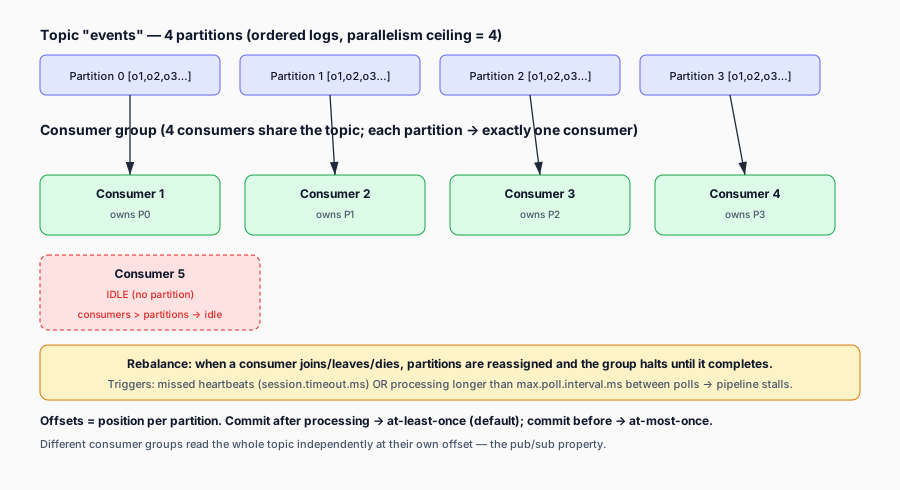
The commit-log model
A Kafka topic is a named stream of records. Internally a topic is not one queue — it is a set of ordered, append-only logs called partitions. A producer appends records to a partition; consumers read from a partition in order. Records are retained on the partition for a configured retention period (time or size based), not deleted when read. This is what makes Kafka a log rather than a queue: many independent consumers can read the same data, each at their own pace, and the data stays until retention expires.
A record has three parts: a key, a value, and a timestamp. The key is optional but important: if a key is set, Kafka routes the record to a partition deterministically (a hash of the key). If no key is set, the producer uses a round-robin or sticky partitioner. Keys matter because records with the same key always land on the same partition — which is the basis for any per-key ordering guarantee.
Partitions: the unit of parallelism
A partition is an ordered log. Two guarantees hold within a partition:
- Order is preserved per partition. Records are delivered to a consumer in the order they were appended.
- A partition belongs to exactly one broker in the cluster at a time (with replicas for fault tolerance — one replica is the leader and handles all reads/writes; the others are followers).
This means the partition count of a topic is the hard ceiling on consumer parallelism. You cannot have more consumers reading a topic in parallel than it has partitions — extra consumers in the same group will sit idle. This is the single most common scaling mistake: set partitions=1, then wonder why adding consumers doesn’t speed anything up.
Choose the partition count up front based on your target throughput. Repartitioning a topic is possible (adding partitions) but breaks key ordering if existing keys hashed to a different partition under the new count — so plan for peak, not for now.
Consumer groups: the unit of scaling
A consumer group is a set of consumers that jointly consume a topic. Kafka assigns each partition of the topic to exactly one consumer within the group. So:
- If
partitions=12and your group has 4 consumers, each consumer gets 3 partitions. - If
partitions=12and your group has 12 consumers, each gets 1 — full parallelism. - If
partitions=12and your group has 20 consumers, 8 consumers are idle.
Different consumer groups are independent — each group reads the whole topic at its own offset. This is the publish-subscribe property: one topic, many independent readers.
Rebalances happen when the group membership changes (a consumer joins, leaves, or is considered dead). During a rebalance, partitions are reassigned, and no consumer in the group can process records until the rebalance completes. This is why long-running or fragile consumers stall pipelines — and there are two distinct timeout mechanisms to keep straight:
session.timeout.ms— missed heartbeats. If a consumer stops sending heartbeats for this long, the broker considers it dead and triggers a rebalance.max.poll.interval.ms— the maximum time a consumer can spend processing betweenpoll()calls. If processing one batch takes longer than this, the consumer is kicked from the group even though it’s still heartbeating, because the broker assumes it’s stuck.
A consumer that processes slowly (long batches) hits max.poll.interval.ms; a consumer that’s actually dead or paused hits session.timeout.ms. Both end in a rebalance that briefly halts the group. Mitigations include tuning the right timeout for the failure mode, keeping max.poll.interval.ms above your worst-case processing time, and using cooperative (incremental) rebalancing where supported.
Offsets: the unit of position
Each record in a partition has a monotonically increasing offset. A consumer’s position is the offset of the next record it will read. Consumers commit offsets to record their position so they can resume after a restart.
Where and how offsets are committed is what determines delivery semantics:
- At-least-once — commit offsets after the record is processed. If the consumer crashes after processing but before committing, it will re-read and re-process those records on restart. This is the default and most common mode. Your processing must be idempotent (or you must dedupe downstream) so re-processing is safe.
- At-most-once — commit offsets before processing. If the consumer crashes after committing but before processing, those records are lost. Used only when loss is acceptable and latency is the priority.
- Exactly-once — harder and more nuanced. Kafka supports exactly-once semantics for its own end (producer idempotence + transactions) and for reads within a transactional consumer group. For downstream sinks that aren’t transactional with Kafka, true end-to-end exactly-once usually requires idempotent writes or a transaction spanning Kafka and the sink. In practice many pipelines run at-least-once and make processing idempotent.
The producer side has its own knob: acks. With acks=all, the leader waits for all in-sync replicas to acknowledge the write before responding — the durable choice. With acks=1 or acks=0 you trade durability for latency. For a pipeline that must not lose data on a broker failure, acks=all is the setting.
When to use Kafka (and when not)
Kafka fits when you have a durable, high-throughput stream that multiple independent consumers read at different speeds, and you can tolerate (or design around) at-least-once delivery. It is overkill for a simple work queue where one consumer drains a buffer and deletes each message after processing — a traditional message broker or a database-backed queue is simpler there. The reason people reach for Kafka is the log property: replayability, multiple subscribers, and horizontal scale via partitions.
The takeaway
If you remember three things: partitions cap parallelism, consumer groups scale readers up to the partition count, and offset commits determine delivery semantics. When a Kafka pipeline misbehaves, the first questions are: how many partitions, how many consumers in the group, is a rebalance happening, and what is the commit strategy. Everything else — auth, backpressure, throughput — builds on this base.
Sources & References
- Apache Kafka — Introduction (core concepts: topic, partition, offset, consumer group): https://kafka.apache.org/intro
- Apache Kafka — Documentation > Configuration (producer
acks, consumersession.timeout.ms,enable.auto.commit): https://kafka.apache.org/documentation - Apache Kafka — Producer Configs (
acks, idempotent producer): https://kafka.apache.org/documentation/#producerconfigs - Apache Kafka — Consumer Configs (group management, offset commits): https://kafka.apache.org/documentation/#consumerconfigs
- Apache Kafka — Security (SASL, OAUTHBEARER — relevant to the auth post): https://kafka.apache.org/documentation/#security