Azure Synapse Spark Pools: Architecture and Autoscaling
Azure Synapse Spark Pools: Architecture and Autoscaling
Azure Synapse Analytics is Microsoft’s unified analytics service. It bundles several analytical engines behind one workspace — dedicated SQL pools, serverless SQL pools, Apache Spark pools, and pipelines. This post covers the Spark pool specifically: what Synapse manages for you, how a Spark pool is provisioned and scaled, and where the boundary between “Synapse” and “Spark” actually falls. Every claim traces to Microsoft Learn.
What Synapse Analytics is
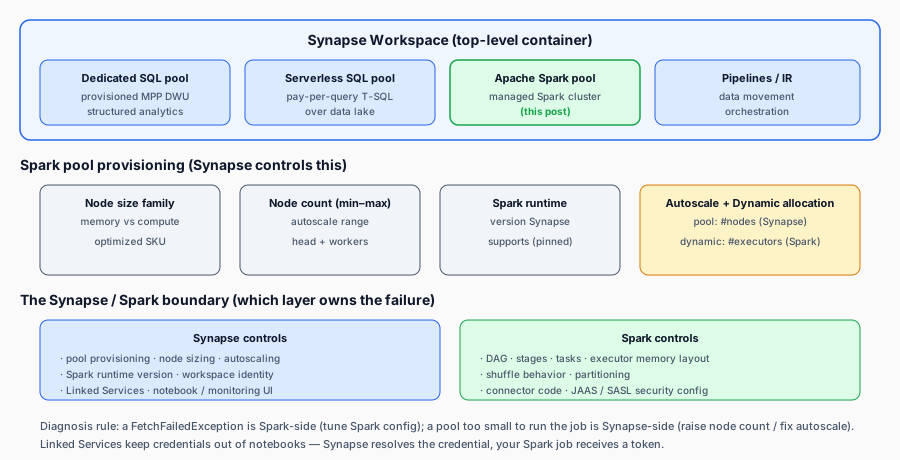
A Synapse workspace is the top-level container. Inside a workspace you create one or more pools, each of which is an instance of a particular analytical engine:
- Dedicated SQL pool — the formerly-named SQL DW: a provisioned, columnar MPP database for structured analytics workloads. Billed by Data Warehouse Units (DWUs).
- Serverless SQL pool — a pay-per-query T-SQL endpoint over data lakes (no provisioning).
- Apache Spark pool — a managed Spark cluster for big-data prep, machine learning, and ETL. This is the focus here.
- Pipelines / Integration Runtime — data movement and orchestration.
The point of running Spark inside Synapse (rather than self-managing a Spark cluster or using HDInsight) is that Synapse handles provisioning, scaling, patching, and integration with the rest of the workspace (Linked Services, pipelines, the data lake). You pay for the cluster resources while a pool is running.
Apache Spark pool provisioning
When you create a Spark pool you configure:
- Node size family — the VM family the nodes run on (memory-optimized vs compute-optimized). Affects how much RAM and CPU each node has.
- Node size — the specific SKU within the family (e.g. a medium or large node).
- Node count — the number of nodes (including the head/driver node). You configure a range (min–max) for autoscaling rather than a single number.
- Spark runtime version — the Apache Spark version bundled with the pool (you pick from the versions Synapse supports; you cannot pin an arbitrary Spark build).
- Autoscale — whether the pool scales between your min and max node count based on load.
The head node (driver) and the worker nodes (executors) both come from this pool. Unlike a fully self-managed Spark cluster, you do not separately size the driver — Synapse derives the layout from your pool config. The first node of the pool typically serves as the driver.
Autoscaling
Synapse Spark pool autoscaling adjusts the node count within your configured min–max range based on the pending tasks and resource usage of the running jobs. Two things to keep straight:
- Synapse pool-level autoscaling scales the number of nodes in the pool up or down. This is a Synapse control-plane operation, not a Spark one, and it has its own scale-up/scale-down thresholds and cooldowns.
- Spark dynamic allocation (the Spark feature,
spark.dynamicAllocation.enabled) adjusts the number of executors Spark uses within the pool it has been given. Dynamic allocation is a Spark-level mechanism that requests/releases executors from the cluster manager based on pending tasks.
These two are complementary but operate at different layers and at different timescales. A common mistake is to treat them as interchangeable. Pool autoscaling grows the pool when more nodes are needed overall; dynamic allocation lets a single application use fewer executors when its task queue is empty and release them back, so a shared pool can serve multiple jobs more efficiently.
When you tune a long-running Synapse Spark job, the relevant question is which layer is constraining you: is the pool too small (raise the max node count / fix pool autoscale thresholds), or is the job not using the executors it could (dynamic allocation, partitioning, skew)?
Linked services
A Linked Service is Synapse’s name for a connection definition to an external data source or destination — an Azure Data Lake Storage account, a Key Vault, a SQL database, an HTTP endpoint, and so on. Linked Services live at the workspace level and are referenced by pipelines and notebooks.
For Spark work specifically, Linked Services matter because they are how a Synapse Spark notebook reaches an external system without you hand-encoding credentials in the notebook. When a Linked Service uses managed identity or Key Vault integration, the credentials are resolved by the Synapse workspace for the supported Linked Service authentication paths (Azure-resident data stores, SQL, the data lake), not pasted into your code. This is the bridge to the identity/authentication post — for the supported paths, the pattern of “Synapse resolves the credential, your Spark job receives a token” is what keeps secrets out of notebooks. Note that this does not automatically extend to arbitrary external systems (e.g. a Kafka broker with OAuth): for those, the Spark/Kafka client’s token acquisition and injection require a separately documented integration (see the managed-identity post’s “honest boundary” section).
Where Synapse stops and Spark begins
This is the boundary that causes the most confusion:
- Synapse controls: pool provisioning, node sizing, autoscaling, Spark runtime version, workspace-level identity, Linked Service definitions, the notebook/monitoring UI.
- Spark controls: job DAG, stages, tasks, executor memory layout, shuffle behavior, partitioning, JDBC/connector code inside the job, JAAS/SASL config inside the job’s properties.
The boundary matters most when something goes wrong. If a job fails with a Spark FetchFailedException, that is a Spark-level shuffle problem — Synapse pool autoscaling won’t fix it; the tuning lives in Spark config. If a pool cannot reach a Kafka broker with OAuth, the SASL/JAAS config is Spark-side; the Synapse layer gives you the workspace identity and Linked Service but does not dictate the client security protocol. Knowing which layer owns the failing config is the first step to fixing it.
The takeaway
Synapse Spark pools give you a managed Apache Spark cluster where Synapse owns provisioning, scaling, and integration, and Spark owns the execution model. Set the pool size and autoscale range for your throughput, decide whether you also want Spark dynamic allocation, use Linked Services to keep credentials out of notebooks, and always ask “which layer owns this config?” before tuning.
Sources & References
- Microsoft Learn — Azure Synapse Analytics overview: https://learn.microsoft.com/azure/synapse-analytics/overview-architecture
- Microsoft Learn — Apache Spark pools in Synapse (pool types, provisioning): https://learn.microsoft.com/azure/synapse-analytics/spark/apache-spark-overview
- Microsoft Learn — Spark pool autoscale: https://learn.microsoft.com/azure/synapse-analytics/spark/apache-spark-pool-configurations
- Microsoft Learn — Linked services: https://learn.microsoft.com/azure/synapse-analytics/data-integration/data-integration-concepts
- Microsoft Learn — Managed identity in Synapse: https://learn.microsoft.com/azure/synapse-analytics/security/synapse-workspace-managed-identity