Fixing Shuffle Fetch Failure in Azure Synapse Spark
Accuracy note (2026-07-29 audit): This post was reviewed against current official documentation in July 2026 and contains inaccuracies relative to the current state of the tools described. The post is retained for its workflow reasoning; the specific factual issues are:
Two refinements: (1) Enabling
spark.shuffle.service.enabledonly preserves shuffle files after executor removal when the external shuffle service is installed and configured by the cluster manager — setting the application property alone does not create the service; verify Synapse’s configured shuffle-preservation mechanism before relying on this. Spark’s modern dynamic-allocation docs also describe shuffle-tracking/decommission-based alternatives. (2) The ‘maximum delay capped at maxRetries * retryWait’ should be read as the configured retry-wait budget, not an end-to-end fetch-delay cap.Reference docs to verify against:
- Apache Spark — dynamic allocation / external shuffle service — https://spark.apache.org/docs/latest/configuration.html
A shuffle fetch failure is one of the most frustrating errors you can hit in an Azure Synapse Spark pool. The job runs fine for a while, then a stage suddenly fails with a FetchFailedException, Spark retries the stage, and if the underlying problem persists the whole job eventually aborts. The error message is thin — it points at a symptom (a reduce task could not pull map output from another executor), not the cause.
This post walks through what a shuffle fetch actually is, why it fails on Synapse, how to diagnose it, and the concrete config changes that fix it. Every config key below is a real Spark or Synapse knob, cited to the official docs.
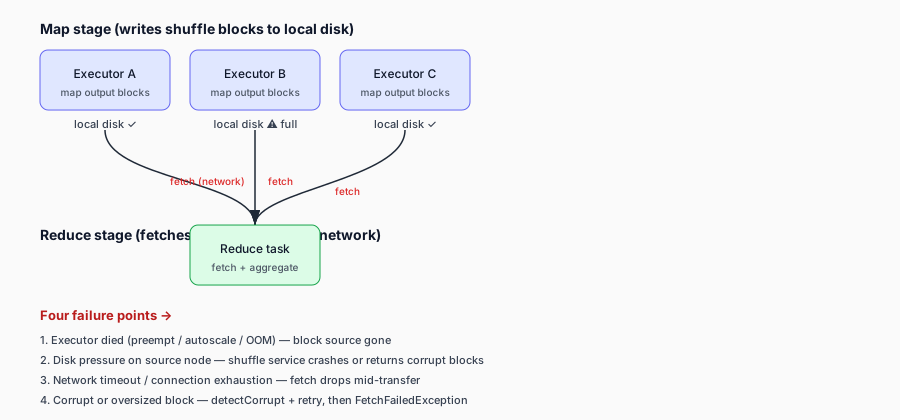
What a shuffle fetch is
When you run a shuffle operation — a join, groupBy, distinct, or anything that needs data repartitioned — Spark splits the work into two stages. The map stage writes sorted output blocks to local disk on each executor. The reduce stage fetches those blocks across the network from whichever executor holds them.
A fetch failure means a reduce task tried to pull a shuffle block from a map-side executor and the fetch did not complete. Spark’s default behavior is to retry: it re-attempts the fetch a few times, and if it still fails it marks the map stage as failed and re-runs it. If re-runs also fail, the job aborts.
The Apache Spark configuration docs document the retry knobs under “Shuffle Behavior”: spark.shuffle.io.maxRetries (default 3) controls how many times a fetch is retried, and spark.shuffle.io.retryWait (default 5s) controls the wait between retries. The maximum delay caused by retrying is capped at maxRetries * retryWait — 15 seconds by default.
Why it fails on Azure Synapse
On Synapse, shuffle fetch failures usually come from one of four root causes:
1. The source executor died. If the executor holding the map output is removed — by YARN preemption, autoscale scale-down, or an out-of-memory kill — the reduce task has nobody to fetch from. Synapse Spark pools run on YARN, and the Synapse autoscaler can decommission executors based on CPU and memory metrics. The Synapse autoscale docs confirm that pool-level autoscaling decommissions nodes, and that application-level dynamic allocation uses spark.dynamicAllocation.enabled with spark.dynamicAllocation.minExecutors and spark.dynamicAllocation.maxExecutors.
2. Disk pressure on the source node. Shuffle map outputs and spilled data live on the executor’s local VM storage. The Synapse Spark pool configuration docs explicitly call out “Out of Disk Space” and java.io.IOException: No space left on device as failures caused by shuffle data and spilled data consuming local VM storage. If the node runs out of disk, the shuffle service can crash or return corrupt blocks.
3. Network timeout or connection exhaustion. Large shuffles create many simultaneous fetch connections. If the serving executor or the NodeManager cannot keep up, connections get dropped or time out. The Spark config docs document spark.shuffle.io.connectionTimeout (defaults to spark.network.timeout), spark.shuffle.io.connectionCreationTimeout, and spark.shuffle.io.backLog (the accept queue length) for exactly this scenario.
4. Corrupt or oversized shuffle blocks. Spark has built-in corruption detection (spark.shuffle.detectCorrupt, default true) and checksum verification (spark.shuffle.checksum.enabled, default true). When a block is detected as corrupt, the fetch is retried; if it fails again, a FetchFailedException is thrown to retry the previous stage.
How to diagnose it
Start in the Synapse Studio Monitor > Apache Spark applications tab. The Synapse monitoring docs show that this view exposes the job graph, stage details, shuffle read/write sizes, failed-task inspection, and driver/executor logs. Open the failed application, find the failed stage, and look at the shuffle read metrics for the failing tasks.
In the Spark UI (or Synapse’s Spark History Server), the per-task shuffle read metrics are the key signal. The Spark monitoring docs document these under shuffleReadMetrics: fetchWaitTime (time spent blocking on remote shuffle blocks), remoteBlocksFetched, localBlocksFetched, remoteBytesRead, and remoteBytesReadToDisk (large blocks fetched to disk rather than memory). A high fetchWaitTime with low remoteBlocksFetched points at the source executor being slow or dead. A high remoteBytesReadToDisk points at oversized blocks.
Then read the executor logs for the failing reduce task and the map-side executor it was fetching from. The reduce-side log will show the FetchFailedException with the address of the source executor. The map-side log (if the executor is still around) will often show the real cause — an OOM, a disk-full IOException, or a connection reset.
How to fix it
The fix depends on the root cause, but these are the levers that most often resolve shuffle fetch failures on Synapse:
Reduce shuffle volume. The single most effective fix is to shuffle less data. Prefer reduceByKey (which has a bounded memory footprint on the map side) over groupByKey (which has an unbounded one) — the Synapse Spark performance docs explicitly recommend this. Salt skewed keys, or pre-aggregate in buckets, to break up a hot partition that forces one executor to hold a giant shuffle block.
Size your executors correctly. The Synapse performance docs recommend starting at ~30 GB per executor and keeping the heap below 32 GB to keep GC overhead under 10%. An executor that is too small spills to disk and produces oversized shuffle blocks; one that is too large suffers long GC pauses that look like dead executors to the reduce side. Set spark.executor.memory and spark.executor.memoryOverhead so the total container fits the Synapse node size.
Tune the fetch retry and connection knobs. If the root cause is transient (network blips, brief GC pauses), raise spark.shuffle.io.maxRetries from 3 to 5 or 8, and raise spark.shuffle.io.retryWait from 5s to 10s. If the root cause is connection exhaustion on a large cluster, lower spark.reducer.maxBlocksInFlightPerAddress (default unlimited) so a single reduce task does not hammer one source executor with thousands of simultaneous fetches, and lower spark.reducer.maxReqsInFlight to cap total in-flight requests.
Protect the source executor. If executors are being removed by autoscale mid-shuffle, enable spark.shuffle.service.enabled (the external shuffle service preserves shuffle files after executors are removed) and set a floor on spark.dynamicAllocation.minExecutors so the pool does not shrink below what a running shuffle needs. The Synapse autoscale docs confirm both are supported.
Increase shuffle parallelism. The Spark tuning docs recommend 2–3 tasks per CPU core, and note that increasing parallelism shrinks each task’s working set — which shrinks each shuffle block, which makes fetches less likely to time out or hit the disk-full wall. Set spark.default.parallelism (for RDD APIs) or spark.sql.shuffle.partitions (default 200 for SQL/DataFrame APIs) high enough that no single task holds a huge block.
When to escalate
If you have tuned all of the above and fetch failures persist, the cause is usually infrastructural: a consistently bad node, a disk filling up faster than the job can clean up, or a network path between executor groups that is silently lossy. At that point, capture the failing stage’s executor logs, the FetchFailedException stack trace, and the fetchWaitTime / remoteBytesReadToDisk distributions, and raise a Microsoft support ticket — the Synapse monitoring docs expose the Livy, prelaunch, and driver logs you need to attach.
Shuffle fetch failure is rarely a single misconfiguration. It is a symptom of the shuffle stage being larger, slower, or more fragile than the cluster can sustain. The fix is almost always a combination of shuffling less data, sizing executors for the workload, and giving the fetch path enough retries and headroom to survive the transient failures that are normal on a shared cloud cluster.
Sources
- Apache Spark Configuration — Shuffle Behavior —
spark.shuffle.io.maxRetries,spark.shuffle.io.retryWait,spark.shuffle.io.connectionTimeout,spark.shuffle.io.connectionCreationTimeout,spark.shuffle.io.backLog,spark.reducer.maxBlocksInFlightPerAddress,spark.reducer.maxReqsInFlight,spark.shuffle.detectCorrupt,spark.shuffle.service.enabled. - Apache Spark Tuning Guide — Memory Usage of Reduce Tasks — increase parallelism to shrink per-task working set; 2–3 tasks per core.
- Apache Spark Monitoring — Executor Task Metrics —
shuffleReadMetrics:fetchWaitTime,remoteBlocksFetched,remoteBytesReadToDisk. - Optimize Spark jobs for performance — Azure Synapse Analytics — executor sizing (30 GB, <32 GB heap),
reduceByKeyovergroupByKey, data skew salting. - Azure Synapse Spark pool configurations — “Out of Disk Space”,
java.io.IOException: No space left on device, shuffle data on local VM storage. - Monitor Apache Spark applications in Azure Synapse Analytics — job graph, shuffle read/write, failed-task inspection, driver/executor logs.
- Autoscale for Azure Synapse Analytics Apache Spark pools —
spark.dynamicAllocation.enabled,minExecutors,maxExecutors, node decommissioning.